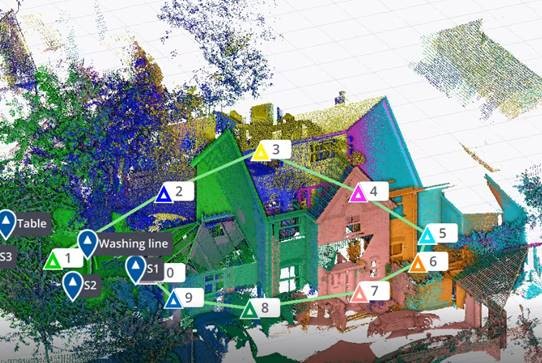
The driving force behind Soarvo’s launch? Pure genius and a bit of fire and frustration too. Soarvo have come up with something designed to rescue a geospatial community drowning in much needed, excellent, high-quality data, but restricted in what they can do with it. Think of it as throwing a life belt… but make it a carefully developed revolutionary 3D geospatial platform instead!
Here at KOREC we have a long history in the development of geospatial data platforms. Go right back to the earliest days of GIS in the 90’s and we were there, developing, supporting and working with the very best. So trust us when we say we know a good thing when we see it – and that good thing is Soarvo.
Why’s it different?
The obvious question is what is Soarvo, and the easy answer is of course found in its official description as a “…..revolutionary 3D geospatial data platform, which enables users to Aggregate, Illustrate and Collaborate all in one place.”
That’s exactly what it ‘does’ but what makes it really different is why and how. Let’s go back a couple of years or so when the geospatial industry was spoilt for choice when it came to sensors for generating extremely large, accurate data sets whether that be from mobile mapping, drones or 3D Laser Scanners. The hardware was doing a great job! But what wasn’t so great was what was happening in many offices. Without the mother of all PC’s and a significant investment in multiple software packages, skills and office time, our fantastic, captured data was becoming either a bottle neck holding up projects or simply siloed.
Great data sets aren’t meant to be hidden away, they need to be shared, seen, and collaborated on, not just admired by a select few. That’s why geospatial professionals across all industries – from surveying to rail to mapping – were on the hunt for something that could handle it all and turn those data sets into useful info, fast. But could they find anything? Nope, there wasn’t a single package that could do the job… until now.
Soarvo is born!
The Soarvo aim was to create something with exceptional functionality and security but with a user-friendly interface as inviting as the hugely popular design software, Canva. So, we created Soarvo from the ground up, taking end-user feedback on board at every step of the development process.
And now it’s ready.
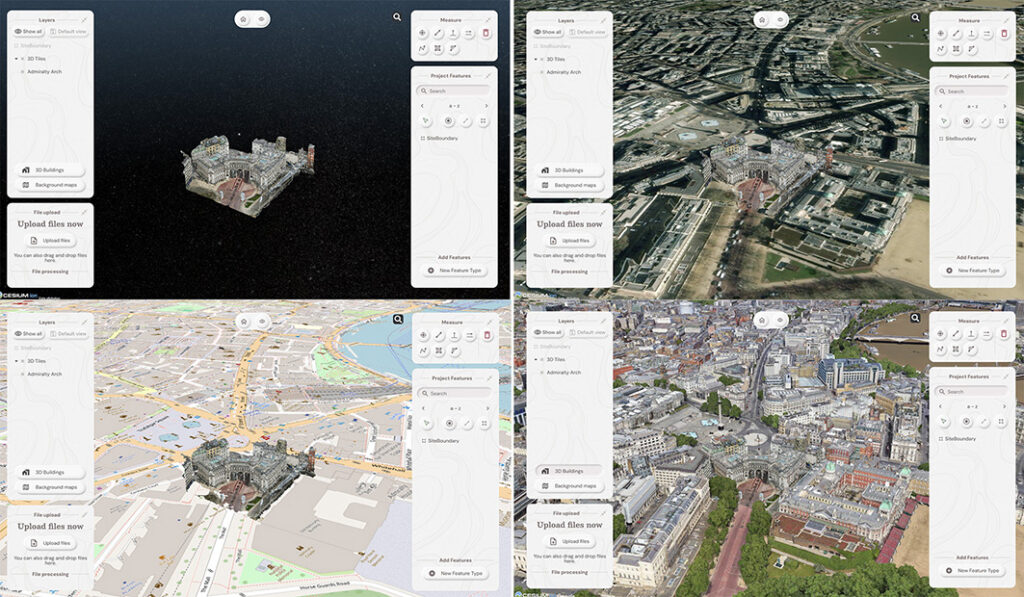
Top left: What you had. Remaining three pictures, adding context with SOARVO
Why it’s exciting? Our top five reasons
It’s extremely easy to use: The development’s been all about the user experience, with an interface built for ease of use. That’s why it looks and feels so different (in the best possible way) compared to other data sharing software out there.
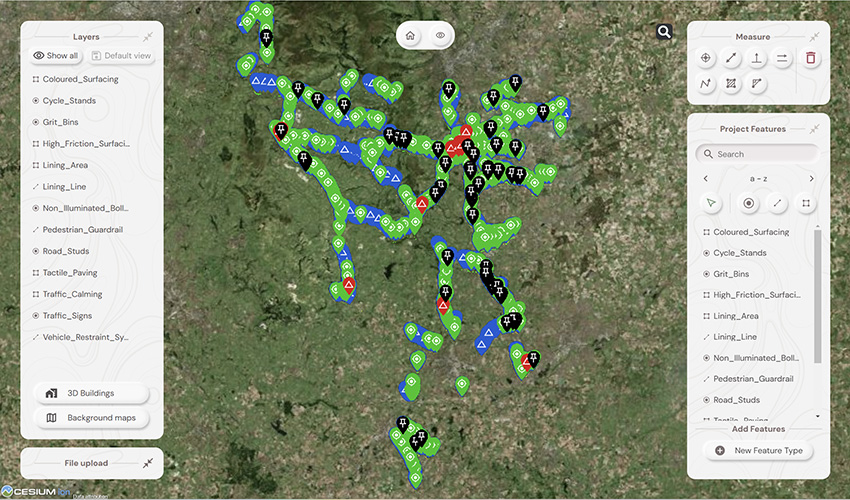
Favourite feature of Paul Brodin, Technical Lead: “The visualisation functionality and the speed with which it loads. I know because I timed it – 15 seconds for a mobile mapping data set that previously took hours!”
It provides a unique view of your data compared to other platforms: Well, how does it do that? The answer is it provides context around your dataset and positions it in the real world. For example, your laser scan point cloud doesn’t sit in a black space, it’s positioned on to the background map of your choice from OS to Google to Bing. This opens up new doors with your clients. It’s all about making your data set relevant for its end users by providing visualisation in a rich 3D environment with analysis and measurement tools thrown in.
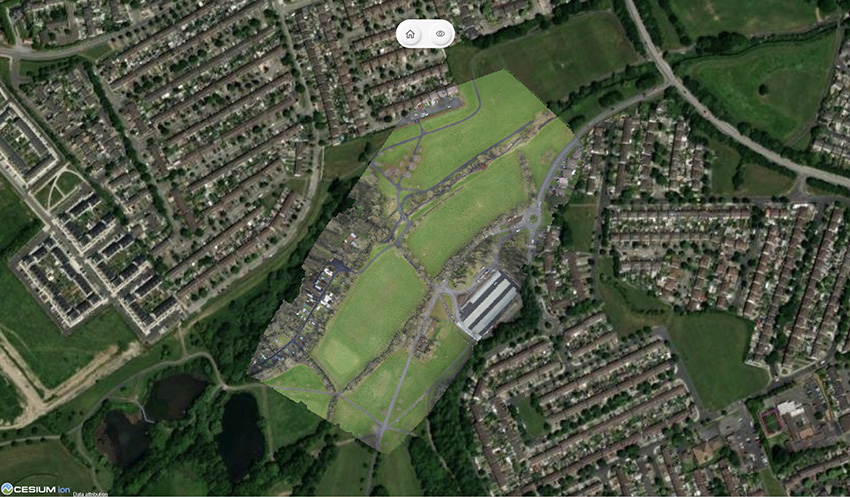
Favourite feature of Alan Browne, CEO and Co-Founder of SOARVO: “It’s all about the effortless processing of drone data – everything included and definitely no fuss required.”
It truly delivers on collaboration: Once your datasets are uploaded, you simply share a secure link to your chosen users and they can log in securely, via the cloud, for viewing or editing depending on their pre-determined rights. We don’t mess about with login limits – invite the whole team if you fancy because the whole point is sharing this information whether it be for visualisation, site planning, measurement, whatever.
Everyone’s invited: As well as unlimited log ins, the software handles data from just about every sensor under the sun, seamlessly combining output from drones, laser scans, GNSS, total stations, mobile mapping, mixed reality, 3D models, CAD and GIS.
It’s a standalone tool for drone data: Capture your aerial data and drop it straight into SOARVO to create your deliverables whether that’s an ortho-mosaic, point cloud, or 3D model. No extra software, no faff—just process, share, and crack on!
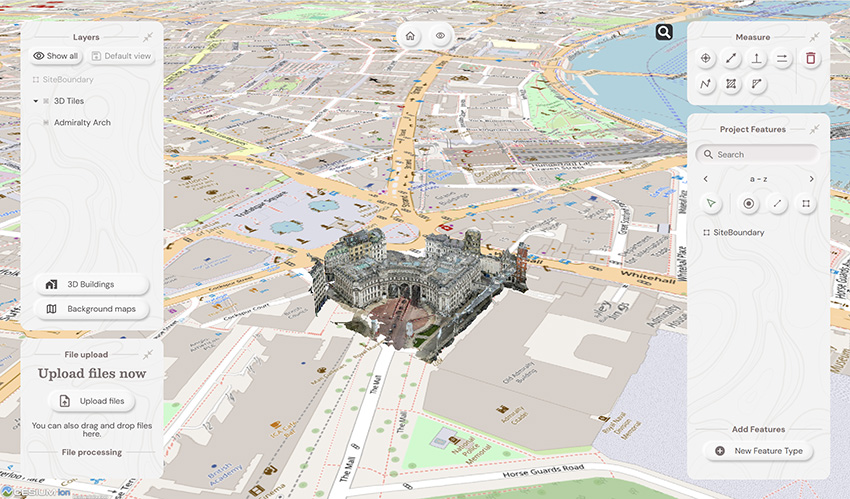
Favourite feature of Richard Gauchwin, Senior Product Manager: “For me, it’s all about how it looks and also hearing the amazing reactions from our early access users. As someone who used to be in sales, being able to say ‘yes’ to so many questions just proves we’ve built something genuinely unique here.”
But don’t just take our word for it…
We love feedback and our early access users have provided exactly that:
Soarvo provides us with a platform to automatically process drone orthomosaics and view them within a web-based geospatial data solution. This capability is greatly beneficial to us—having a one-stop shop for all our drone and GIS needs in a single platform is both unique and highly valuable.
The ability to easily share project updates with clients, alongside geospatial and media data, has resolved a long-standing need for us. We now have greater flexibility to share data with contractors and provide updates online, without the need to email GIS files or rely on others to know how to use complex GIS software.
Having a central online location where our team can share data and collaborate easily on projects with online easy to use GIS tools makes workflows and data sharing much more efficient and accessible. Soarvo has provided us with an opportunity to streamline data management within the team.
Ease of navigation in 3D
Speed of rendering large point clouds and ability to move them
Simple clean interface and comprehensive basemap data
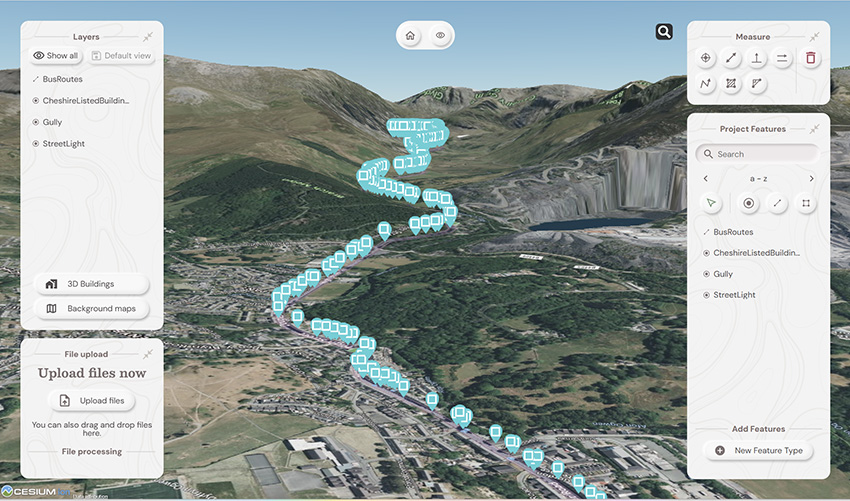
Favourite feature of Gabriel Hradilek, Chief Operating Officer: “A simple one from me, but absolutely massive for our customers: how easy and secure it is to share data. It’s a big deal, trust me!”
Need to know more, contact KOREC
Here at KOREC we’re delighted to be the UK & Irish distribution partner for SOARVO. That means when you get your hands on the new software, you’re also getting over 30 years of our know-how, support, and training – all backed up in our T.R.U.S.T. brand promise. Join the waitlist at https://soarvo.com/
- Lower price point for affordable entry into 3D Laser Scanning
- Hardware/software subscription options that fight theft and spread the cost
- Easy upgrade from Core to Premium to expand your laser scanning capabilities with the same hardware
- Improved performance, further, faster and cleaner data
- 1 TB of storage on Trimble’s Reality Data Capture Service (TRCPS), for easy point cloud data sharing, included with all X9 Core and Premium purchases
- …and of course all the best features are still there; auto-levelling, on-site registration, automatic calibration, laser pointer, simple workflows and KOREC’s renowned technical support backed up by the T.R.U.S.T. brand promise
Trimble launched the X7 in 2019 bringing simplicity and performance to laser scanning, and then four years later came the launch of the Trimble X9 bringing the same simplicity and even greater performance. But if we know anything about Trimble, it’s that the development team never sleeps!
So, what’s new? In September we unveiled the Trimble X9 Core and Premium, both offering the same great X9 hardware but with different hardware & software purchasing choices – perpetual and subscription – depending on your current and future requirements as your business grows.
Core or Premium?
The Trimble X9 Core offers a user-friendly solution for both beginners and seasoned professionals, making it an ideal starting point to expand your scanning capabilities. Competitively priced, it brings a number of features greatly improved from the original Trimble entry level X-Series scanner. Expect increased angular accuracy, increased imagery quality, reduced range noise, high sensitivity data capture for all scan modes, optimisation of calibration routine to save time and reduce frequency of full calibrations and atmospheric correction for temperature and pressure.
The Trimble X9 Premium delivers faster, farther, and more precise measurements than the Core version—capturing extensive areas in a single setup with zero detail overlooked and is ideal for surveyors tackling complex and demanding projects.
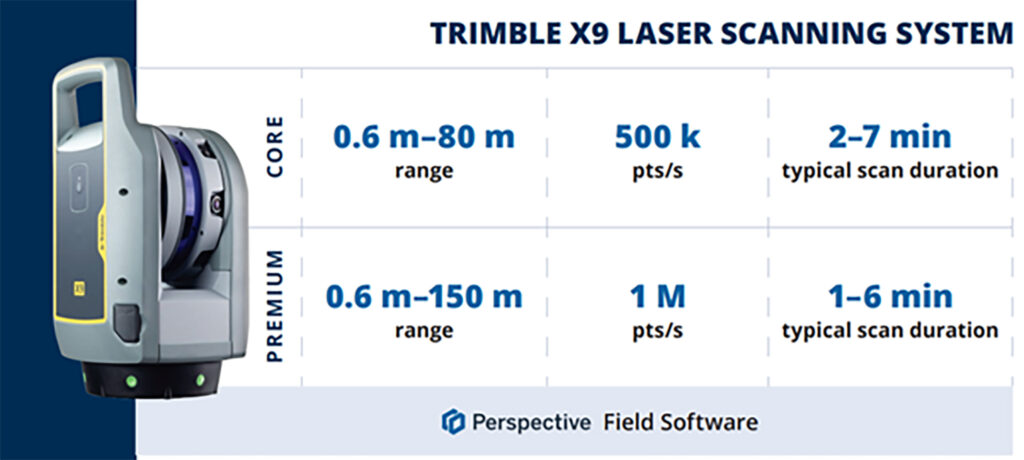
Subscriptions bring flexibility
Some of our customers love the flexibility of a subscription, others still to prefer an initial outlay so Core and Premium come with two options, Perpetual or Subscription.
Subscription brings a number of key benefits including a couple of extra important ones too, namely if your instrument is stolen, the subscription only runs until the end of that period (one year) which means after that time, the thief has effectively stolen a very expensive paperweight which should act as a deterrent. Additionally, if anything happens to your hardware, through theft or accident, the cost to replace it will be significantly lower than the original outlay.
View a KOREC video on subscriptions as a theft deterrent here
What are the reasons for offering both perpetual and subscription licensing? In one word, flexibility. Perpetual licenses provide traditional purchase options while subscriptions of course offer lower upfront costs.
Subscription benefits include:
- Access to the best Trimble technology with a lower price point
- Allows you to adapt the technology at a level to suit and then customise accordingly
- Ensures all devices and software are on the same, latest version
- Provides greater flexibility and scalability to meet the needs of a growing business with easy movement between Core and Premium annual subscriptions
New! 1 TB of storage on TRCPS included with all X9 Core and Premium purchases
In September, Trimble announced the launch of the Trimble Reality Capture platform service (TRCPS), designed to enable you to share & collaborate, and store & manage, massive data sets securely and efficiently in the cloud.
For a limited period, KOREC will be including 1 Terrabyte of storage on the TRCPS platform, for one year, with all Trimble X9 Core or Premium scanner purchases. (TRCPS seamlessly integratesasan extension inside Trimble Connect cloud software).
Last but not least – the best features are all there!
We’ve conducted numerous case studies on the Trimble X-Series, thanks to its many satisfied customers. While the technology offers a wide range of impressive features, we’ve highlighted the top ones most frequently praised by our users:
- On-site registration – saving processing time back at the office and ensuring nothing is missed whilst the surveyor is still on site.
- Auto-calibration – By choosing a scanner with smart auto calibration (the routine can be optimised), you’re minimising the risk of the scanner not collecting accurate data on important jobs and the risk of delivering something that could liability for the customer. Smart, self-calibrating scanners like Trimble’s X9 Core and Premium generate a report as a back-up for every job you do. You also don’t have to send it away for calibration, sometimes costing thousands of pounds and leaving you without a scanner for weeks if not months.
- Auto-levelling – speeds up your time around site
- Straight forward workflows – KOREC technical support is excellent at helping you to integrate a laser scanning workflow into your existing survey practices
- It’s got a handle – if the X9 can go anywhere so you’ll need to manoeuvre it in tricky areas without risking your investment!
- KOREC support – by far the most cited point in all our case studies, for its speedy, quality of information and friendliness.
- The laser pointer – for easy geo-referencing of the point cloud without the need for a total station
Next steps
If you’re interested in finding out more about th X9 Core or Premium or booking a demo, contact us now by email or call us on 0345 603 1214.
Meanwhile, we’ve done some great blogs and case studies on the X9 – here are the links to four of our most visited:
Go beyond the spec sheet –Five important questions to ask before purchasing a laser scanner
Case study (ScanPlan) – “The X9 is life changing”
Case study (Connect Scaffolding) – Planning for scaffolding design
Case study (South West Surveys) – Measured building scans for redevelopment
“Our clients expect the very best from us and that means we’ve got to provide the very best end product and in turn, that relies on great equipment capable of generating great data. The new Trimble X12 fits the bill perfectly”
Neil Pollock, Director, Three Sixty Group
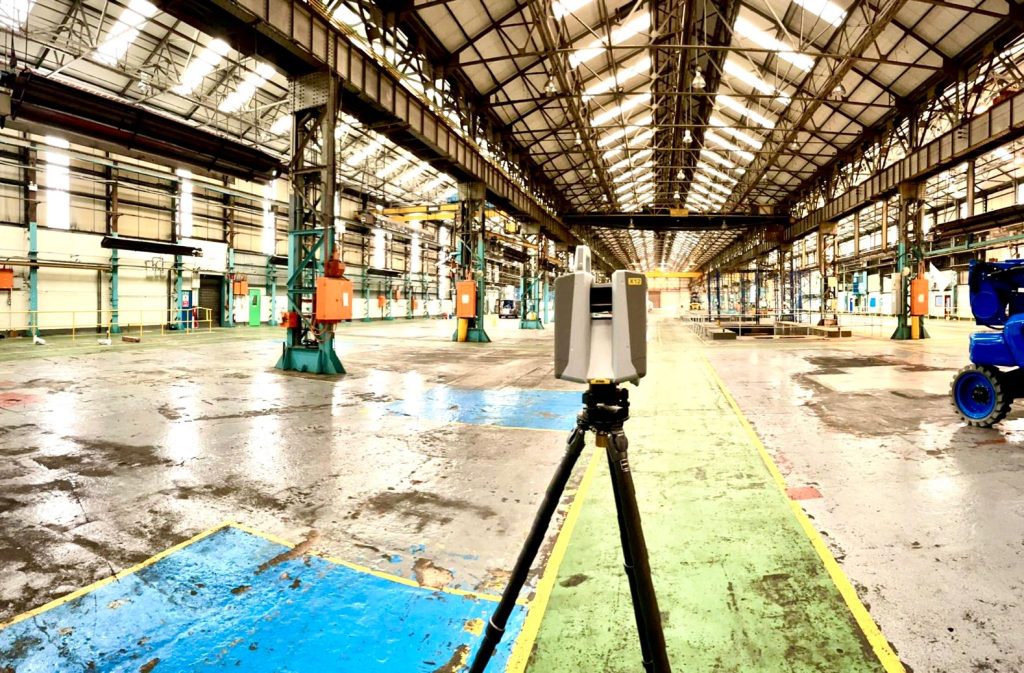
A few weeks ago, our KOREC Laser Scanning Sector Specialist, Melvin Penwill, got his hands on one of the first Trimble X12’s in the country. He was only too happy to put it through some rigorous testing and then share his opinions, including his 6 highest rated features, in a useful LinkedIn Post.
At some point, he was persuaded to let the customers have a go too!
About Three Sixty Group
Operating nationally, Three Sixty Group works across a diverse range of sectors from Utilities and Rail to heritage and listed buildings. The company has a fleet of 3D Laser Scanners that includes three Trimble X7’s as well as instruments from other manufacturers.
We caught up with Director, Neil Pollock, who’s been using the X12 for a floor flatness survey in a vast, engine manufacturing plant in Derby. With specified tolerances of just +/- 2-3mm for aspects of this job, it was the perfect testing ground for the X12 which was used both indoors for the high accuracy floor survey, and externally for an overall building survey where scans were undertaken with a range of up to 100m.
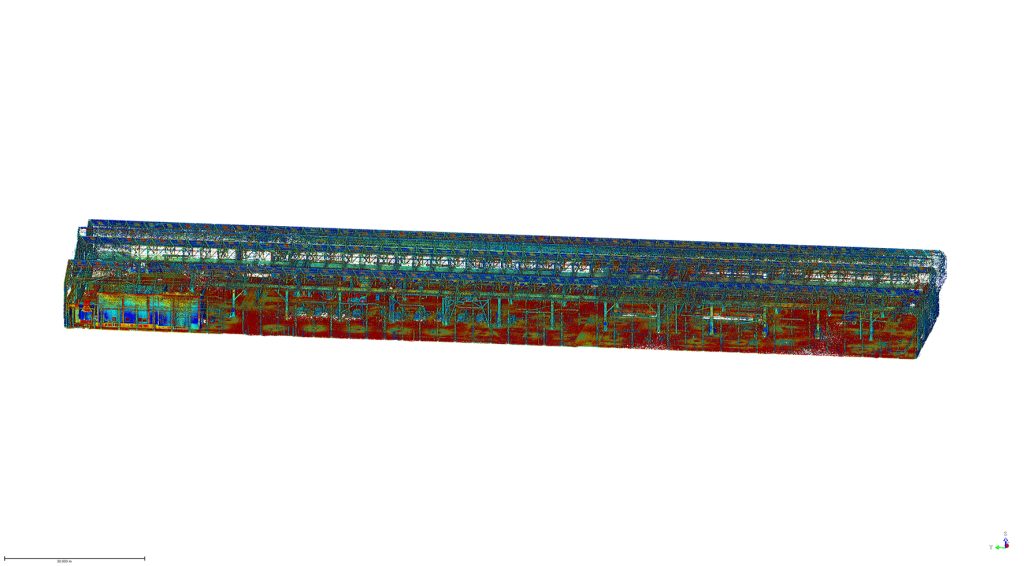
Here’s what Neil rated:
- Size – although he was aware of the dimensions (150 mm (W) x 258 mm (D) x 328 mm (H)) of the X12, when it came out of the box, he found it even smaller and lighter than he expected.
- Learning curve – The Three Sixty Group surveyors are already familiar with the Trimble Perspective software and workflow from their use of the X7’s. They were therefore able to transition to the X12 seamlessly.
- Cleanliness of the data – Even at a 100m range, Neil found the quality of the data to be top notch and way beyond any other scanner that the company has worked with previously. This ensured total confidence in the overall quality of the survey. Three Sixty Group is seeing a growing requirement for heritage work and felt that the X12 would excel in the level of detail required for this work as well as being suitable for the short or mid-range work required on more standard jobs.
- Low noise – In spite of the shiny factory floor, noise was minimal.
- Image quality – Excellent quality and super-fast to take at just 2 minutes. With Trimble Perspective, it’s now also far easier to retake images.
- ‘Window’ feature – rather than take a full 360 scan with the Trimble X7, or carry out a quick preview with the Trimble TX8, Neil rates the ability to ‘window off’ a section for a high-resolution scan as a great time saver.
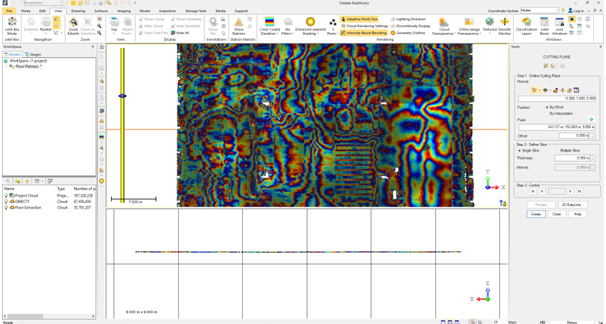
Neil concludes: “The data from the X12 is just so clean, and that makes it very, very easy to work with across every job. In short, the better the data, the higher the quality of the product that we can provide all our customers with. This is especially important for our heritage work which is growing all the time. Our clients expect the very best from us and that means we’ve got to provide the very best product and in turn, that relies on great equipment capable of generating great data. The new Trimble X12 fits the bill perfectly.”
Thank you to Neil Pollock for chatting to us about his X12 experiences
For further information, please call your KOREC Sales Consultant or contact Melvin.penwill@korecgroup.com

KOREC’s ‘Scanning and Point Clouds’ Sector Specialist, Melvin Penwill, field tests the new Trimble X12.
At the end of July, Trimble announced the new X12 3D Laser Scanner, its first release since the groundbreaking X7 of which you’ve no doubt heard plenty of talk over the last couple of years! A new instrument is always an exciting moment and as KOREC’s ‘Scanning and Point Clouds’ product specialist, I was delighted to get my hands on one of the units that landed at our Huntingdon Offices for our consultant training day.
The Trimble press release describes the X12 as ‘…..integrating intuitive Trimble software for precise data capture and in-field registration with state-of-the-art 3D laser scanning and imaging hardware technology from Zoller+Fröhlich (Z+F), combining the expertise of two industry leaders into a single solution.” A nice description, that highlights that this really is a ‘best of both worlds’ combination of Z+F technology and a tried and tested Trimble workflow, but let’s take a look at how that works in practice.
Out of the box
So, first impressions, it’s small! For a scanner of this range (0.3 m–365 m) and precision (≤ 1 mm + 10 ppm/m), it’s way more compact than its closest rivals measuring just 150 mm (W) x 258 mm (D) x 328 mm (H)) and weighs in at 7.7kg and that includes the batteries. It also has a handle, a significant detail that’s been much appreciated on the X7. The box looks great too, but doesn’t accommodate the Trimble T10x Tablet, but then again, that makes sense since the tablet is often going to be separate from the instrument for charging etc.

However, this is an all-in-one package and includes everything you need to start scanning immediately including the Trimble Perspective software.
Here’s what I rate – my six top highlights:
- All the KOREC consultants found the Trimble Perspective workflow incredibly easy to use. Those that were familiar with the X7 were up and running immediately, those that were unfamiliar found Perspective intuitive and with just a couple of questions here and there required little further assistance. This is vital for survey companies that need an instrument that’s suitable for use by everyone on the team for an early ROI with little down time for training.

- Window scanning – this is a great feature! Do a quick 360° scan (23 or 46 seconds) to position yourself and then use the window option to select areas for more detail. Expect 0.6mm at 10m….unbelievable!
- Great imagery – you can add excellent imagery to your scan in just 2 minutes, again it’s super quick and the quality is excellent. The Perspective software also means that it’s really easy to retake images. A lot of thought has gone into making this a really simple procedure.
- Clean, sharp data and noise, or more accurately, lack of noise! One KOREC customer scanned a black car. Normally with a reflective surface of this sort, you can expect noise. In this case, the customer thought that that the data had been filtered in Trimble RealWorks because it looked so unbelievably clean. Not so, this was all the work of the X12. It’s worth noting that noise is at 0.2mm at 10m for the X12 compared to maybe 2-3mm with the X7.
- Scanning in the dark – don’t be put off anymore, even for inspection work. The X12 has four LED lights which are so strong that from the results, you wouldn’t even know you were in a dark room.
- Fast – this scanner is also speedy, one of the fleetest on the market and with Trimble Perspective, users can check their data, take measurements, and add annotations before leaving their site which makes for faster turnaround time in the office.
The proof of the pudding…

I spotted this on the drive back from Huntingdon and couldn’t resist! The obelisk was in a really tricky environment with trees all around but I wanted detail, not trees. I did a 360° scan for registration and then a window scan with images. The end result was clean and crisp.

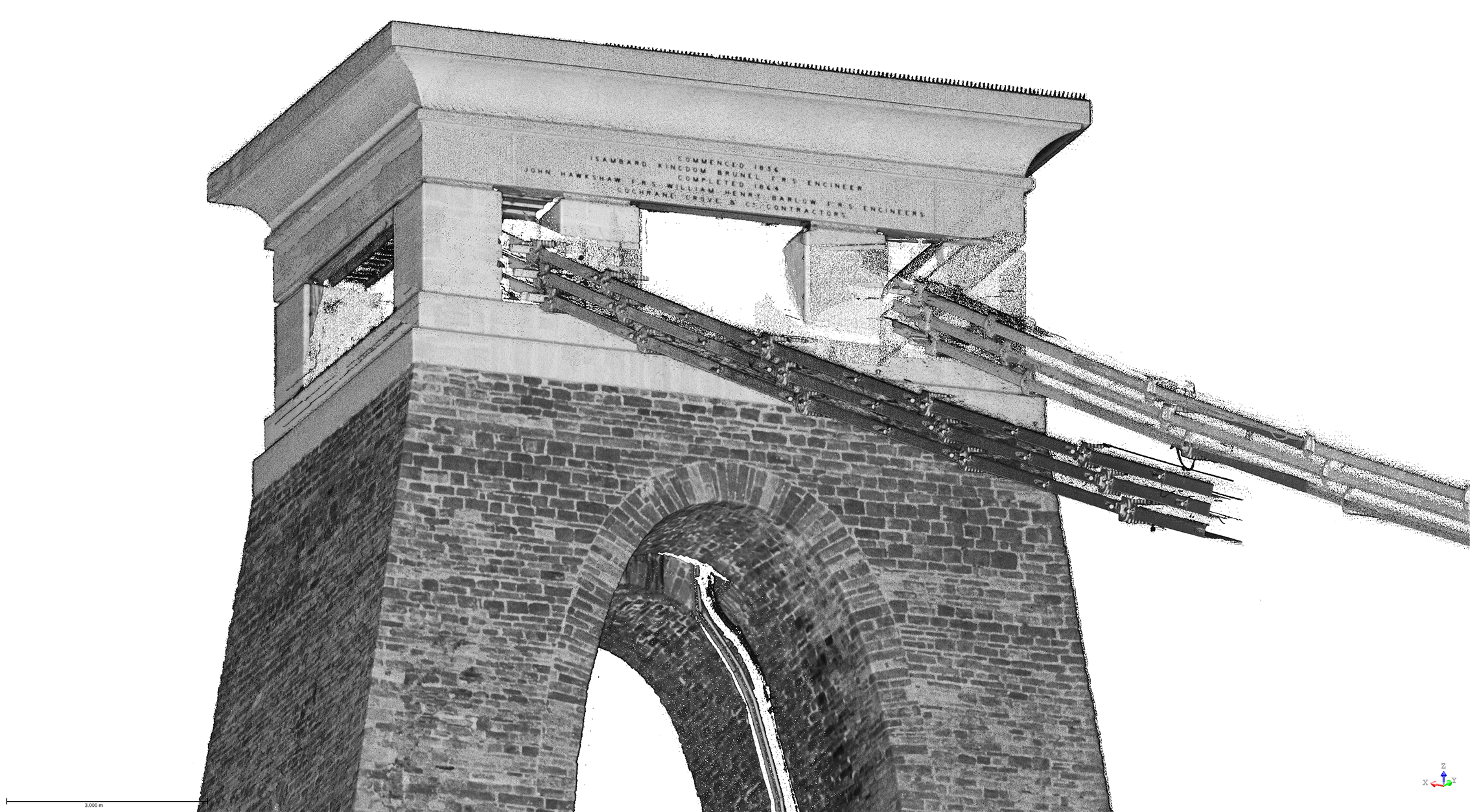
I chose this bridge because I’ve visited it regularly with the X7 so I knew it would be a really useful comparison to undertake the same scan with the X12. The result with the X12 is a totally different level. This is an instrument with an understandably higher price tag than the X7, but this scan reminded me exactly why. I scanned at an 80-90m range and again, the results were impeccable with the detail on the brickwork crisp and clear.

Conclusion
In all honesty, when I first heard about the X12, I was asking myself how it would fit into the fleet of one of our typical KOREC survey customers and as ever, the answer comes not from a press release or a data sheet but those who are out in the field or running a survey business, all of whom have productivity, profit and great deliverables in mind. The customers I’ve shown the X12 to have been wowed by its performance as a single instrument suitable for any job. So, I’m signing off with a quote from a recent demonstration that sums it up perfectly:
“It’s totally fit for purpose, every purpose, in fact it’s a bloody great scanner!”
If you’d like to know more about the X12, please contact me at Melvin.penwill@korecgroup.com and please do sign up for our X12 webinar at https://korec.group/x12-webinar-1 on Tuesday 11th October.

How does the new Trimble Catalyst DA2 receiver measure up against the DA1?
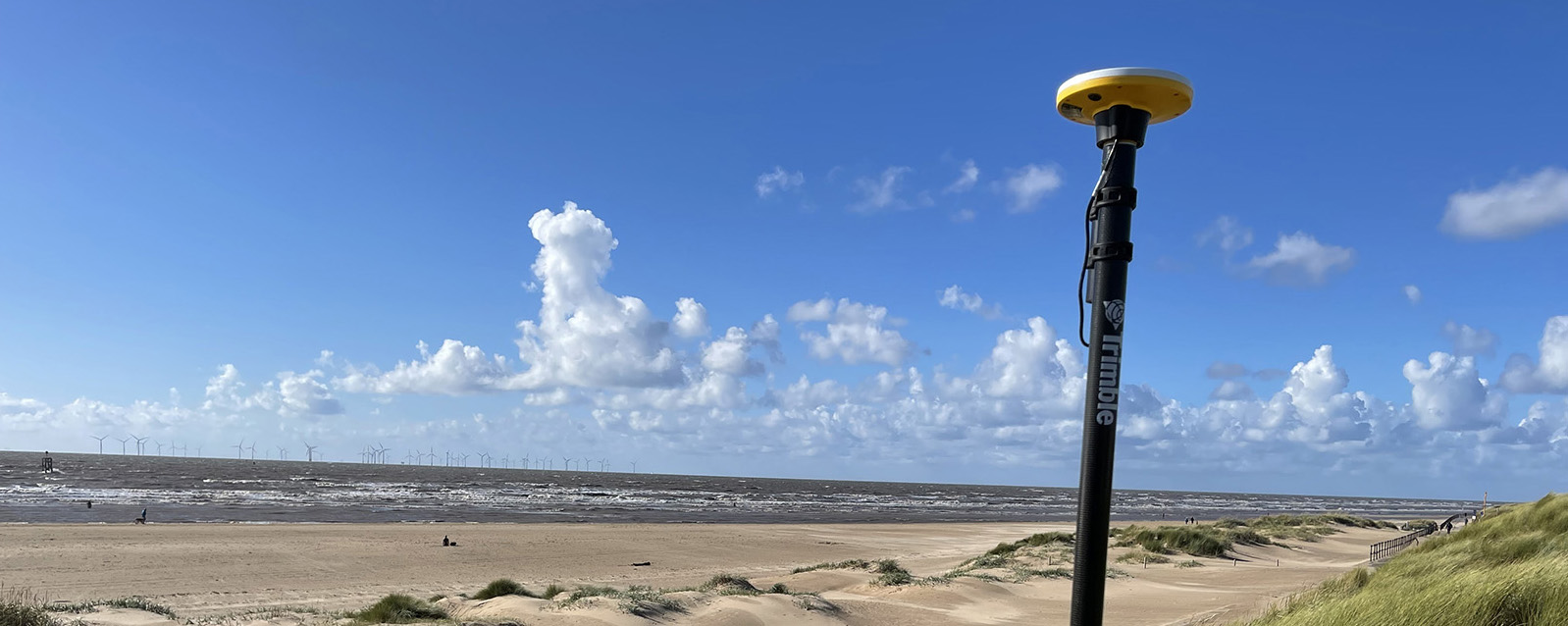
What better way to find out than by putting afforable cm accuracy in the form of the DA2 into the hands of experienced Catalyst user and advocate of the DA1 system, Andrew Stephenson Principal Designer on the Morrison Water Services Northern area Engineering Team.
Andrew was an early adopter of Trimble Catalyst and used the DA1 extensively saving £20k on a recent 1-2cm asset collection project which was nominated for a Water Industry 2021 award for its innovative approach to high accuracy data capture and management.
The set up
Andrew and Morrison Water Services Surveyor, Asa Blake, used the DA2 in conjunction with a 1cm accuracy Catalyst subscription and their existing KOREC Capture field software running on a rugged Trimble TDC600 Android device (although the DA2 is also now compatible with iOS devices). Drawing on previous experience of how the DA1 worked under different conditions, Andrew was keen to carry out some comparative tests with the new DA2 in the same situations to test its performance and ultimately, it’s productivity improvements.
Three challenging test sites
Andrew and Asa opted to test the DA2 in three demanding scenarios which any GNSS would find challenging, firstly, Leeds City centre, secondly under tree canopy and finally in a remote location with no mobile phone coverage.
Here’s Andrew’s report:
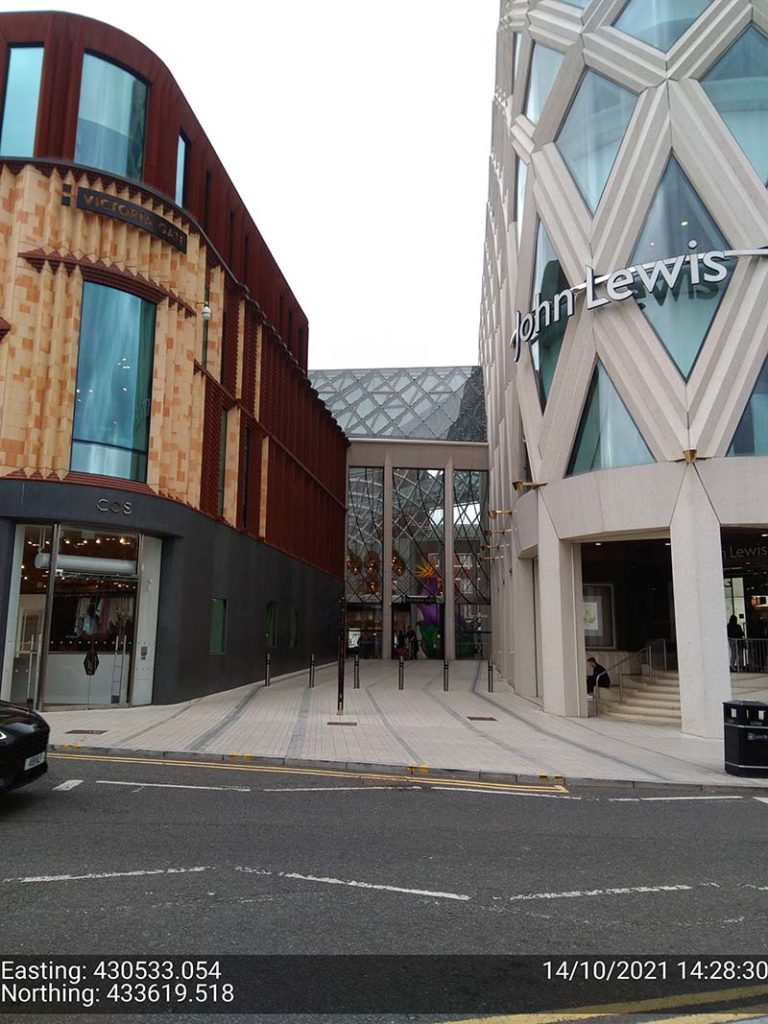
Leeds city centre – built up environment
“In Leeds City centre we were able to achieve 1cm positions. Even next to the John Lewis building where previously we’d been unable to receive a signal at all, the DA2, always delivered an accurate position.”
The technology behind the performance: Trimble ProPoint
Until the launch of the DA2, Trimble ProPoint was only available in top of the range Trimble GNSS receivers. ProPoint delivers better results in harsh GNSS conditions, for example, near tree canopy and in built-up areas.
Under tree canopy
“We tested this scenario under the trees in Cookridge, Leeds – centimetre positions were easily achievable. ”
The technology behind the performance: Trimble ProPoint (see above).
Expect cm positions under tree canopy within 40 seconds!

Remote location with no phone signal
“This is a common problem for us so we knew exactly where to test out the DA2’s capabilities for this one. Scar House is situated in the Nidd Valley in North Yorkshire and it’s almost impossible to get a mobile phone signal there. The DA2 again delivered 2cm positions thanks to its ability to receive corrections via satellite rather than via an internet connection. This is a game changer for us.”
The technology behind the performance: Trimble RTX.
The DA2 means that you are no longer reliant on receiving your cm corrections over an internet connection. Thanks to Trimble’s RTX technology you can now get your corrections via satellite (GPS, Galileo, GLONASS, BeiDou, QZSS, IRNSS, MSS, SBAS) which is great for areas with limited mobile phone coverage and internet connectivity.
Conclusion
Andrew’s verdict: “Most of our projects have a specification for 10cm accuracies and in fairness to the DA1 we were often able to work within this spec, but not always. The afforable cm accuracy of the DA2 brings peace of mind and the knowledge that we can always overachieve on precision and in particular,in the three conditions above that previously challenged us.
We’ve also noted some additional benefits with the DA2 – the improved speed is excellent! By the time we’d logged on we were down to 1cm which is a remarkable improvement on the DA1. The DA2 is also Bluetooth enabled which saves battery drain for the phone because there is no need to bother with leads (or water!) into the connection of the phone.
The DA2 delivers outstanding results where we would have never thought possible with the Catalyst technology. We tested this at Scar House Reservoir, which is as remote as it gets in Yorkshire, but the DA2 delivered accuracy of 2cm using RTX which is remarkable!”
You can read about our Trimble Catalyst business case here.
A related case study on knotweed mapping with Catalyst is here and asset data collection here.
Visit our webinar section here for the full details on the new Catalyst system.
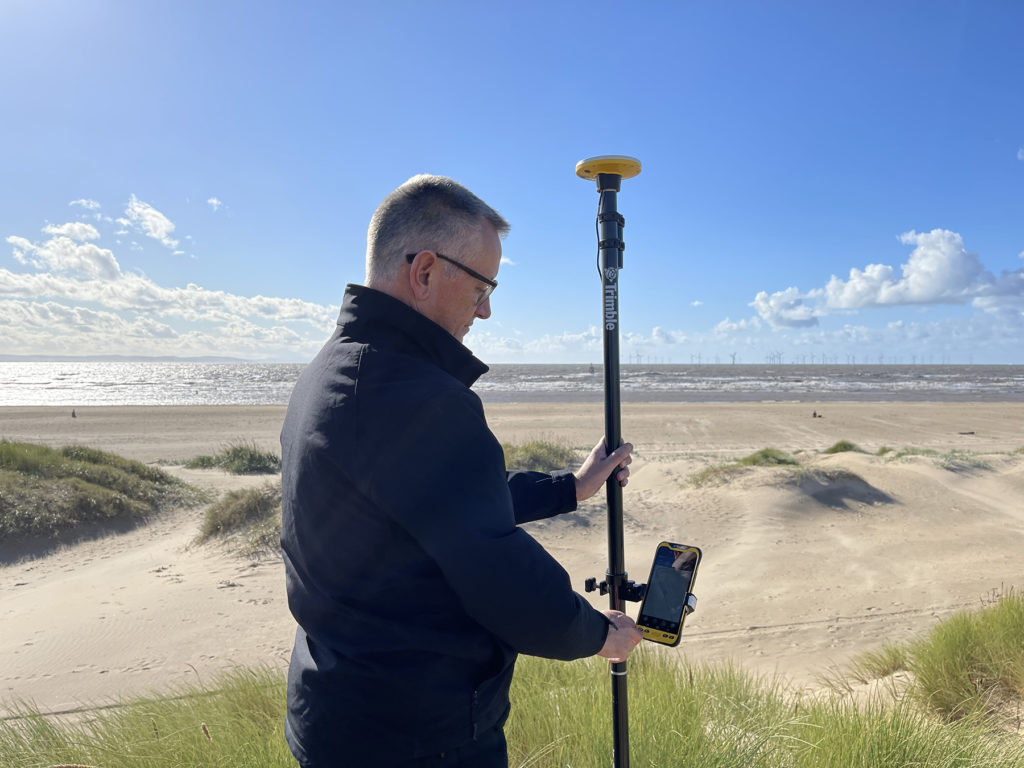
We’d like to introduce you to a new acronym – PAAS or Positioning as a Service!
The DA2 is the second-generation receiver and antenna for Trimble’s Catalyst service. Simply, Catalyst is a revolutionary, GNSS concept delivering positioning as a service to mobile devices. It turns your Android or IOS device into a precision mapping, navigation and measurement tool that you can use with any location enabled app or service including KOREC Capture and Esri FieldMaps.
Catalyst delivers the most cost-effective method for achieving cm accuracy positioning in the industry.
Subscription based services have grown faster than traditional businesses in many areas of the economy. Trimble is leading the way in PAAS with its Catalyst positioning service.
Of course, here at KOREC we don’t just take things at face value so our Mapping Business Area Manager, Richard Gauchwin, has been out and about putting the DA2 through its paces.
We caught up with him to find out what’s new and what’s impressed. Here’s his verdict:
- Number one has to be the fact that the DA2 is now a full GNSS receiver which removes dependencies on the mobile device which you may have seen with the DA1.
Whilst the DA1 connected via a cable into an Android phone, it was the app on the phone where all the GNSS processing was carried out. In short, processing times etc were limited by the phone’s performance. Not so with the DA2 receiver, it’s a whole different story! The biggest plus is that Catalyst is now so much faster to use. For example using the DA1, it might take you minutes to get a position, with the DA2, we’re talking seconds!
They may look the same and still weigh in at just 330g, but in terms of performance they couldn’t be more different.
2. The DA2 brings you far more flexibility as it now has Bluetooth which allows you to connect wirelessly to your mobile device of choice. And believe me, there is definitely more choice because this now means that the DA2 is compatible with both IOS and Android.
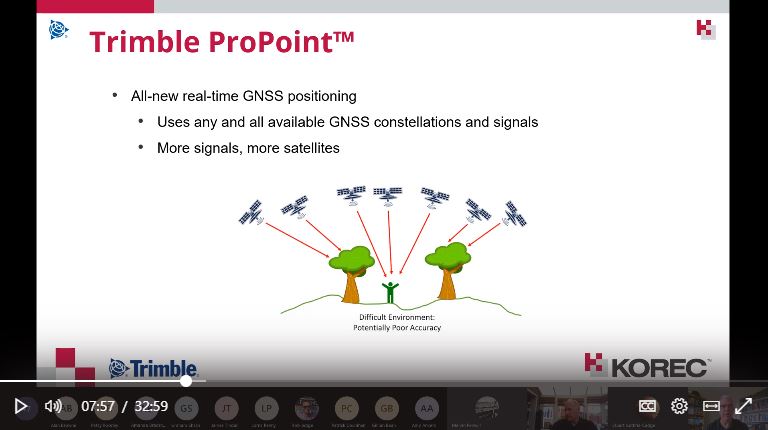
3. The DA2 offers Trimble’s ProPoint technology which has previously only been available in top of the range GNSS receivers. ProPoint means better results in harsh GNSS conditions, for example near tree canopy and in built-up areas. Expect a cm position near tree canopy within 40 seconds.
4. New subscription choices mean even better scalability. Subscriptions have been clarified to accommodate the better accuracies achievable. Choose from 60cm, 30cm, 10cm or 1cm. Trimble have also provided more choice in the number of hours you can purchase including some great options available for equipping large workforces. And of course, you still only pay for what you use.
5. The DA2 means that you are no longer reliant on receiving your cm corrections over an internet connection. Thanks to Trimble’s RTX technology you can now get your corrections via satellite which is great for areas with limited mobile phone coverage and internet connectivity.
6. The DA2 is future proof and will update wirelessly when required.
Who is Catalyst suitable for?
In a nutshell, we describe Catalyst as being a truly cost-effective option for those who require high accuracy positions as a part of their workflow, for example, positioning Ground Control Points for an aerial mapping project, recording the location of soil samples on a construction project or positioning valve or pipe connections on a drainage job. By having access to a cm accuracy system, with no training costs and no outlay for expensive, specialist hardware, Trimble Catalyst is truly a system that can put cm accuracy into the hands of the many different users and/or across large workforces.
We have a great analogy comparing Catalyst to a buying a printer and printer inks. Simply, the hardware costs in buying a printer are minimal, the service, or in this case the printer ink is where the cost lies. If you are just printing out two or three pages every now and again then this is the equivalent of a Catalyst user who can really gain value from the system. If however, you print off many full reports every day, then you will not achieve good value from Catalyst and it’s best to consider a dedicated survey grade GNSS.
If you’d like to see which KOREC customers been using Catalyst then please visit our customer story blog here to read about:
· V.T.O.L Media – establishing ground control points for aerial surveys
· 3LM – a holistic approach to agriculture and the land
· TP Knotweed – rapid response identification and removal of knotweed
· A14 Integrated Deliver Team – fast one-off positions and augmented reality in the field
A related case study on knotweed mapping with Catalyst is here and asset data collection here.
Visit our webinar section here for the full details on the new Catalyst system.
KOREC and Drone Pilot Academy celebrate 5 years of success with an extended partnership bringing new pilot benefits.
- DPA now an approved partner for drone demonstrations.
- Increased dissemination of useful information through webinars and social media.
- Faster access to new industry releases.
- Competitive package pricing on drone purchase, product and CAA training.
KOREC is delighted to announce that following a productive 5 years with Drone Pilot Academy (DPA), which has seen hundreds of drone pilots successfully undertake consecutive flight training and Civil Aviation Authority (CAA) accredited pilot training courses, the partnership has been extended to bring additional benefits for existing and prospective drone pilots. These include:
- DPA will now be KOREC’s approved partner for the demonstration of all KOREC supplied senseFly and Parrot drones. This will ensure a fast turnaround for the viewing and testing of the latest drone technology and an even more streamlined approach to combined drone purchase and training.
- Increased collaboration for the sharing of news, regulation changes, tips and updates through social media and webinars. For example, you can now view a live stream from KOREC supplied drones using Microsoft Teams …ideal for fast decision making, inspections and progress reports, all viewed COVID safe from a laptop. This is just one of the ‘Know Hows’ to be covered in the KOREC/DPA webinar on Monday 22nd February along with an analysis of new European regulations, A2 drone categories and new products.
- Fast access to new industry releases such as the ANAFI USA with its thermal camera and 32x zoom and senseFly’s eBee Geo, an affordable fixed-wing mapping drone.
- Collaboration on drone price and training prices for the most cost-effective packages.
Mark Poveda -KOREC Group Commercial Director said “This partnership enables KOREC to offer the most cost saving, robust solutions to the professional commercial drone industry in the UK. DPA staff deservedly have a great reputation in the industry – instructors are ex-military aviators and surveyors with a wealth of experience in training and instruction and also have factory training on our drones so they know the systems inside out.”
James Ixer – Managing Director of DPA said “This has really been a fantastic journey over the last 5 years. Our instructors have earnt their credibility within the sector through their qualifications as land and building surveyors and unrivalled experience using drones in the industry, knowledge that is extremely useful when advising customers on how to integrate this fantastic technology into existing workflows.”
One graduate of the academy, Owner and Managing Director Lee Husk, of PDS Ltd testifies “It is a winning combination between the two companies as you have a one stop shop to get you from complete novice to operating sophisticated drones in no time at all. We have always believed in investing in the latest technology and operate both the SenseFly eBee X and the Parrot ANAFI Without a shadow of a doubt our end clients never fail to be impressed by the outputs these drones can achieve.
Read a case study on how Lee Husk used the Parrot ANAFI here.
Join our webinar with Drone Pilot Academy on Monday 22nd February, click here.

SeneseFly’s eBee Geo (left) and Parrot’s ANAFI USA (right)
Customised reporting for different sectors, simplifying your workflows without compromising on detail
New partnerships with the biggest names in mapping, to help you discover #morethanamap
Stay tuned to find out more or contact us.
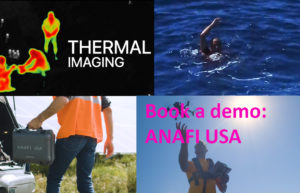
Designed for the US army and manufactured in the USA, ANAFI’s latest offering combines multiple security measures, great functionality and is operational from the palm of your hand in just 55 seconds. These features, along with an extremely competitive price for the applications it’s aimed at, make the ANAFI USA a perfect choice for police, fire, search and find, security agencies and surveying and inspection professionals.
What we rate:
- The visuals: 32x zoom allowing operators to see details clearly from up to 5 km away. Spot details as small as 1 cm with precision from a distance of 50 metres. Plus thermal cameras for the detection of vital hotspots.
- Easy operation: Less than 55 seconds to unfold the drone, turn it on, establish the secure radio link and take off.
- Security: Did we mention that this drone was designed for the US army? The ANAFI USA comes with a Secure Digital (SD) card encryption feature that ensures a complete protection of photos and videos if the drone or the SD card is lost and also includes a secure WPA2 Wi-Fi connection. Signed firmware prevents any malicious modification of the drone software and the drone’s features are fully compliant with the European Union General Data Protection Regulation (GDPR).
For a demo call Richard Gauchwin KOREC Business Area Manager – Mapping & GIS
M: 07786 118436
E: richard.gauchwin@korecgroup.com
Here’s a question. How do you continue to motivate, inspire, inform, or even just get your teams together during a national lockdown?
Whilst 2020 has been unusual (to say the least), for KOREC, we were already quite used to remote working & collaboration. Serving two nations, and with staff the width and breadth of the country, regular communication via phone, email, virtual chat or even Whatsapp was already the norm for many.
But for those used to office working or field working, now confined to the kitchen table at home, we realised that it was more important than ever to ensure everyone felt connected & informed.
That’s why we launched our virtual lunch ‘n’ learn series in October. The objective was simple – every 2 weeks, we invite everyone in the organisation to a brief overview of a product, solution or application. The vibe is informal – questions and interruptions are very much welcomed, prizes are awarded, and of course, lunch is munched.
It’s the perfect opportunity for a refresher on a particular product, an introduction to the latest piece of kit on the market, all presented by one of our in-house experts. For our people, it’s a reminder of the sheer variety & versatility of the solutions that KOREC offers, be it land survey, drone, rail, highways, mobile mapping…the list goes on.
It’s an excellent way for many of us to take 30 minutes out of our day, to get together, have a chat, and even learn something new.
So far, we’ve held 3 sessions;
An overview of our in-house, K-Matic software suite, presented by Darrell Theobalds
Introduction to the R12 & R12i GNSS systems & ProPoint, hosted by Leigh Rowell
Laser scanning made simple, with the X7, presented by Melvin Penwill
And we have many more up our sleeves going into 2021.