

The third question in our ‘five important questions blog’ is……
5. Has it got a handle?
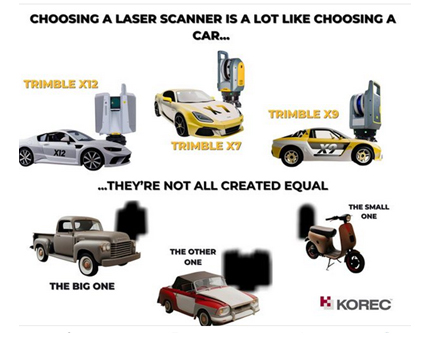
It’s possibly any scanners most underrated feature, but your scanner is worth thousands of pounds, not to mention any down time if it gets dropped! Easy maneouverability is vital in tight spaces of if you’re working within complex structures. Several of our customers have mentioned this as one of the deciding factors in their purchasing decision but it doesn’t even get a mention on the spec sheet!
Top tip: First hand example of how useful that handle can be, right here!
In conclusion, buying a 3D Laser Scanner is a lot like buying a car! Upkeep, reliablility, performance and suitability for purpose are all going to dictate your ultimate decision, and whilst we understand the attraction of leather seats, metallic paint and 0-60 in less than three seconds, we also understand that business decisions have to be based on hard facts. When choosing a 3D Laser Scanner, there is no easy choice, it’s about balancing your priorities to find the one that best fits your application.
However, it might be useful to know that the Trimble X7 and X9 are the ONLY 3D Laser Scanners on the market that offer all of the following:
- Self-levelling
- Auto-calibration
- Weatherproof with an IP55 rating
- Speed – fastest field to finish workflow
- In-field auto registration
- A handle!
1. What is the cost of ownership v. unit cost?
2. What’s more important to you, scan time or total time to project deliverable?
3. Survey grade levelling….optional extra or must have feature?
4. What’s the scanner’s IP rating and can I carry on working in the rain?
For a Trimble X12, X9 or X7 demonstration, call us now on UK: 0345 603 1214
IRE: 01456 4702 or
KOREC is always delighted to support the next generation of surveyors coming through college, and especially when they’re keen to get their hands on some ground breaking Trimble technology! It was therefore with great pleasure that we loaned a Trimble X7 3D Laser Scanner to the BSc Geospatial Surveying TU Dublin final year students for a project that was also supported by a number of survey service providers.
The Project
Christ Church Cathedral has stood at the heart of Dublinfor almost 1000 years and this important heritage site welcomes visitors from all over the world every day. Facilitated by the Cathedral’s staff, the final year students were lucky enough to work as a team on an assignment that required them to undertake a series of scans to provide the cathedral with floor plans of the inside and elevations of the exterior. The end results were to be handed to the Cathedral’s insurance company before a policy renewal.
The Deliverables
- A geo-referenced colourised point cloud – to be used for future work in the cathedral.
- Sections, plan and elevation drawings in 1:50 scale. These drawings would then be used by a quantity surveyor to measure the volume of the assets.
- A walk-through of the point cloud. This was done to illustrate the possibility of creating a virtual tour of the church.
On Site
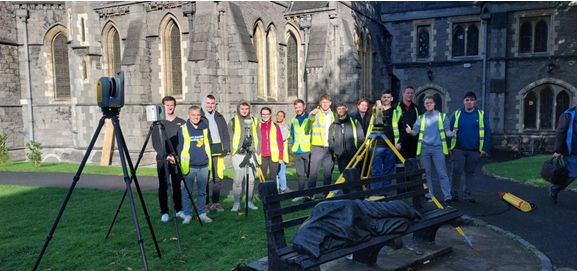
The students were divided into two separate teams, a laser scanning team and a control network team.
A control network to geo-reference the scans was established. The exterior of the building, minus the roof, was then scanned in just a day using the Trimble X7 and involved around 54 setups.
The students found the instrument ,and the tablet connected to it, very intuitive and following the initial setup, very simple to use: “All we had to do is press “start scan”. The X7 did the rest of the work!”
Highest rated Trimble X7 feature
The students rated the automatic registration and the self-levelling features above all. Automatic registration meant that they did not have to register the scans when they got back to the office whilst the attendant report allowed them to prove the accuracy of their work to the client and lecturers.
The self-levelling feature was also appreciated for the way it cut down on site time – the whole building scanned in a single day.
Finally, being able to geo-reference the project on site meant less work when it came to post-processing. The students were also able to colourise their scans on export.
After the survey
The final year students presented their survey and scan results in the beautiful Henry Roe room in the Cathedral.
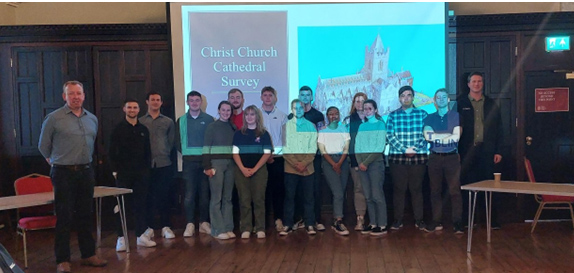
Our thanks to Dylan de Beer and Adam Hoey for their feedback on both the project and of course the X7. Both felt the use of a top range 3D Laser Scanner to be extremely beneficial their studies and also a good indicator of what industry standard surveying can be like with the use of good equipment.
“Our clients expect the very best from us and that means we’ve got to provide the very best end product and in turn, that relies on great equipment capable of generating great data. The new Trimble X12 fits the bill perfectly”
Neil Pollock, Director, Three Sixty Group
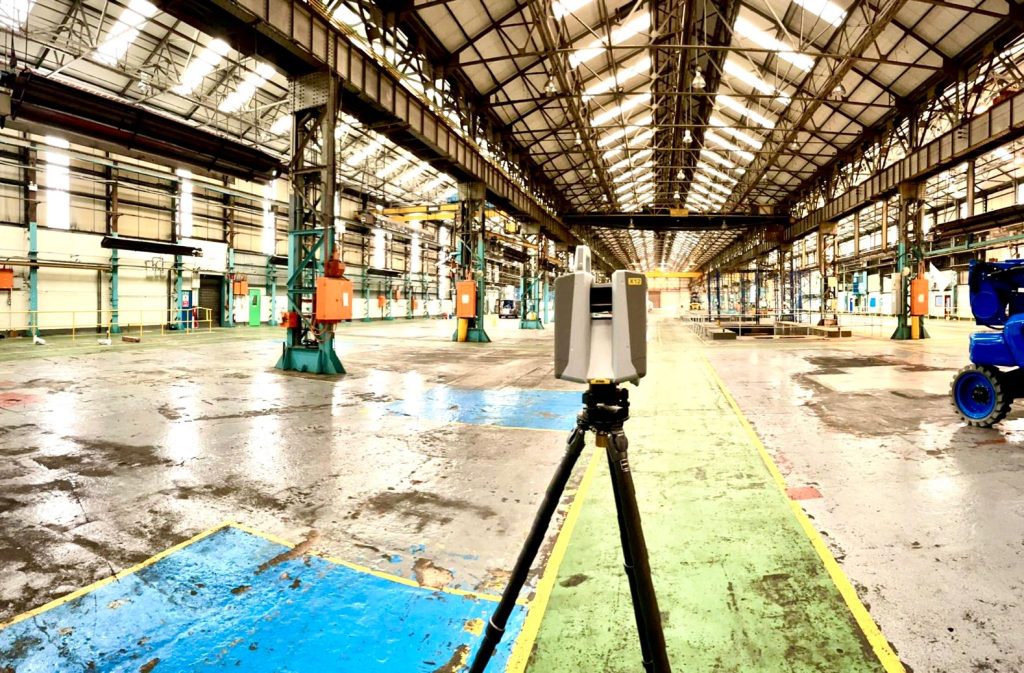
A few weeks ago, our KOREC Laser Scanning Sector Specialist, Melvin Penwill, got his hands on one of the first Trimble X12’s in the country. He was only too happy to put it through some rigorous testing and then share his opinions, including his 6 highest rated features, in a useful LinkedIn Post.
At some point, he was persuaded to let the customers have a go too!
About Three Sixty Group
Operating nationally, Three Sixty Group works across a diverse range of sectors from Utilities and Rail to heritage and listed buildings. The company has a fleet of 3D Laser Scanners that includes three Trimble X7’s as well as instruments from other manufacturers.
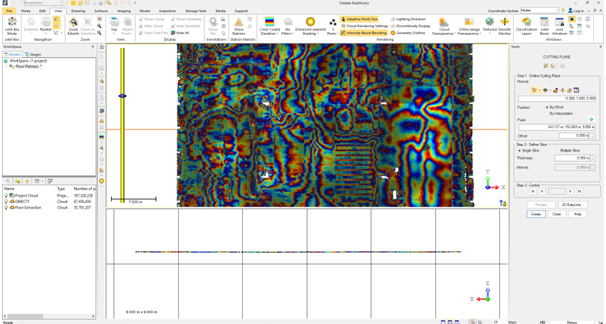
We caught up with Director, Neil Pollock, who’s been using the X12 for a floor flatness survey in a vast, engine manufacturing plant in Derby. With specified tolerances of just +/- 2-3mm for aspects of this job, it was the perfect testing ground for the X12 which was used both indoors for the high accuracy floor survey, and externally for an overall building survey where scans were undertaken with a range of up to 100m.
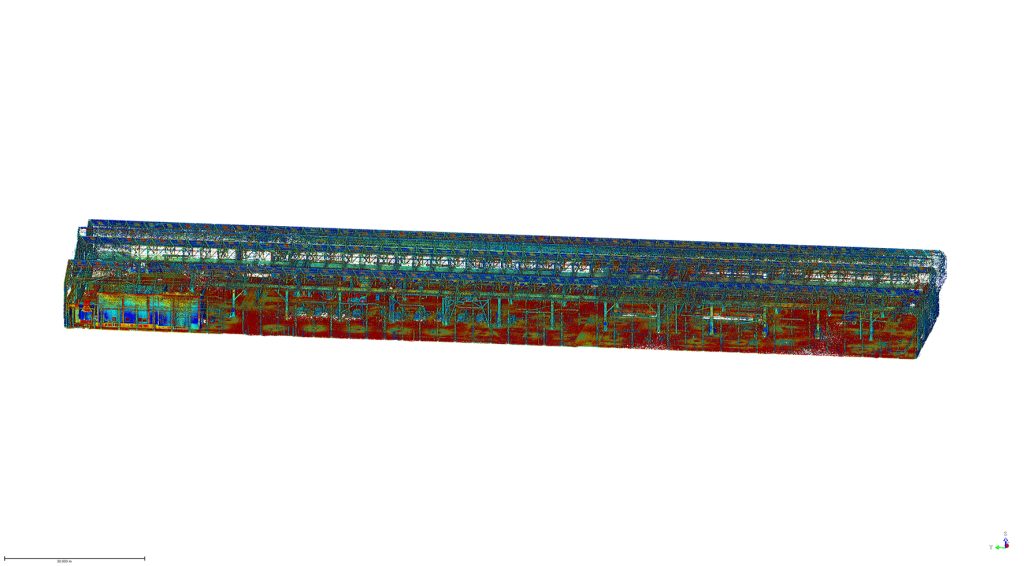
Here’s what Neil rated:
- Size – although he was aware of the dimensions (150 mm (W) x 258 mm (D) x 328 mm (H)) of the X12, when it came out of the box, he found it even smaller and lighter than he expected.
- Learning curve – The Three Sixty Group surveyors are already familiar with the Trimble Perspective software and workflow from their use of the X7’s. They were therefore able to transition to the X12 seamlessly.
- Cleanliness of the data – Even at a 100m range, Neil found the quality of the data to be top notch and way beyond any other scanner that the company has worked with previously. This ensured total confidence in the overall quality of the survey. Three Sixty Group is seeing a growing requirement for heritage work and felt that the X12 would excel in the level of detail required for this work as well as being suitable for the short or mid-range work required on more standard jobs.
- Low noise – In spite of the shiny factory floor, noise was minimal.
- Image quality – Excellent quality and super-fast to take at just 2 minutes. With Trimble Perspective, it’s now also far easier to retake images.
- ‘Window’ feature – rather than take a full 360 scan with the Trimble X7, or carry out a quick preview with the Trimble TX8, Neil rates the ability to ‘window off’ a section for a high-resolution scan as a great time saver.
Neil concludes: “The data from the X12 is just so clean, and that makes it very, very easy to work with across every job. In short, the better the data, the higher the quality of the product that we can provide all our customers with. This is especially important for our heritage work which is growing all the time. Our clients expect the very best from us and that means we’ve got to provide the very best product and in turn, that relies on great equipment capable of generating great data. The new Trimble X12 fits the bill perfectly.”
Thank you to Neil Pollock for chatting to us about his X12 experiences
For further information, please call your KOREC Sales Consultant or contact Melvin.penwill@korecgroup.com

KOREC’s ‘Scanning and Point Clouds’ Sector Specialist, Melvin Penwill, field tests the new Trimble X12.
At the end of July, Trimble announced the new X12 3D Laser Scanner, its first release since the groundbreaking X7 of which you’ve no doubt heard plenty of talk over the last couple of years! A new instrument is always an exciting moment and as KOREC’s ‘Scanning and Point Clouds’ product specialist, I was delighted to get my hands on one of the units that landed at our Huntingdon Offices for our consultant training day.
The Trimble press release describes the X12 as ‘…..integrating intuitive Trimble software for precise data capture and in-field registration with state-of-the-art 3D laser scanning and imaging hardware technology from Zoller+Fröhlich (Z+F), combining the expertise of two industry leaders into a single solution.” A nice description, that highlights that this really is a ‘best of both worlds’ combination of Z+F technology and a tried and tested Trimble workflow, but let’s take a look at how that works in practice.
Out of the box
So, first impressions, it’s small! For a scanner of this range (0.3 m–365 m) and precision (≤ 1 mm + 10 ppm/m), it’s way more compact than its closest rivals measuring just 150 mm (W) x 258 mm (D) x 328 mm (H)) and weighs in at 7.7kg and that includes the batteries. It also has a handle, a significant detail that’s been much appreciated on the X7. The box looks great too, but doesn’t accommodate the Trimble T10x Tablet, but then again, that makes sense since the tablet is often going to be separate from the instrument for charging etc.

However, this is an all-in-one package and includes everything you need to start scanning immediately including the Trimble Perspective software.
Here’s what I rate – my six top highlights:
- All the KOREC consultants found the Trimble Perspective workflow incredibly easy to use. Those that were familiar with the X7 were up and running immediately, those that were unfamiliar found Perspective intuitive and with just a couple of questions here and there required little further assistance. This is vital for survey companies that need an instrument that’s suitable for use by everyone on the team for an early ROI with little down time for training.

- Window scanning – this is a great feature! Do a quick 360° scan (23 or 46 seconds) to position yourself and then use the window option to select areas for more detail. Expect 0.6mm at 10m….unbelievable!
- Great imagery – you can add excellent imagery to your scan in just 2 minutes, again it’s super quick and the quality is excellent. The Perspective software also means that it’s really easy to retake images. A lot of thought has gone into making this a really simple procedure.
- Clean, sharp data and noise, or more accurately, lack of noise! One KOREC customer scanned a black car. Normally with a reflective surface of this sort, you can expect noise. In this case, the customer thought that that the data had been filtered in Trimble RealWorks because it looked so unbelievably clean. Not so, this was all the work of the X12. It’s worth noting that noise is at 0.2mm at 10m for the X12 compared to maybe 2-3mm with the X7.
- Scanning in the dark – don’t be put off anymore, even for inspection work. The X12 has four LED lights which are so strong that from the results, you wouldn’t even know you were in a dark room.
- Fast – this scanner is also speedy, one of the fleetest on the market and with Trimble Perspective, users can check their data, take measurements, and add annotations before leaving their site which makes for faster turnaround time in the office.
The proof of the pudding…

I spotted this on the drive back from Huntingdon and couldn’t resist! The obelisk was in a really tricky environment with trees all around but I wanted detail, not trees. I did a 360° scan for registration and then a window scan with images. The end result was clean and crisp.

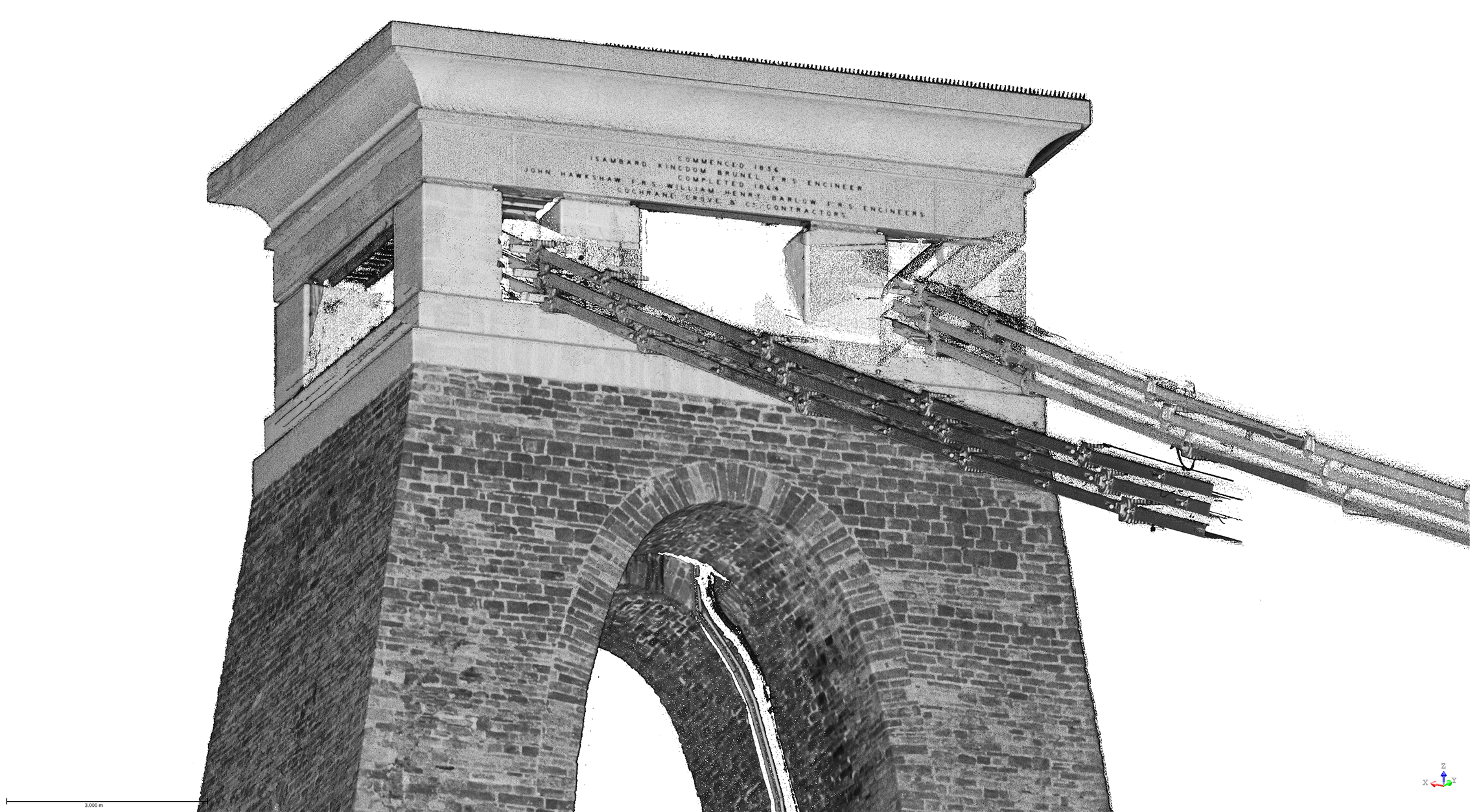
I chose this bridge because I’ve visited it regularly with the X7 so I knew it would be a really useful comparison to undertake the same scan with the X12. The result with the X12 is a totally different level. This is an instrument with an understandably higher price tag than the X7, but this scan reminded me exactly why. I scanned at an 80-90m range and again, the results were impeccable with the detail on the brickwork crisp and clear.

Conclusion
In all honesty, when I first heard about the X12, I was asking myself how it would fit into the fleet of one of our typical KOREC survey customers and as ever, the answer comes not from a press release or a data sheet but those who are out in the field or running a survey business, all of whom have productivity, profit and great deliverables in mind. The customers I’ve shown the X12 to have been wowed by its performance as a single instrument suitable for any job. So, I’m signing off with a quote from a recent demonstration that sums it up perfectly:
“It’s totally fit for purpose, every purpose, in fact it’s a bloody great scanner!”
If you’d like to know more about the X12, please contact me at Melvin.penwill@korecgroup.com and please do sign up for our X12 webinar at https://korec.group/x12-webinar-1 on Tuesday 11th October.

“Robots conducting automated on-site data capture and monitoring are coming to a construction site near you.”
Trimble Press Release
…but did you know that Spot, the agile robot with the Trimble X7 3D Laser Scanner, is already being used commercially on four different sites across the UK and Ireland!
In each case, the purchase of Spot and the X7 was based on a carefully researched benefit-cost analysis, taking into account that Spot and the X7 is an autonomous system and the only one available where contractors can operate both the robot and laser scanner through a single integrated tablet controller.
Following on from our first Spot post, ‘What does autonomy mean to you’, we look forward to bringing you stories from all of Spot’s ‘owners’ and first up in this series is a look at how Balfour Beatty’s Digital Plant Manager, Mark Crawford, assisted the company to become the first in the UK to have the fully integrated Trimble workflow between Spot and the X7.
Mark explains how autonomous Spot was introduced to a working site at the end of 2021:
“This integrated workflow means that not only do we have a ‘working’ dog instead of a ‘show’ dog but it’s also our first robotic employee, who has already been out walking and capturing data across our site in Derby for the last 48 hours.
We spent day one doing business introductions and site inductions with a full site tour for operational familiarisation, plus the expected fun of walking up and down stairs, over obstacles, through the offices and then we got down to some proper work.
Out on its own in the wet and windy weather we’ve completed its first solo fieldwalk mission, with a 12 scan set up, all done in 18 minutes of scanning time and 10 minutes of travel – back on the dock and point to point registration and refinement complete in under 10 minutes has resulted in us capturing 65.4 million points and a working model to measure off for our facilities team.
There’s been a lot of buzz and excitement around this platform and integrated solutions and quite rightly so. To be able to get one in, employed and deployed on our sites only heightens that excitement when you start to consider the art of the possible on the journey of robotics and reality capture and automated tasks.”
Spot podcast – autonomous applications

Following on from the introduction of Spot, Mark teamed up with Trimble’s David Burczyk, Construction Robotics Lead at Trimble Connected Construction, to record a Spot podcast for the Constructive Voices series. This is an extremely informative look at how the business decision to purchase Spot and the X7 was reached and what Balfour Beatty hopes to achieve through this innovative step. Both have plenty of insights to share:
“We’re doing things with a remote operator app which will allow you to remotely operate Spot without having to be physically on the same job site.” David Burczyk, Trimble.
“Sellafield has worked with Spot to take radiation readings…. with a person operating him from a place of safety and the robot goes instead. That’s got to be a win in anybody’s eyes.” Mark Crawford, Balfour Beatty.
Listen to the podcast here:
What’s Next?
- Check out the Trimble X7 product page
- Check out Spot in action over on our YouTube channel;
Graham Sharp specialises in talking to potential KOREC customers ready to invest in Trimble X7 technology for the first time. For many of these businesses, this is a decision based on many considerations from ROI, to financing to running costs.
He’s therefore put together some great packages designed to tackle head-on the FAQ’s that have to be asked before a successful investment.
What’s in the package?
- A full system ready to go with all hardware from one provider
- Software capable of full onboard registration and export to proprietary formats
- Warranty for the duration of the finance (extendable after)
- Firmware & software updates for the duration of the finance (extendable after)
- Technical support – forever
- Calibration costs and associated down time – ZERO !
How much is the package?
Prices include a complete Trimble X7 system, that offers full onboard registration and export to proprietary pointcloud formats and is also fully covered with a Silver KCP (KOREC Care Package) for all warranty, updates and support for the length of your finance deal from the following rates:
3 Years @ £265 per week
4 Years @ £218 per week
5 Years @ £191 per week
For a no cost / no obligation demonstration of the Trimble X7 and details on this package, please contact:
Call UK Sales: 0345 603 1214
Call Ireland Sales: 01 456 4702
For anything else, view our contact page.
Here at KOREC we love an analogy and this cycling one works a treat!
This year the Tour de France gave us a Wout van Aert as the winner of the prestigious stage 20 time trial in Paris. But he didn’t win the race. That honour was earned by the Slovenian Tadej Pogacar and it was he who finished the race wearing the yellow jersey.
Similarly, if your scanning operations depend on a speedy turnaround for your client, then you can be sure that the Trimble X7 has the features to get you over the finishing line first because the race doesn’t end without a fully registered point cloud that’s ready for the creation of 3D models, drawings etc.
Here are seven reasons why the X7 is unrivalled when it comes to delivering a timely, quality job:
- The Trimble X7 provides you with options to speed up your time on site. For example, thanks to a new firmware update (as recently shared by our laser scanning expert Melvin!), auto-calibration can now be switched off for shorter scans. This can save you 30 seconds per scan providing a 30% speed boost. Remember, you are in charge of the workflow, not the manufacturer, instrument or software. If you don’t need HDR photographs, you’d don’t have to have them, similarly for difficult surfaces or objects, with the Trimble X7 you can simply turn the high-sensitivity scanning mode on or off as required.
- It’s not all about the time the scanner is turning and collecting data. The X7’s auto-levelling feature ensures that you are ready to go as soon as you set the instrument down. The X7 has the IMU and dual axis compensator on all models, meaning data is always level to survey grade accuracy and does not require the same level of post-processing as those that don’t meet that same accuracy specification.
- The X7 doesn’t stop when you do! Infield registration is happening while you scan, full scan refinement, georeferencing, colourisation and export, in the same software on the same device, means that whilst you’re driving around between sites, the X7 is still working, registering the data so that it’s ready to send or transfer at the next stop.
- Or if you’re really pressed for time, you can use the wireless capabilities of the Trimble T10 Tablet and send the registered point cloud from the field.
- The full onboard registration in the field also provides data surety – you can be sure that you’ve got everything whilst still on site so need for return visits for missing data.The unmeasured points view from each Station View assures you nothing has been missed whilst you’re still on site. This allows you to fill in any important areas before leaving, a great time saver if it’s something that may mean a return visit or incomplete data set if you had to wait to do this back in an office.
- It’s got a handle 😉
- Finally, the Trimble X7 has been engineered to capture 500,000 points per second ensuring a high quality point cloud cutting down on any issues that can come from capturing more data than you need, namely extremely large data sets that are unwieldy to handle, navigate, transfer and store to archive.
Got a question? Want to find out more about the X7? Why not submit an inquiry with our friendly team?
Call UK Sales: 0345 603 1214
Call Ireland Sales: 01 456 4702
For anything else, view our contact page.
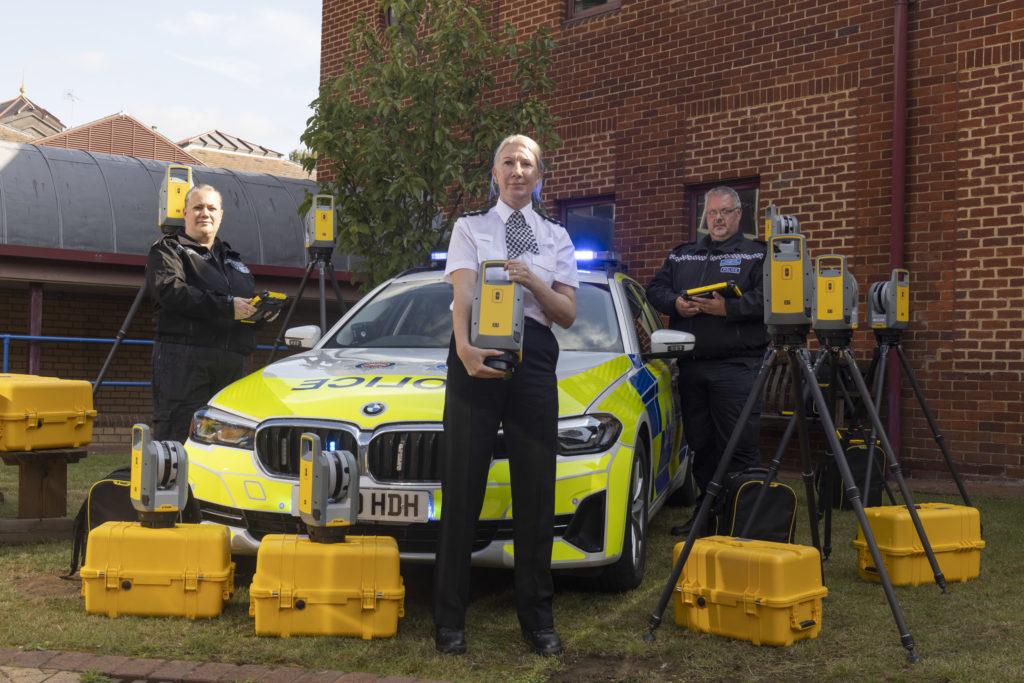
We’re delighted to announce that the hard work of KOREC Regional Director Barry Monk and our KOREC team of scanning/forensic specialists has resulted in a significant investment in Trimble X7 3D Laser Scanners by Surrey and Sussex Police.
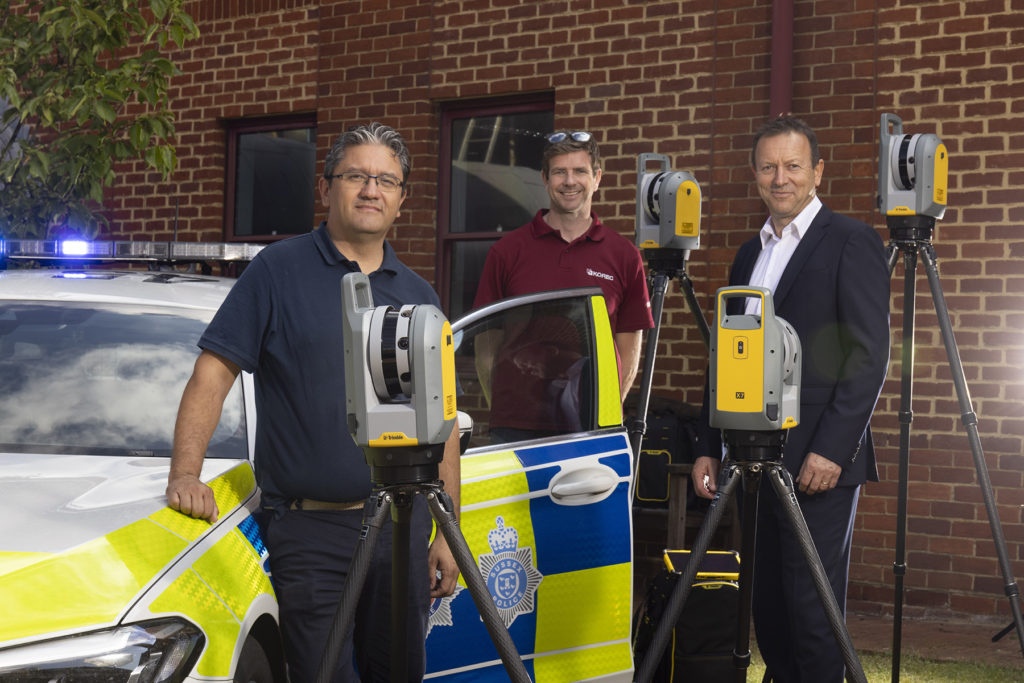
The nine new X7’s have already been delivered and we were pleased to be there on the day to ensure that the handover went smoothly.
Read the official press release here
Whilst the benefits of the Trimble X7 are relevant to a wide range of users including surveying practices, construction companies, architects, steel manufacturers, and many more have been well documented, the demands of police forensic work require an instrument that can deliver in very specific areas which is why the X7 has proved to be an excellent match:
11 points why the Trimble X7 is a perfect match for forensic police work
- Ease of use – the learning curve for the X7 is the shortest of any scanner we’ve ever seen with our training department estimating that even a non-surveyor can be efficient in data collection within hours. This gives it a far wider range of use. Thanks to its intuitive Perspective software running on a tablet, crime and collision scene investigators can reliably collect scan data even if they have not used the instrument for several weeks.
- Fit in with your existing workflow – export formats supported include Trimble and non-Trimble software through the instrument’s new Trimble Perspective software. For example, the open .E57 format for easy importing of data straight into 3rd party registration software.
- Verification of information on site – the X7’s automatic on-site registration means that officers can check that all the information they need has been collected. Often there is no chance to revisit a scene, so this feature is vital for ensuring a full and detailed survey has been completed before leaving the site.
- Survey completed and sent from the site – with registration carried out on site, the finished scan data can be sent from the field for immediate analysis. This ensures a smooth flow of information in an environment where shift work and office processing time can delay the final deliverable by days.
- Fast set up and use – the X7 can be up and running in minutes thanks to the quick release mechanism and automated survey grade self-levelling – just put the scanner down and it’s ready to go.
- Night-time benefits with easy moving and set up around the site – an IMU has been included in the X7 which calculates the new station orientation and will import new data with this orientation already applied. The registration process which follows is then much faster due to the scan already having the correct orientation- just pick it up, hold it as you wish, walk where you want and put it down. This also makes it great for night-time working because unlike other manufacturer’s scanners it is not subject to the dark/low-light condition caveats that optically based solutions are.
- ROI – auto calibration brings reliability, cost-savings and no downtime – not only is the X7 priced competitively, but users are calculating that the auto-calibration feature alone can save in excess of £3k – £4k a year because unlike other manufacturer’s scanners, the X7 does not need to be sent abroad for this process. Instead it’s done automatically, every time it’s used, with the option of a printable certificate.The calibration of some instruments can take up to 2-3 months requiring the hire of a replacement instrument. The X7 eliminates the need for this.
- Rain never stops play – Trimble instruments have a proven record in the rain and with its IP55 rating, the X7 is no exception.
- Highly portable – the X7 weighs just 5.8kg and can be carried easily in a backpack.
- Excellent data quality – fast data collection plus the option of a high sensitivity mode for scanning dark vehicles etc.
- Images and annotations – Trimble Perspective software on a tablet drives the X7 and allows users to annotate, add images, tags, notes etc.
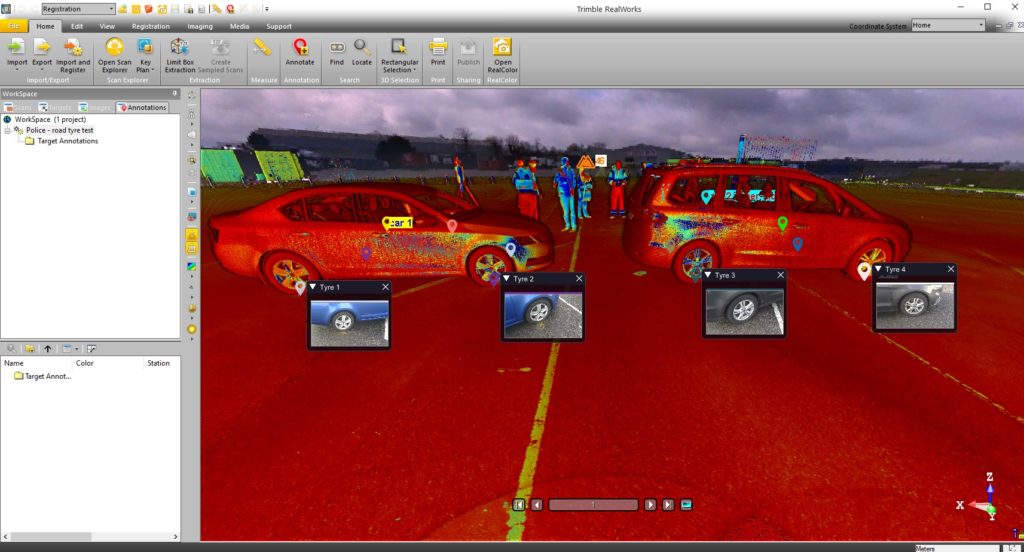
KOREC’s Barry Monk explains why the X7 is a good choice for Surrey Police and Sussex Police chose the Trimble X7
“Working with Surrey Police and Sussex Police on this project was an exciting opportunity to understand the impact a solution such as this can have in ensuring that the requirements of both Police and the public are met.
Breaking down and understanding each element of attending a scene and collecting crucial information was key. The Police have one chance to collect the data in one visit and not miss a thing. With the Trimble X7 solution we were able to tick so many boxes. It is compact and lightweight with all the accessories in a single, easy to carry lightweight backpack and the X7 even has handle which are important aspects when it comes to transporting it quickly on to a scene. Additionally, the onboard Trimble Forensics Capture software is extremely intuitive to use. The X7 proved quick and easy to set up and GO with auto levelling and confirmed calibration at the beginning of each scan. The 3D visualisation of each scan within the Capture software gave confidence and comfort to the investigator that all data was captured. If there were areas that were missed, an extra scan could be added with ease.
In many of the scenes that the investigators attend, speed with accuracy is key. Once the scene was captured, the investigator could start the registration process in the field or whilst on route to another scene or to the station. The complete point cloud would then be ready to review but it didn’t stop there. Once we had the finished point cloud, putting the data set through to Trimble Forensics Reveal software gave the police the power to verify, understand and produce information to support the outcome of the case. As Trimble’s Reveal software was designed with Forensics investigations in mind, there are many tools to allow the investigator to present that data but also to prove what potentially happened in the incident.
The flexibility of the Trimble X7 linked to the Trimble Forensic Reveal software also enables us to develop for future maybe more complicated scenes for investigation and I am pleased that we will continue to work with the police and provide future developments.”
KOREC specialises in bringing end to end solutions and our Forensics offering is no exception. As well as the Trimble X7, we also offer Trimble Forensics Reveal, software that gives you all the tools you need to recreate, analyse and visualise crime and crash scene data. Ideal for capturing small data sets using tape measures or total stations and also for managing full 3D scan point clouds.
If you’d like further information on Police/Forensics applications for our Trimble survey solutions, please contact our KOREC specialist in this area, Cesar Almeida.
Cesar can be emailed at cesar.almeida@korecgroup.com or called on 07721 919912.
For further information on the Trimble X7:
Call UK Sales: 0345 603 1214
Call Ireland Sales: 01 456 4702
For anything else, view our contact page.
When Trimble launched its newest 3D Laser Scanner, the X7, the company clearly stated that its aim was to create a laser scanner that truly addressed the pain points of every user who wished to capture a high-quality point cloud quickly and efficiently.
What better way to find out if they succeeded than with some simple market research? We shared our poll with thousands of you via LinkedIn and the Laser Scanning Forum in our efforts to discover the biggest bugbears with your current scanning set up, asking you to select from four options or add your own in the comments section. And the results are in…….
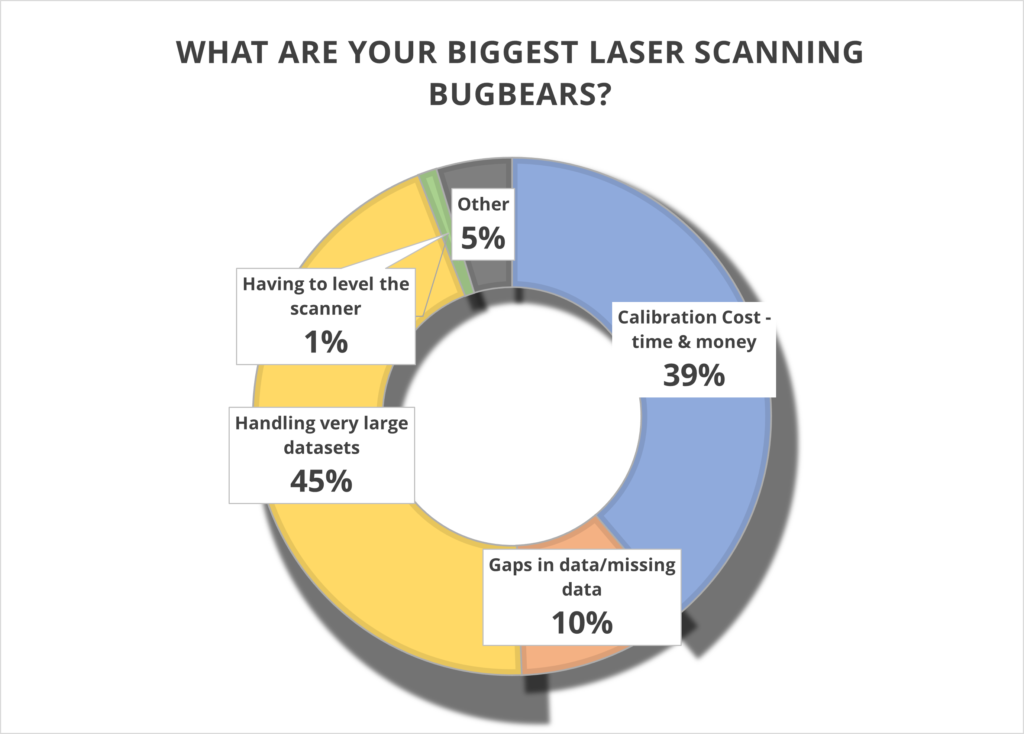
Has Trimble addressed these pain points? Let’s take a closer look.
1. Handling very large data sets (45%)
With surveyors often undertaking up to 100 scans a day, it remains vital that these large data sets can be handled quickly and efficiently. The X7 is perfectly equipped to do this because the scan is fully captured and registered in the field and then can be quickly reviewed and quality controlled in the office via Trimble Realworks. It’s you, the client, who is in the control of the workflow, not the manufacturer.
Additionally, the Trimble X7 captures four times less data (500,000 points per second compared to the 2 million or 1 million of other manufacturer scanners) which of course means less data to store and handle.
You can also avoid unnecessary expenses with storage devices by saving your data directly onto Trimble’s own developed and supported field tablet, the T10. Trimble is unique in that it develops its own scanner, software and tablet for a fully developed and supported Trimble solution.
We can also go directly to a CAD compatible format such as RCP from either the field with Trimble Perspective, or the office with Trimble Realworks, without additional licenses or import\export procedures. Less time in processing in the office, means the client can maximize production time heavily. Remember, having more data isn’t always better!
For more information, Trimble has a handy white paper on scanning and handling large data sets here.
Top KOREC tip – When handling large projects use ‘Labels’ to help organise the data in your project by adding a label like “kitchen or lounge” to each scan. You could also have different registration groups so you can split the scan data into Reg. Set 1 which could be Ground floor scans then Reg. Set 2 could be First floor scans.
2. Calibration cost – time and money (39%)
It’s your number two bugbear and we can completely appreciate why. Centara Ltd is just one of our customers who switched from its existing manufacturer’s laser scanner to a Trimble X7 because the business case made perfect sense. They calculated that the auto-calibration feature alone would save them in excess of £3k-4k a year because unlike their other scanner, the X7 would not need to be sent abroad for this process, nor would a replacement hire be needed for the duration which was usually around to 2-3 months. These savings enabled Centara to invest in additional kit that they were not expecting to purchase until the next financial year.
Other customers have cited the ability to ensure that data is always correct and validated with a calibration certificate as another plus. Evidence required? We’ve done a little video on how to calibrate your X7 in under 2 minutes.
Or why not take a Trimble ‘deep dive’ into auto calibration here
3. Gaps in data/missing data (39%)
Noticing that some of your data is missing only when you’re back at the office registering your scans clearly cuts deep with a large percentage of you. Not only is it frustrating, it’s also time consuming to revisit a site, particularly if entry is restricted.
Trimble has combatted this problem with one of the X7’s strongest features – infield registration. This feature enables users to stitch together different station positions automatically, in the field and directly on the tablet. It works indoors with walls, outdoors with vegetation and relies on a completely innovative alogrithim. You immediately see what you have and if there is a problem, or missing data, you can change settings or take more scans right away there and then in the field. Many Trimble customers have described this feature in just one word ‘Amazing’!
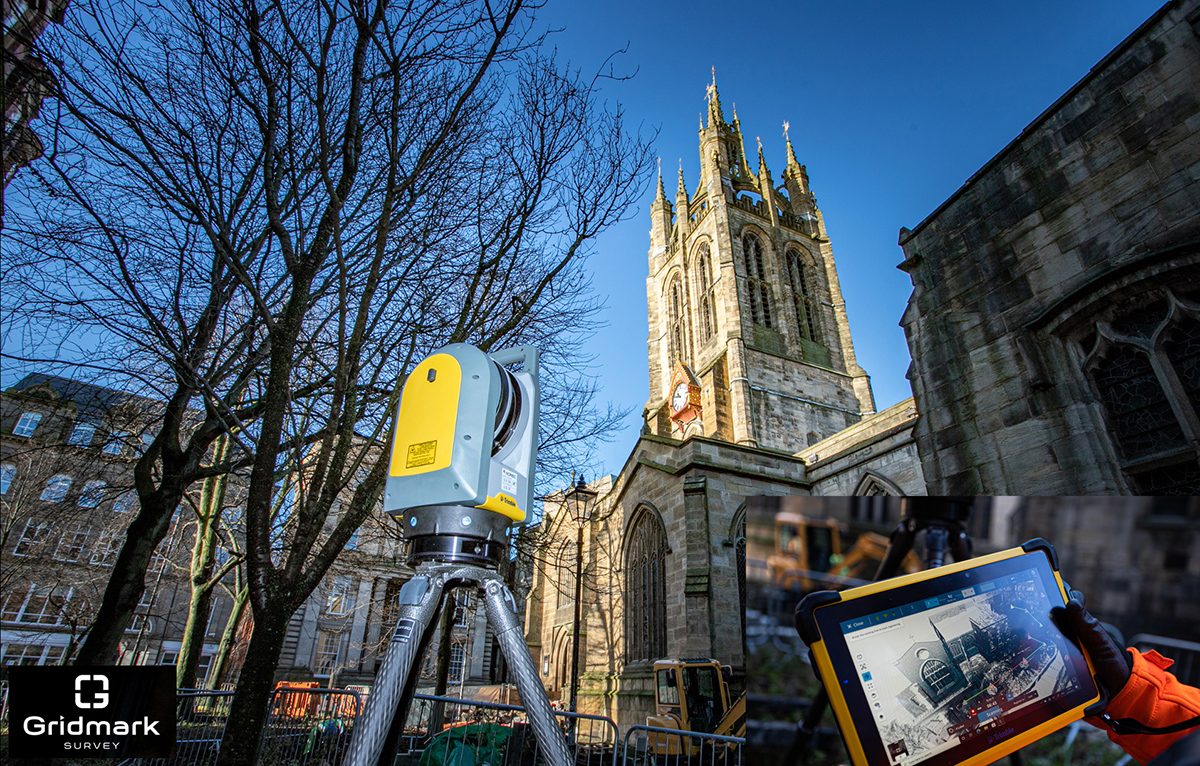
Gridmark Survey particularly appreciated the ability to automatically register each scan when they carried out a survey of the 900-year-old Newcastle Cathedral Church of St Nicholas. This allowed them to review everything in 3D before moving on. Overall, the Gridmark surveyors carried out 104 laser scans and collected 3.7 billion measurable points over a three day period.
4. Having to level the scanner (1%)
We’re amazed that only 1% of the vote went to this tiresome bugbear. However, for those under strict time pressures, it’s definitely a bonus X7 feature. In particular, Police Collision Investigators rate the ability to get the X7 up and running in minutes thanks to the quick release mechanism and automated survey grade self-levelling – they just put the scanner down and it’s ready to go. In each case, the instrument re-adjusts down to millimetre accuracy. There is no compromise with the Trimble X7 which has the IMU and Trimble X-Drive on all models, meaning data is always level and does not require post-processing.
5. Other (4%)
We appreciated all your comments including the addition of a couple more bugbears to our list:
a) Mirrors/Reflection/Refraction
Trimble is a leading hardware and software manufacturer and it is always pushing boundaries and leading development. Trimble appreciates that this remains a challenge and continues to work on a solution.
b) Portability
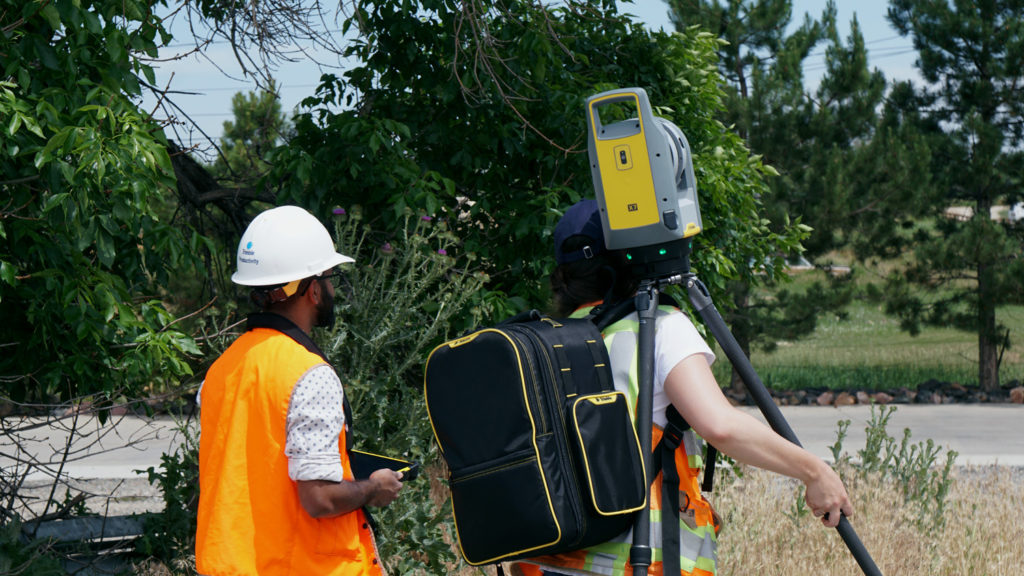
The good news is that the X7 comes in a handy backpack and weights just 5.8kg. It’s also got a handle!
Got a question? Want to find out more about the X7? Why not submit an inquiry with our friendly team?
On a recent mobile mapping mission, KOREC employee Graham Beckford was lucky enough to pass not one, but two pre-historic jewels in England’s crown – Stonehenge and the Uffington White Horse.
Despite dull and grey conditions, there was no missing the new Professional Services vehicle as it drove up alongside the ancient stone circle – one of Europe’s most recognisable and oldest monuments built around 5,000 years ago.
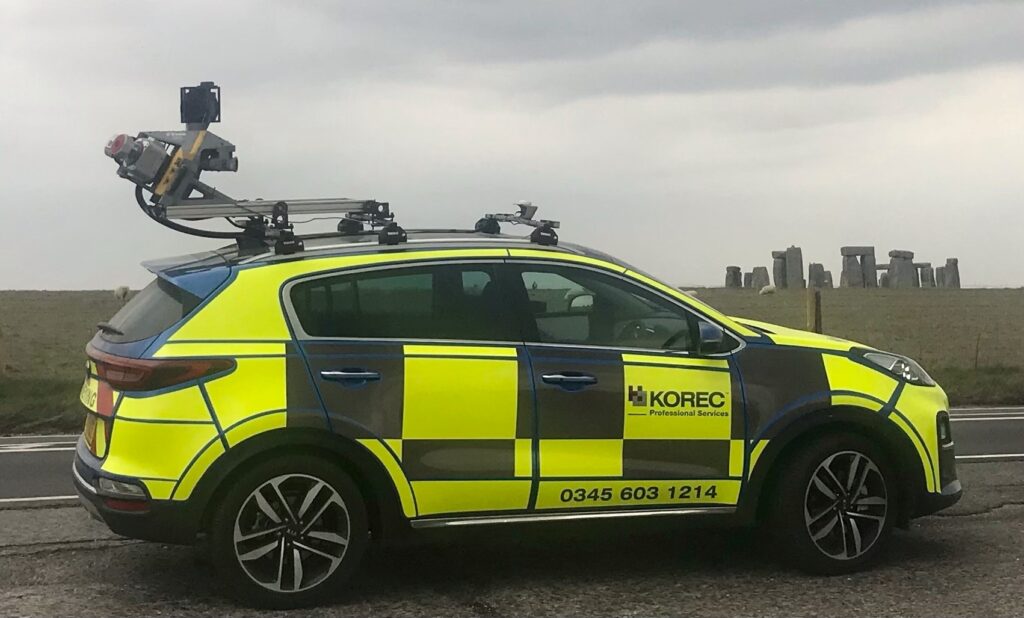
Mounted on top of the car is the Trimble MX9, a LiDAR based mobile mapping solution which rapidly captures pointclouds and images for highway surveys. A mobile mapping device such as the MX9 can be driven at normal speeds to capture survey data without the disruption of road closures.

Inclement weather persisted for Graham’s mission as he passed from Wiltshire and into Oxfordshire, specifically the Vale of White Horse to photograph the 3,000 year old hill monument – just visible in the background of this photograph.
Have you been on any mobile mapping adventures recently? Why not submit your pictures to our monthly KOREC Photo Competition by emailing marketing@korecgroup.com.
If you’d like to find out more about mobile mapping, our professional services division or anything else do not hesitate to contact us.