

The third question in our ‘five important questions blog’ is……
3. Survey grade self-levelling –optional extra or ‘must have’ feature?
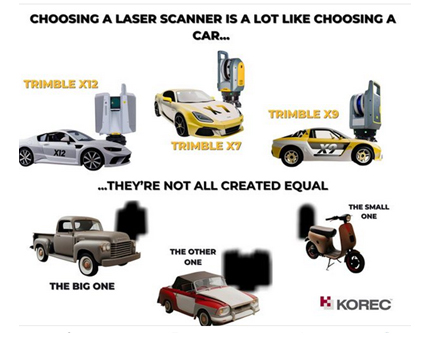
Both the Trimble X7 and X9 have a great survey grade self-levelling feature which level the data up to a 3” arc.
But what exactly does that mean in practical terms?
Imagine you are scanning a multi-storey building that’s up to 10m in height, using the X7 or X9 you will have a pointcloud that will deviate from the vertical at just 0.1 of a millimetre which is perfectly acceptable. Likewise, over a longitudinal stretch, for example a road, the difference in level over a 20m length might be 0.3 of a millimetre, again, perfect acceptable, all because of the 3” arc.
Here’s how that 3” compares to other manufacturers levelling:
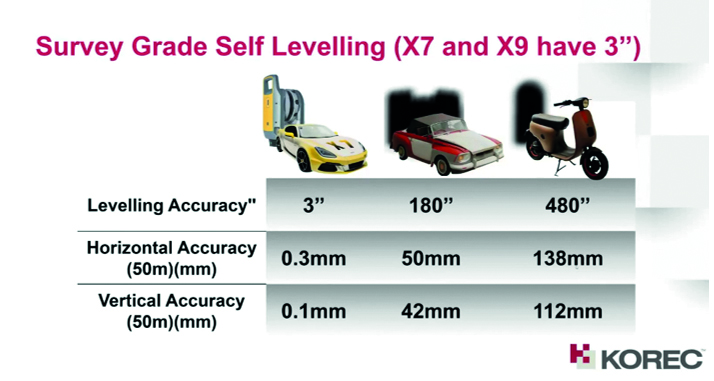
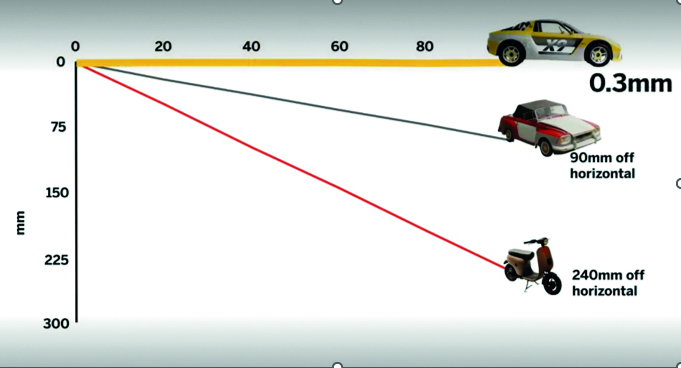
Yes, the levelling accuracy deviates heavily. It’s important to understand how important it is that your data is levelled, either with the X Series survey grade self-levelling function or by using one of two options:
- Manually force an arbitrary scan to be levelled in the software (relies on guesswork).
- Bring in control from a total station which you will need to traverse through a site (this is time consuming and increases production costs).
Top tip: Having survey grade self-levelling ensures the accuracy of your pointcloud and also saves you time. For example, if you’re undertaking 150 scans in a day you can save an hour of site time, 5 hours a week.
Keep following this blog to see our next three questions!
Click here for the answer to our previous question:
1. What is the cost of ownership v. unit cost?
2. What’s more important to you, scan time or total time to project deliverable?
The second question in our ‘five important questions blog’ is……
2. What’s more important to you, scan time or total time to project deliverable?
We admit it, 0-60 mph in under 3 seconds is going to feel great! But back in the real world, everyone knows that it’s the total journey time that really counts…and it’s exactly the same in the laser scanning world.
The first thing to consider is that speed is not always what you think*, because Scan Speed and Scan Rate are not the same thing. Scan speed is the number of points you collect per second, scan rate is the number of seconds needed by a scanner to collect that data and this depends on the density of the[CA1] scan data you require and the range of your scan. So in theory, the scanner with the fastest speed doesn’t always have the fastest rate. It’s therefore really important to make sure that you select a scanner that has the best balance for your applications.
Additionally, it’s vital to consider the ‘overall journey time’. Time saved in the field doesn’t always equate to a faster deliverable. When purchasing a scanner, one of the best ways to deliver a faster result to your customer is through in field automatic scan registration, and there’s two reasons for that:
- A scanner that can automatically fully register, refine, georeference, colourise and export your data before you even get back to the office will save you hours of processing time. You can check your data in the field as well.
- In-field registration ensures that you have captured everything you need, before you leave the site which means no costly return visits to capture missed data.
The Trimble X7, X9 and X12 are the only scanners that offer this feature, on a solution fully developed and supported by Trimble.
Keep following this blog to see our next three questions!
Click here for the answer to our first question:
1. What is the cost of ownership v. unit cost?
On Tuesday, September 26th 2023 – 11:00 AM (BST), we’ll be live with our ‘Scan Superiority’ webinar where we’ll be addressing:
- Lifetime Cost
- Self-levelling
- Auto calibration
- Weatherproof
- Fastest field to finish workflow
- In field auto registration
If the new year is all about fresh ideas, new resolutions and looking forwards, then we can think of no better way for the KOREC Rail and KOREC Monitoring teams to welcome you to 2023 than with a round-up of all our latest news including new products, events and why we have even more to offer our KOREC rail customers!
The KOREC monitoring team also specialises in rail!
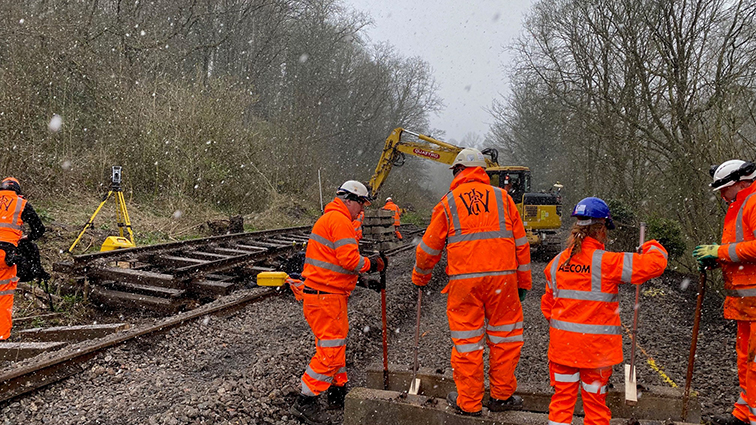
Did you know that our KOREC Monitoring team is also extremely experienced in rail applications? In fact we’ve had so many enquiries from the rail sector during 2022 that we’ve extended this team to meet all your specialist enquiries. From tunnel monitoring during piling and excavation work at Kings Cross to monitoring the Metro in Newcastle City Centre in the North East, our expertise will bring KOREC customers seamless workflows, logical processes, and the ability to display data in the formats required for rail projects.
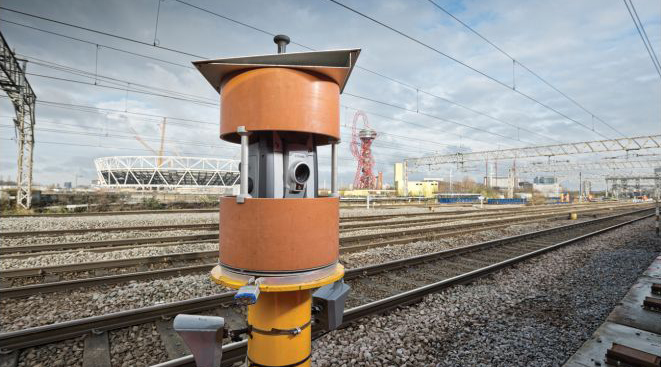
As HS2 takes off we want to be in a strong position to support this benchmark engineering rail project and of course all our other customers to the highest level.
NEW – Rail monitoring software module reduces up to 95% of office time!
Especially relevant to rail monitoring is the launch of Trimble 4D for Rail, a special software module for real-time displacement monitoring and detection. This rail module simplifies the data collection process and reduces up to 95% of the office work required to automate movement detection.
Released in December, this software module makes rail monitoring easier than ever. For full details on exactly how, there’s a great Trimble Blog that’s well worth a read. Expect full information on:
· Rail monitoring – an introduction and the basics
· How to create & integrate accurate rail as-builts with ease
· All about automated analysis & visualisation
· Next steps – flexible monitoring & expanded business opportunities
For further information, please contact our KOREC Monitoring Consultant, Liam Hartley, on 07870 896318 or you can view a useful Trimble webinar here.
….And with that mention of Liam, now seems the right time to introduce both our Rail and Monitoring teams!
Meet the Rail and Monitoring Teams – faster contact with the right person
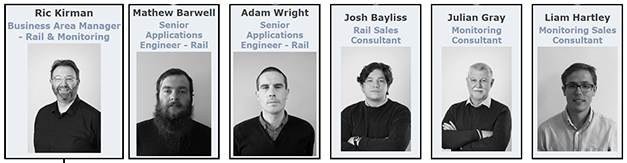
LIAM HARTLEY – Monitoring Consultant. Follow Liam on LinkedIn
ADAM WRIGHT – Senior Monitoring Applications Engineer. Follow Adam on LinkedIn
JULIAN GRAY – Systems Support. Follow Julian on LinkedIn
…..and why not reconnect with the Rail team
RIC KIRMAN – Rail Manager. Follow Ric on LinkedIn
JOSH BAYLISS– Rail Consultant. Follow Josh on LinkedIn
MATT BARWELL – Senior Rail Applications Engineer. Follow Matt on LinkedIn
Vacancy – Rail Applications Engineer. View job details here
NEW – Another useful release, the Trimble GEDO IMU is now wireless!
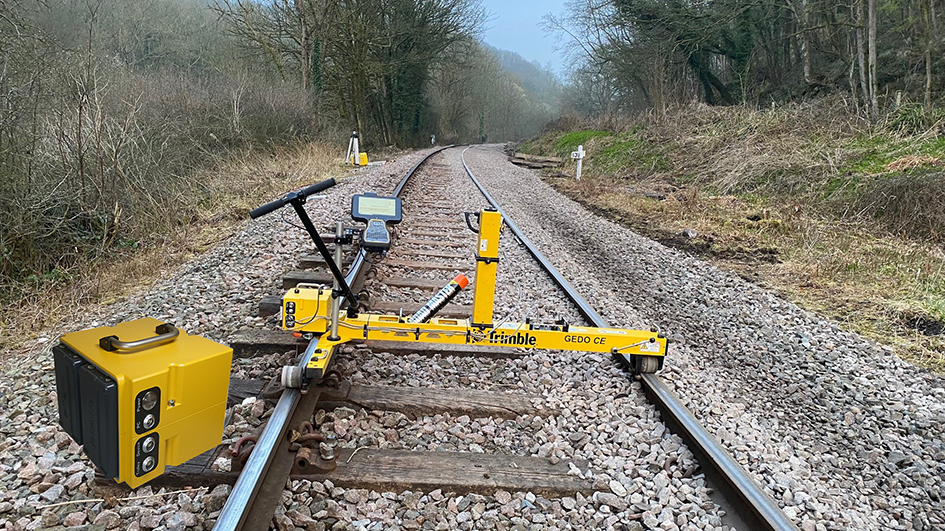
The next generation of Trimble GEDO IMU, along with a new set of accessories, has also been released; All Trimble GEDO IMU systems will now feature a Wi-Fi connection for cable-free connection to your data logger along with new power management with battery hot-swap capability.
We’re delighted to see the wireless versions already being used effectively on sites across the country with Protech Rail Engineering and Network Rail.
Our own Matt Barwell has been testing it out and reports that “it’s handy and there’s no doubt the wireless connection to the data logger will really enhance the longevity of your equipment. This is definitely a smart move by Trimble.”
Contact Matt for a demo by calling him on 07974 255597.
GEDO NovaTrack – new version
We like to think of Trimble’s GEDO NovaTrack software as the missing piece of the puzzle. Super easy to use, cost effective and highly workable, we’ve been seeing great take up across the UK and Ireland with users reporting a turnaround time that’s 50% faster.
Simply, NovaTrack can be incorporated into your GEDO workflow to enable the creation of intelligent track alignments based on GEDO rail surveys.
- Using the GEDO CE system, carry out a track survey
- Process in GEDO Office
- Open the file in NovaTrack and produce a new alignment of based on user defined parameters
- Take alignment back out into the field for setting out and design tamping
Using GEDO NovaTrack, rail engineers will always be maintaining track to the same improved position therefore enhancing track quality and speed. Plus the new alignment can also be used to create 3D ballast files in GEDO Office for machine control applications.
We’re always out and about – where to find us
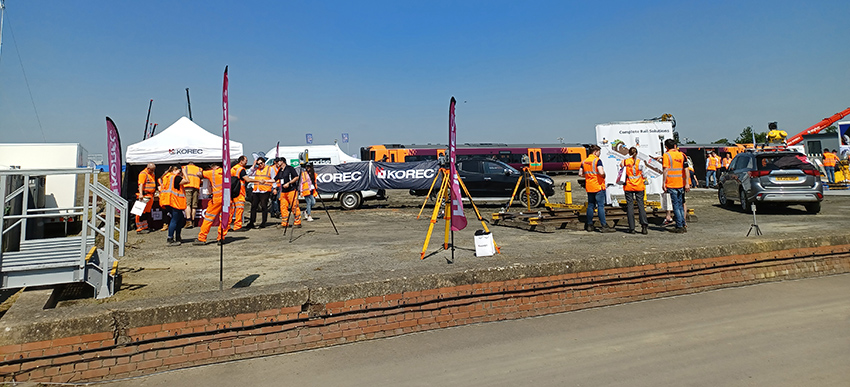
Over the coming months, we’ll be attending:
The Rail Infrastructure Event – London 2023
Thursday 9 March 2023, 9:30am-13:30 | Business Design Centre, Islington
Rail Live – Stratford-upon-Avon 2023
Europe’s largest rail plant Show running on the 21st and 22nd June 2023
Looking ahead – we need your comments for Trimble development
Towards the end of March, KOREC Rail will be hosting all of Trimble’s leading rail distributors at a special meeting at Doncaster’s National College For Advanced Transport & Infrastructure. This is an extremely prestigious event for KOREC to be a part of and it recognises the achievements of our rail team over the last 2 years.
However, the real business of this event is for Trimble and Trimble’s dealers to get their heads together to share best practice, new and exciting workflows, technical knowledge and above all, your feedback. This is absolutely the best opportunity we have with Trimble for sharing what you , our customers, really want to see technology wise in the future.
Please do use the LinkedIn comments section to get your wish list into the hands of those that can really help!
And finally, we’re especially looking forward to:
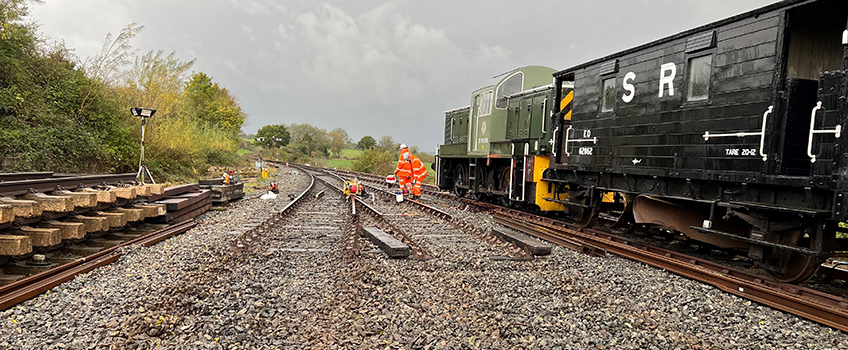
Assisting the PWI with the survey works for the upcoming (end of March) practical trackwork challenge to be held at the Midland Railway – Butterley in Derbyshire. This follows on from last year’s successful participation in this event.
We look forward to seeing you soon!
If you’re a regular reader of the news, you’ll no doubt have seen a number of stories recently on how the 3G switch off is already affecting the way we go about our daily lives.
In particular, the Sunday Times recently featured an article about the growth of parking apps (regular visitors to our cities can have to deal with 30 different ones!) as parking machines are removed.
These machines are disappearing because the mobile phone operators are switching off the 3G data networks used to process card payments.
According to the article, Vodafone switched off its 3G network in Plymouth and Basingstoke on February 28th and will switch off the entire network by the end of the year. EE’s 3G network will be closed by early next year, with Three to follow by the end of 2024.
This is a serious inconvenience and indicative of the type of changes we can expect a whole lot more of during 2023. Mark Poveda, Group Commercial Director of KOREC said: “The geospatial industry, as reliant as it has become on phone networks for GNSS receivers, loggers and general field/office comms, is going to be no exception. We’re already hearing anecdotal evidence of performance issues from customers who have noticed changes in service availability where they have previously worked without problem.”
Why is 3G being switched off?
Mobile providers are switching off the 3G networks to make room for the more advanced 4G and 5G networks. 4G and 5G give users better, faster and more reliable services and therein lies our opportunity.
When 3G networks first came online in 2002, it was like trading a tape measure for a 3D Laser Scanner and when the first iPhone was launched in 2007, little did we imagine that there would be over thirty-four iterations to date, with the first 3G version only released in 2008.
Mark said: “When the 5G network is fully active, its potential is hard to imagine but I believe that if we prepare now, then 5G is another fantastic opportunity for our tech savvy, expanding industry to become even better, more effective and of course, more profitable too.”
So, what’s the plan?
KOREC customers have been asking us when the 3G switch-off will happen, what will happen and what controllers and receivers will be affected. First of all, we’d like to reassure you that this won’t happen overnight, but will be phased in, subject to each mobile provider’s personal timetable:
- Vodafone is starting its switch-off in early 2023.
- EE plans to start its switch-off in early 2024.
- Three expects to switch-off by the end of 2024.
- O2 has not yet announced any switch-off plans.
However, these timings may yet change and certainly aren’t set in stone and we are already receiving anecdotal evidence of performance issues from customers who have noticed changes in service availability where they have previously worked without problem.
Simply, if you are using any manufacturer’s loggers or receivers not compatible with 4G or above, the chances are you will be affected at some point.
As a distributor for Trimble survey and mapping solutions, here at KOREC, we’re in exactly the same position as everyone else and consequently, having to plan ahead for these inevitable changes.
Our customers, whether they are surveyors or engineers, are asking for a better connected site. A 5G network will assist this by enabling data to flow even faster and more efficiently than previously. For example, 3G can reach speeds of 8MB per second. 5G speeds will eventually run in excess of 1GB per second, up to a maximum of 20GB.
In geospatial terms, that means a 5GB laser scanning project that took 2 hours to download on the 3G network, can be downloaded in just 35 seconds on 5G!
Additionally, reports are stating that 5G can support one thousand more devices per square metre than 4G – a welcome upgrade for an ever connected world where even your fridge can communicate with you on food expiry and usage!
We are already investing in and upgrading our solutions to meet this new demand and would urge all users of any manufacturer’s geospatial systems to look ahead as well so that they are not caught out unexpectedly on site. Nobody wants to disappoint a client, lose revenue, deal with frustrated surveyors in the field or fail to deliver a project on time.
Which loggers and receivers will be affected?
Those Trimble devices currently streaming data across the 3G network will connect to the 2G network when and where 3G is unavailable. The devices involved are the older generation controllers and those with internal GNSS receiver modems, which include:
- Mapping: Trimble Juno and Geo7x
- Survey: Trimble TSC3 controller & Trimble R8s, R8 and R6 receivers
It’s extremely important to remember that all manufacturers of loggers and receivers released before 4G will be affected, this isn’t just something that will affect Trimble equipment.
What will happen if I am using one of these loggers or receivers when 3G is switched off?
What happens will very much depend on where you are working in the UK and Ireland.
In areas where good 2G coverage remains (although this is scheduled to also be switched off by 2033), it is uncertain how reliable this coverage will be and how well it will perform.
However, the one thing that is certain is that you will be challenged with the slower speeds of a 2G network.
It’s also worth bearing in mind that there are no resources available that clearly detail which areas of the country have good, if any 2G coverage.
What can I do to stop the 3G switch off affecting my day-to-day work?
Above all, the 3G switch off is something that cannot be accurately predicted beyond the fact that it will happen.
Whilst we don’t want any KOREC customers to panic, we do urge you to be prepared and encourage all users of the loggers and receivers listed above to think ahead so that you are not caught out unexpectedly on site.
Please register below to receive more information and options to keep you working.
Purchasing a laser scanner shares striking similarities with buying a car! It represents a substantial investment, necessitates ongoing maintenance, boasts varying operational costs across different models, and showcases a range of performance capabilities. Naturally, your choice should align with its intended purpose – just as you wouldn’t opt for an electric car if your primary journeys involve long-distance travel through remote regions, neither would you select a gas-guzzler for driving into busy city centres. Similarly, it’s vital that the 3D Laser Scanning system you choose can produce the deliverables requested by your clients.
But how do you distinguish the top performers from the rest of the pack?
Setting priorities
We’ve come a long way since the early days of laser scanning when there was very little choice; units cost upwards of £80k and even the best designed were heavy and cumbersome to transport. Today there is a choice for every application and budget but with so many options, which scanner is going to be the best choice for your current projects, your client’s deliverable and your future plans?
The real challenge lies in surpassing the obvious inquiries about range, points per second, and accuracy to attain that elusive perfect balance that will deliver the right choice. Instead, we strongly encourage you to set aside the spec sheet, as it often fails to offer a true like for like comparison and instead, focus your attention on these five key questions to ask before making your investment. First up:
1. What is the cost of ownership v. unit cost?
The unit price tag may look good but what are the ongoing expenses? It’s time to dig a little deeper.
As a priority, we’d urge you to ask how often the scanner needs to be calibrated, after all you wouldn’t expect a reliable performance from your car if it wasn’t serviced regularly. It’s crucial to consider not only the financial aspect of calibration but also the duration your instrument will be unavailable for use, particularly when it requires international shipment. Additionally, factor in the expenses associated with acquiring a temporary replacement.
By choosing a scanner with smart auto calibration, you’re minimising the risk of the scanner not collecting accurate data on important jobs and the risk of delivering something that could liability for the customer. Smart, self-calibrating scanners like Trimble’s X7 and X9 generate a report as a back up for every job you do.
Under cost of ownership, it’s also important to check for hidden costs or the total production costs. That leather upholstery and heated seats can add up as can upgrades for firmware software licensing or any additional modules you may need to create your preferred deliverable, office processing time and investment in IT.
Keep following this blog to see our next four questions!
On Tuesday, September 26th 2023 – 11:00 AM (BST), we’ll be live with our ‘Scan Superiority’ webinar where we’ll be addressing:
- Lifetime Cost
- Self-levelling
- Auto calibration
- Weatherproof
- Fastest field to finish workflow
- In field auto registration

Purchasing a laser scanner shares striking similarities with buying a car! It represents a substantial investment, necessitates ongoing maintenance, boasts varying operational costs across different models, and showcases a range of performance capabilities. Naturally, your choice should align with its intended purpose – just as you wouldn’t opt for an electric car if your primary journeys involve long-distance travel through remote regions, neither would you select a gas-guzzler for driving into busy city centres. Similarly, it’s vital that the 3D Laser Scanning system you choose can produce the deliverables requested by your clients.
But how do you distinguish the top performers from the rest of the pack?
Setting priorities
We’ve come a long way since the early days of laser scanning when there was very little choice; units cost upwards of £80k and even the best designed were heavy and cumbersome to transport. Today there is a choice for every application and budget but with so many options, which scanner is going to be the best choice for your current projects, your client’s deliverable and your future plans?
The real challenge lies in surpassing the obvious inquiries about range, points per second, and accuracy to attain that elusive perfect balance that will deliver the right choice. Instead, we strongly encourage you to set aside the spec sheet, as it often fails to offer a true like for like comparison and instead, focus your attention on these five key questions to ask before making your investment. First up:
1. What is the cost of ownership v. unit cost?
The unit price tag may look good but what are the ongoing expenses? It’s time to dig a little deeper.
As a priority, we’d urge you to ask how often the scanner needs to be calibrated, after all you wouldn’t expect a reliable performance from your car if it wasn’t serviced regularly. It’s crucial to consider not only the financial aspect of calibration but also the duration your instrument will be unavailable for use, particularly when it requires international shipment. Additionally, factor in the expenses associated with acquiring a temporary replacement.
By choosing a scanner with smart auto calibration, you’re minimising the risk of the scanner not collecting accurate data on important jobs and the risk of delivering something that could liability for the customer. Smart, self-calibrating scanners like Trimble’s X7 and X9 generate a report as a back up for every job you do.
Under cost of ownership, it’s also important to check for hidden costs or the total production costs. That leather upholstery and heated seats can add up as can upgrades for firmware software licensing or any additional modules you may need to create your preferred deliverable, office processing time and investment in IT.
Keep following this blog to see our next four questions!
On Tuesday, September 26th 2023 – 11:00 AM (BST), we’ll be live with our ‘Scan Superiority’ webinar where we’ll be addressing:
- Lifetime Cost
- Self-levelling
- Auto calibration
- Weatherproof
- Fastest field to finish workflow
- In field auto registration
2. What’s more important to you, scan time or total time to project deliverable?
We admit it, 0-60 mph in under 3 seconds is going to feel great! But back in the real world, everyone knows that it’s the total journey time that really counts…and it’s exactly the same in the laser scanning world.
The first thing to consider is that speed is not always what you think*, because Scan Speed and Scan Rate are not the same thing. Scan speed is the number of points you collect per second, scan rate is the number of seconds needed by a scanner to collect that data and this depends on the density of the[CA1] scan data you require and the range of your scan. So in theory, the scanner with the fastest speed doesn’t always have the fastest rate. It’s therefore really important to make sure that you select a scanner that has the best balance for your applications.
Additionally, it’s vital to consider the ‘overall journey time’. Time saved in the field doesn’t always equate to a faster deliverable. When purchasing a scanner, one of the best ways to deliver a faster result to your customer is through in field automatic scan registration, and there’s two reasons for that:
- A scanner that can automatically fully register, refine, georeference, colourise and export your data before you even get back to the office will save you hours of processing time. You can check your data in the field as well.
- In-field registration ensures that you have captured everything you need, before you leave the site which means no costly return visits to capture missed data.
The Trimble X7, X9 and X12 are the only scanners that offer this feature, on a solution fully developed and supported by Trimble.
3. Survey grade self-levelling – most have feature or optional extra
Both the Trimble X7 and X9 have a great survey grade self-levelling feature which level the data up to a 3” arc.
But what exactly does that mean in practical terms?
Imagine you are scanning a multi-storey building that’s up to 10m in height, using the X7 or X9 you will have a pointcloud that will deviate from the vertical at just 0.1 of a millimetre which is perfectly acceptable. Likewise, over a longitudinal stretch, for example a road, the difference in level over a 20m length might be 0.3 of a millimetre, again, perfect acceptable, all because of the 3” arc.
Here’s how that 3″ compares to other manufacturers’ levelling:


Yes, the levelling accuracy deviates heavily. It’s important to understand how important it is that your data is levelled, either with the X Series survey grade self-levelling function or by using one of two options:
- Manually force an arbitrary scan to be levelled in the software (relies on guesswork).
- Bring in control from a total station which you will need to traverse through a site (this is time consuming and increases production costs).
Top tip: Having survey grade self-levelling ensures the accuracy of your pointcloud and also saves you time. For example, if you’re undertaking 150 scans in a day you can save an hour of site time, 5 hours a week.
4. What’s the scanner’s IP rating or, if the rain comes, will I have to stop working?
Do you use your scanner for TOPO surveys, in construction, in a country where it tends to rain a lot? If so, it’s time to check the IP (ingress Protection) rating of your proposed scanner. The first IP digit relates to the level of protection against solid objects; the second digit relates to the level of protection against liquids. If your scanner IP rating is IP54, it’s imporant to understand that it does not have a closed mirror and you may be risking your scanner by working in conditions it’s simply not suitable for. IP54 means that the scanner is protected against water spray and is suitable for outdoor work, however an IP55 rating means they are suitable for working with in rain.

Top tip: The Trimble X7 and X9 are the only scanners suitable for countries where it rains a lot. Fortunately we’ve done some important research for you – on average it rains 151 days a year in the UK! ….and here’s a useful little video.
5. Has it got a handle?
It’s possibly any scanners most underrated feature, but your scanner is worth thousands of pounds, not to mention any down time if it gets dropped! Easy maneouverability is vital in tight spaces of if you’re working within complex structures. Several of our customers have mentioned this as one of the deciding factors in their purchasing decision but it doesn’t even get a mention on the spec sheet!
Top tip: First hand example of how useful that handle can be, right here!
In conclusion, buying a 3D Laser Scanner is a lot like buying a car! Upkeep, reliablility, performance and suitability for purpose are all going to dictate your ultimate decision, and whilst we understand the attraction of leather seats, metallic paint and 0-60 in less than three seconds, we also understand that business decisions have to be based on hard facts. When choosing a 3D Laser Scanner, there is no easy choice, it’s about balancing your priorities to find the one that best fits your application.
However, it might be useful to know that the Trimble X7 and X9 are the ONLY 3D Laser Scanners on the market that offer all of the following:
- Self-levelling
- Auto-calibration
- Weatherproof with an IP55 rating
- Speed – fastest field to finish workflow
- In-field auto registration
- A handle!
For a Trimble X12, X9 or X7 demonstration, call us now on UK: 0345 603 1214
IRE: 01456 4702
The third question in our ‘five important questions blog’ is……
5. Has it got a handle?
It’s possibly any scanners most underrated feature, but your scanner is worth thousands of pounds, not to mention any down time if it gets dropped! Easy maneouverability is vital in tight spaces of if you’re working within complex structures. Several of our customers have mentioned this as one of the deciding factors in their purchasing decision but it doesn’t even get a mention on the spec sheet!
Top tip: First hand example of how useful that handle can be, right here!
In conclusion, buying a 3D Laser Scanner is a lot like buying a car! Upkeep, reliablility, performance and suitability for purpose are all going to dictate your ultimate decision, and whilst we understand the attraction of leather seats, metallic paint and 0-60 in less than three seconds, we also understand that business decisions have to be based on hard facts. When choosing a 3D Laser Scanner, there is no easy choice, it’s about balancing your priorities to find the one that best fits your application.
However, it might be useful to know that the Trimble X7 and X9 are the ONLY 3D Laser Scanners on the market that offer all of the following:
- Self-levelling
- Auto-calibration
- Weatherproof with an IP55 rating
- Speed – fastest field to finish workflow
- In-field auto registration
- A handle!
1. What is the cost of ownership v. unit cost?
2. What’s more important to you, scan time or total time to project deliverable?
3. Survey grade levelling….optional extra or must have feature?
4. What’s the scanner’s IP rating and can I carry on working in the rain?
For a Trimble X12, X9 or X7 demonstration, call us now on UK: 0345 603 1214
IRE: 01456 4702 or
The third question in our ‘five important questions blog’ is……
4. What’s the scanner’s IP rating or, if the rain comes, will I have to stop working?
Do you use your scanner for TOPO surveys, in construction, in a country where it tends to rain a lot? If so, it’s time to check the IP (ingress Protection) rating of your proposed scanner. The first IP digit relates to the level of protection against solid objects; the second digit relates to the level of protection against liquids. If your scanner IP rating is IP54, it’s imporant to understand that it does not have a closed mirror and you may be risking your scanner by working in conditions it’s simply not suitable for. IP54 means that the scanner is protected against water spray and is suitable for outdoor work, however an IP55 rating means they are suitable for working with in rain.
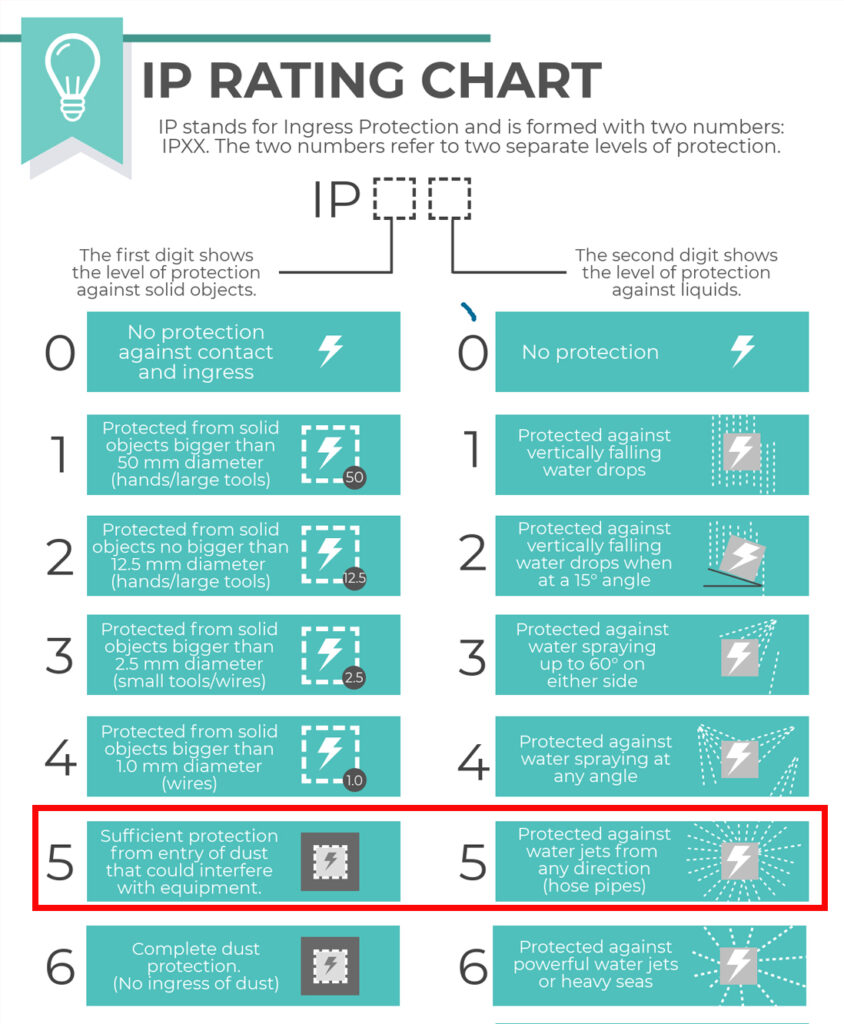
Top tip: The Trimble X7 and X9 are the only scanners suitable for countries where it rains a lot. Fortunately we’ve done some important research for you – on average it rains 151 days a year in the UK! ….and here’s a useful little video.
Keep following this blog to see our fifth and final question
Click here for the answer to our previous question:
1. What is the cost of ownership v. unit cost?
2. What’s more important to you, scan time or total time to project deliverable?
3. Survey grade self-levelling –optional extra or ‘must have’ feature
KOREC is always delighted to support the next generation of surveyors coming through college, and especially when they’re keen to get their hands on some ground breaking Trimble technology! It was therefore with great pleasure that we loaned a Trimble X7 3D Laser Scanner to the BSc Geospatial Surveying TU Dublin final year students for a project that was also supported by a number of survey service providers.
The Project
Christ Church Cathedral has stood at the heart of Dublinfor almost 1000 years and this important heritage site welcomes visitors from all over the world every day. Facilitated by the Cathedral’s staff, the final year students were lucky enough to work as a team on an assignment that required them to undertake a series of scans to provide the cathedral with floor plans of the inside and elevations of the exterior. The end results were to be handed to the Cathedral’s insurance company before a policy renewal.
The Deliverables
- A geo-referenced colourised point cloud – to be used for future work in the cathedral.
- Sections, plan and elevation drawings in 1:50 scale. These drawings would then be used by a quantity surveyor to measure the volume of the assets.
- A walk-through of the point cloud. This was done to illustrate the possibility of creating a virtual tour of the church.
On Site
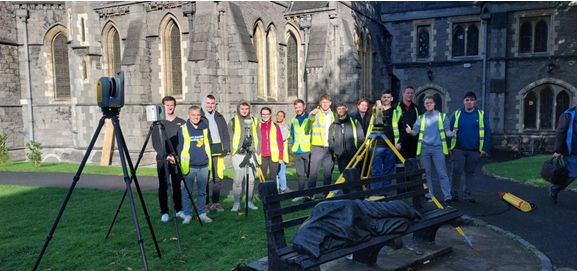
The students were divided into two separate teams, a laser scanning team and a control network team.
A control network to geo-reference the scans was established. The exterior of the building, minus the roof, was then scanned in just a day using the Trimble X7 and involved around 54 setups.
The students found the instrument ,and the tablet connected to it, very intuitive and following the initial setup, very simple to use: “All we had to do is press “start scan”. The X7 did the rest of the work!”
Highest rated Trimble X7 feature
The students rated the automatic registration and the self-levelling features above all. Automatic registration meant that they did not have to register the scans when they got back to the office whilst the attendant report allowed them to prove the accuracy of their work to the client and lecturers.
The self-levelling feature was also appreciated for the way it cut down on site time – the whole building scanned in a single day.
Finally, being able to geo-reference the project on site meant less work when it came to post-processing. The students were also able to colourise their scans on export.
After the survey
The final year students presented their survey and scan results in the beautiful Henry Roe room in the Cathedral.
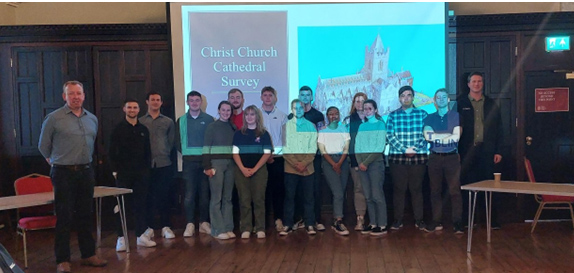
Our thanks to Dylan de Beer and Adam Hoey for their feedback on both the project and of course the X7. Both felt the use of a top range 3D Laser Scanner to be extremely beneficial their studies and also a good indicator of what industry standard surveying can be like with the use of good equipment.
“Our clients expect the very best from us and that means we’ve got to provide the very best end product and in turn, that relies on great equipment capable of generating great data. The new Trimble X12 fits the bill perfectly”
Neil Pollock, Director, Three Sixty Group
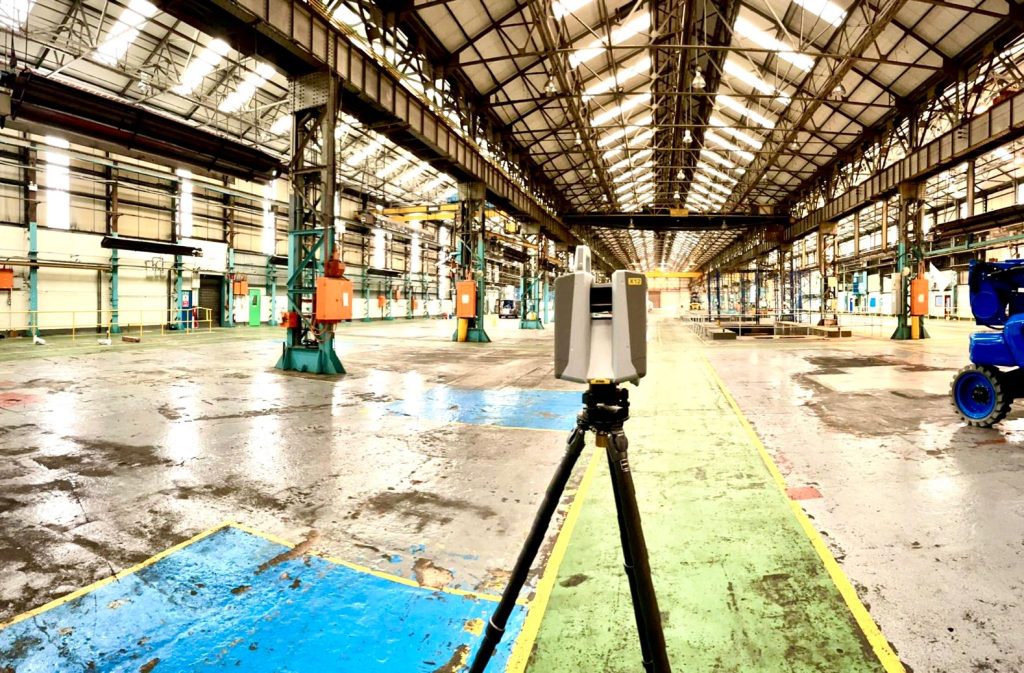
A few weeks ago, our KOREC Laser Scanning Sector Specialist, Melvin Penwill, got his hands on one of the first Trimble X12’s in the country. He was only too happy to put it through some rigorous testing and then share his opinions, including his 6 highest rated features, in a useful LinkedIn Post.
At some point, he was persuaded to let the customers have a go too!
About Three Sixty Group
Operating nationally, Three Sixty Group works across a diverse range of sectors from Utilities and Rail to heritage and listed buildings. The company has a fleet of 3D Laser Scanners that includes three Trimble X7’s as well as instruments from other manufacturers.
We caught up with Director, Neil Pollock, who’s been using the X12 for a floor flatness survey in a vast, engine manufacturing plant in Derby. With specified tolerances of just +/- 2-3mm for aspects of this job, it was the perfect testing ground for the X12 which was used both indoors for the high accuracy floor survey, and externally for an overall building survey where scans were undertaken with a range of up to 100m.
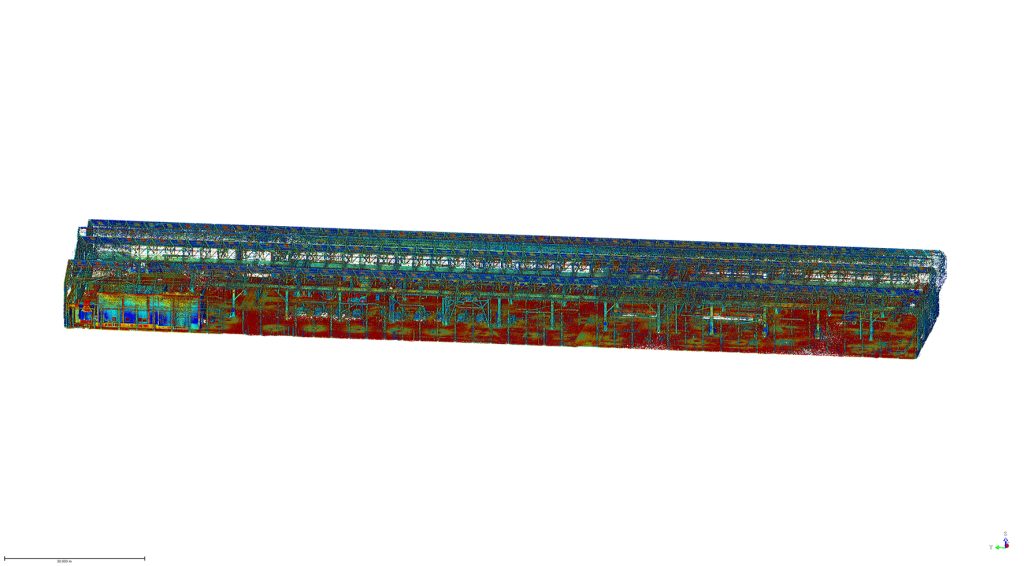
Here’s what Neil rated:
- Size – although he was aware of the dimensions (150 mm (W) x 258 mm (D) x 328 mm (H)) of the X12, when it came out of the box, he found it even smaller and lighter than he expected.
- Learning curve – The Three Sixty Group surveyors are already familiar with the Trimble Perspective software and workflow from their use of the X7’s. They were therefore able to transition to the X12 seamlessly.
- Cleanliness of the data – Even at a 100m range, Neil found the quality of the data to be top notch and way beyond any other scanner that the company has worked with previously. This ensured total confidence in the overall quality of the survey. Three Sixty Group is seeing a growing requirement for heritage work and felt that the X12 would excel in the level of detail required for this work as well as being suitable for the short or mid-range work required on more standard jobs.
- Low noise – In spite of the shiny factory floor, noise was minimal.
- Image quality – Excellent quality and super-fast to take at just 2 minutes. With Trimble Perspective, it’s now also far easier to retake images.
- ‘Window’ feature – rather than take a full 360 scan with the Trimble X7, or carry out a quick preview with the Trimble TX8, Neil rates the ability to ‘window off’ a section for a high-resolution scan as a great time saver.
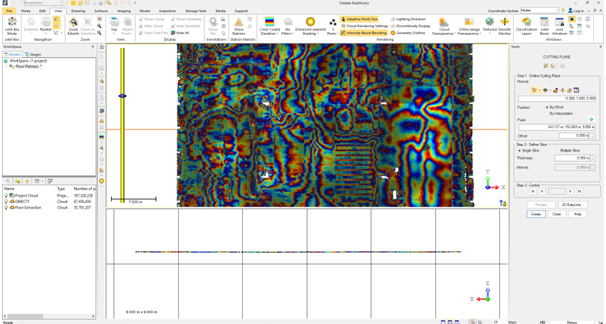
Neil concludes: “The data from the X12 is just so clean, and that makes it very, very easy to work with across every job. In short, the better the data, the higher the quality of the product that we can provide all our customers with. This is especially important for our heritage work which is growing all the time. Our clients expect the very best from us and that means we’ve got to provide the very best product and in turn, that relies on great equipment capable of generating great data. The new Trimble X12 fits the bill perfectly.”
Thank you to Neil Pollock for chatting to us about his X12 experiences
For further information, please call your KOREC Sales Consultant or contact Melvin.penwill@korecgroup.com