

- Lower price point for affordable entry into 3D Laser Scanning
- Hardware/software subscription options that fight theft and spread the cost
- Easy upgrade from Core to Premium to expand your laser scanning capabilities with the same hardware
- Improved performance, further, faster and cleaner data
- 1 TB of storage on Trimble’s Reality Data Capture Service (TRCPS), for easy point cloud data sharing, included with all X9 Core and Premium purchases
- …and of course all the best features are still there; auto-levelling, on-site registration, automatic calibration, laser pointer, simple workflows and KOREC’s renowned technical support backed up by the T.R.U.S.T. brand promise
Trimble launched the X7 in 2019 bringing simplicity and performance to laser scanning, and then four years later came the launch of the Trimble X9 bringing the same simplicity and even greater performance. But if we know anything about Trimble, it’s that the development team never sleeps!
So, what’s new? In September we unveiled the Trimble X9 Core and Premium, both offering the same great X9 hardware but with different hardware & software purchasing choices – perpetual and subscription – depending on your current and future requirements as your business grows.
Core or Premium?
The Trimble X9 Core offers a user-friendly solution for both beginners and seasoned professionals, making it an ideal starting point to expand your scanning capabilities. Competitively priced, it brings a number of features greatly improved from the original Trimble entry level X-Series scanner. Expect increased angular accuracy, increased imagery quality, reduced range noise, high sensitivity data capture for all scan modes, optimisation of calibration routine to save time and reduce frequency of full calibrations and atmospheric correction for temperature and pressure.
The Trimble X9 Premium delivers faster, farther, and more precise measurements than the Core version—capturing extensive areas in a single setup with zero detail overlooked and is ideal for surveyors tackling complex and demanding projects.
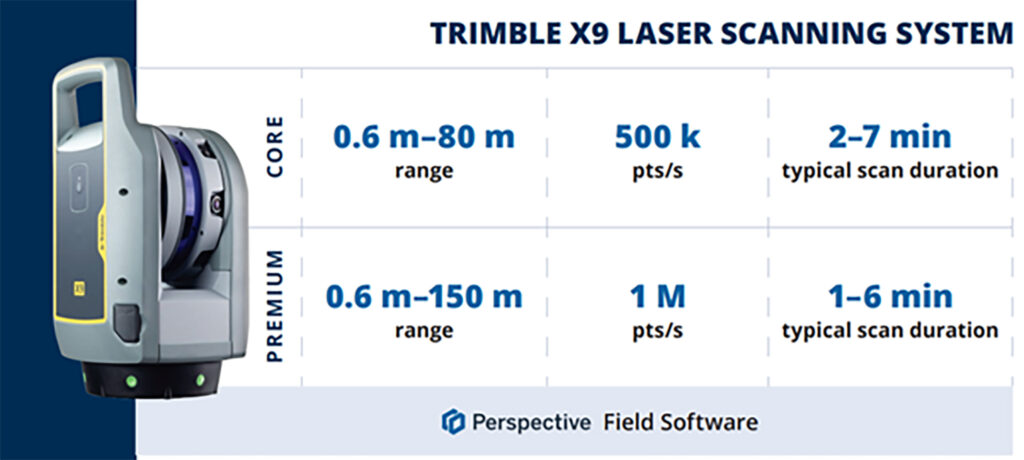
Subscriptions bring flexibility
Some of our customers love the flexibility of a subscription, others still to prefer an initial outlay so Core and Premium come with two options, Perpetual or Subscription.
Subscription brings a number of key benefits including a couple of extra important ones too, namely if your instrument is stolen, the subscription only runs until the end of that period (one year) which means after that time, the thief has effectively stolen a very expensive paperweight which should act as a deterrent. Additionally, if anything happens to your hardware, through theft or accident, the cost to replace it will be significantly lower than the original outlay.
View a KOREC video on subscriptions as a theft deterrent here
What are the reasons for offering both perpetual and subscription licensing? In one word, flexibility. Perpetual licenses provide traditional purchase options while subscriptions of course offer lower upfront costs.
Subscription benefits include:
- Access to the best Trimble technology with a lower price point
- Allows you to adapt the technology at a level to suit and then customise accordingly
- Ensures all devices and software are on the same, latest version
- Provides greater flexibility and scalability to meet the needs of a growing business with easy movement between Core and Premium annual subscriptions
New! 1 TB of storage on TRCPS included with all X9 Core and Premium purchases
In September, Trimble announced the launch of the Trimble Reality Capture platform service (TRCPS), designed to enable you to share & collaborate, and store & manage, massive data sets securely and efficiently in the cloud.
For a limited period, KOREC will be including 1 Terrabyte of storage on the TRCPS platform, for one year, with all Trimble X9 Core or Premium scanner purchases. (TRCPS seamlessly integratesasan extension inside Trimble Connect cloud software).
Last but not least – the best features are all there!
We’ve conducted numerous case studies on the Trimble X-Series, thanks to its many satisfied customers. While the technology offers a wide range of impressive features, we’ve highlighted the top ones most frequently praised by our users:
- On-site registration – saving processing time back at the office and ensuring nothing is missed whilst the surveyor is still on site.
- Auto-calibration – By choosing a scanner with smart auto calibration (the routine can be optimised), you’re minimising the risk of the scanner not collecting accurate data on important jobs and the risk of delivering something that could liability for the customer. Smart, self-calibrating scanners like Trimble’s X9 Core and Premium generate a report as a back-up for every job you do. You also don’t have to send it away for calibration, sometimes costing thousands of pounds and leaving you without a scanner for weeks if not months.
- Auto-levelling – speeds up your time around site
- Straight forward workflows – KOREC technical support is excellent at helping you to integrate a laser scanning workflow into your existing survey practices
- It’s got a handle – if the X9 can go anywhere so you’ll need to manoeuvre it in tricky areas without risking your investment!
- KOREC support – by far the most cited point in all our case studies, for its speedy, quality of information and friendliness.
- The laser pointer – for easy geo-referencing of the point cloud without the need for a total station
Next steps
If you’re interested in finding out more about th X9 Core or Premium or booking a demo, contact us now by email or call us on 0345 603 1214.
Meanwhile, we’ve done some great blogs and case studies on the X9 – here are the links to four of our most visited:
Go beyond the spec sheet –Five important questions to ask before purchasing a laser scanner
Case study (ScanPlan) – “The X9 is life changing”
Case study (Connect Scaffolding) – Planning for scaffolding design
Case study (South West Surveys) – Measured building scans for redevelopment
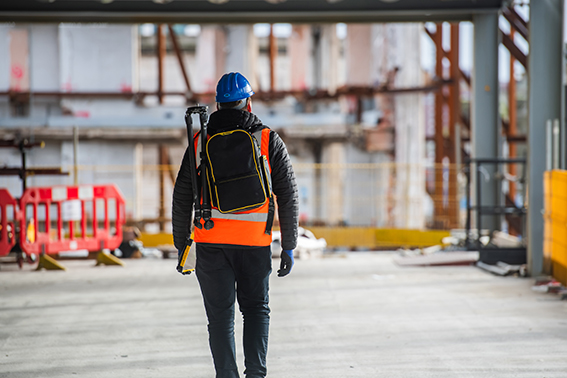
Verification, along with documentation for sub-contractors and as-built surveys are areas where 3D Laser Scanning can really add value to a construction workflow.
Scanners are so much easier to use than a total station so why’s the take up so low on construction sites? I thought I’d share a few thoughts!
Construction needs laser scanning now more than ever. Why do I believe this? Because when I go on to construction sites, yes, I do see total stations but I’m also still seeing tape measures, spirit levels and notebooks! The old ways can be functional and achieve a ‘result’ but to manually check every aspect of a large-scale project is extremely time consuming (unsustainable during a skills shortage) and prone to inconsistencies (we’re all human). In short, a few millimetres out on a ground floor can lead to 50mm out elsewhere. Clashes and rework inevitably result in additional expense and delays costing the industry £2 Billion in the UK each year with 49% of UK construction leaders reporting frequency of errors and rework as occurring a couple of times a week and 48% a couple of times a month*.
3D Laser Scanning has taken off within other industries including surveying, forensics, civil engineering, rail, steel fabrication, facilities management etc. When I talk to professionals in these areas it’s very much about the benefits and gains. When I’m in the construction environment, it’s very much about overcoming objections.I don’t believe that this is down to the traditional opinion that ‘construction is slow to adopt new technology’ and industry surveys back this up – for example, over 98% of polled construction companies in the US & UK use some form of AR on their projects and 87% use BIM*. Instead, the construction industry is raising valid concerns that must be addressed if this next step towards a digital site is to be taken.
Here are the five points I hear most:
I’ve got a total station that does the job just fine
Just as the total station superseded the dumpy level, it’s now time to take another step forward, and that step should be a 3D Laser Scanner. First up, you can trust the accuracy of a laser scanner – and we get asked this a lot. For example, all of the Trimble X Series scanners offer a 3” arc over 20mm, that’s 1mm accuracy. They also self-calibrate at the beginning of every job so you can have total confidence in the accuracy of your collected data.
Therefore, it’s delivering sufficient accuracy for construction applications. However, that’s not where the real value lies. A total station can only ever tell the story of the exact points collected which of course may be completely correct and as per the design. Laser scanning tells the whole story – including everything that’s happening between the total station points – and that’s where the ROI lies, this is vital information for avoiding rework costs and delays. The picture delivered by ten carefully surveyed total station points simple can’t compare to the level of information provided by the thousands of points collected by a laser scanner.
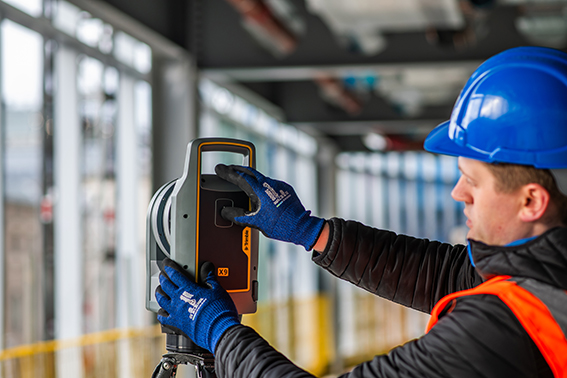
Using a laser scanner on site is relatively easy but it might take me a week to extract the information I need.
You can use your collected point cloud immediately thanks to on-site registration for error checking (a standard feature with Trimble’s X7, X9 and X12 Laser Scanners). Of course, you can check again back in the office but all the answers you need for reacting immediately to an error or clash on site can be viewed through functionality in the included on-board software, Trimble FieldLink, including setting-out errors, clashes, verticality issues and floor flatness.
To get value out of a point cloud, I’d need to invest in hardware and software that can handle massive data sets.
Again, this might have been the situation in the past but now you can carry out essential functionality in the field using the FieldLink software. Back at the office, Cintoo Cloud is a great asset, allowing you to store massive 3D point cloud datasets in the cloud, eliminating the need for extensive local storage and enabling easy access from anywhere. I’ve got a customer in demolition who scans buildings for recycling purposes and lets colleagues view this data in Cintoo which has massively helped his business at a price on average of £1,200 per year for 500 scans. It’s really easy to use and extract data from, perfect for sharing clash information.
We’d have to learn about another new technology
The good news is that a 3D Laser Scanner is far easier to set up and operate than a traditional total station which is why take-up has been so successful in industries that are not traditionally related to survey. We’ve had people scanning statues for documentation, bar & restaurant interiors for planning and all sorts of buildings by architects. We are currently facing a significant skills shortage in the construction industry and this type of technology can attract a forward-thinking generation that has grown up with smartphones, however, it needs a forward thinking buyer to start the ball rolling.
There are so many different types of laser scanner, it’s hard to know where to start
Correct, the market offers many types of laser scanner which is why I’ve also checked with my KOREC construction colleague, Sam Hough for a recommendation on the best 3D Laser Scanning system for construction documentation and as-builts. Here’s his list:
Trimble X7 or X9 3D Laser Scanner (must haves include on-site registration, auto-levelling, auto-calibration, ease of use, IP55 rating and a handle!)
Trimble FieldLink Intuitive software with some great functionality running on a T10x rugged tablet
Cintoo Cloud for viewing and sharing of large point clouds and further functionality for measuring etc eliminating the need for further software/hardware outlay.
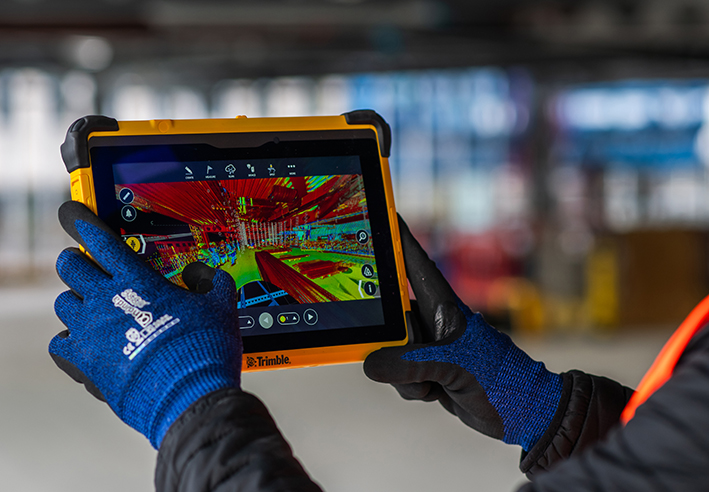
…. which led to an interesting chat with Sam following our recent membership to GIRI – Get it Right Initiative. Sam agrees that 3D Laser Scanning provides a highly effective solution for as-builts, documentation and error/clash detection but he’s ready to argue that it would be far more pro-active to avoid errors and solve any potential problems in the first place! And this is why he will be my next KOREC colleague to share his opinion on LinkedIn…coming soon.
Do you agree with my conclusion that construction is ready to take on 3D Laser Scanning? Please do comment.
For further information on any of the above, please contact myself, Melvin.Penwill@korecgroup.com, or sam.hough@korecgroup.com visit here for full contact information.
*XYZ report Constructing Tomorrow
If you’re looking to invest in 3D Laser Scanning technology, Mark Poveda urges you to go beyond the spec sheet to unlock your perfect 3D Laser Scanning solution and ask these five important questions instead.
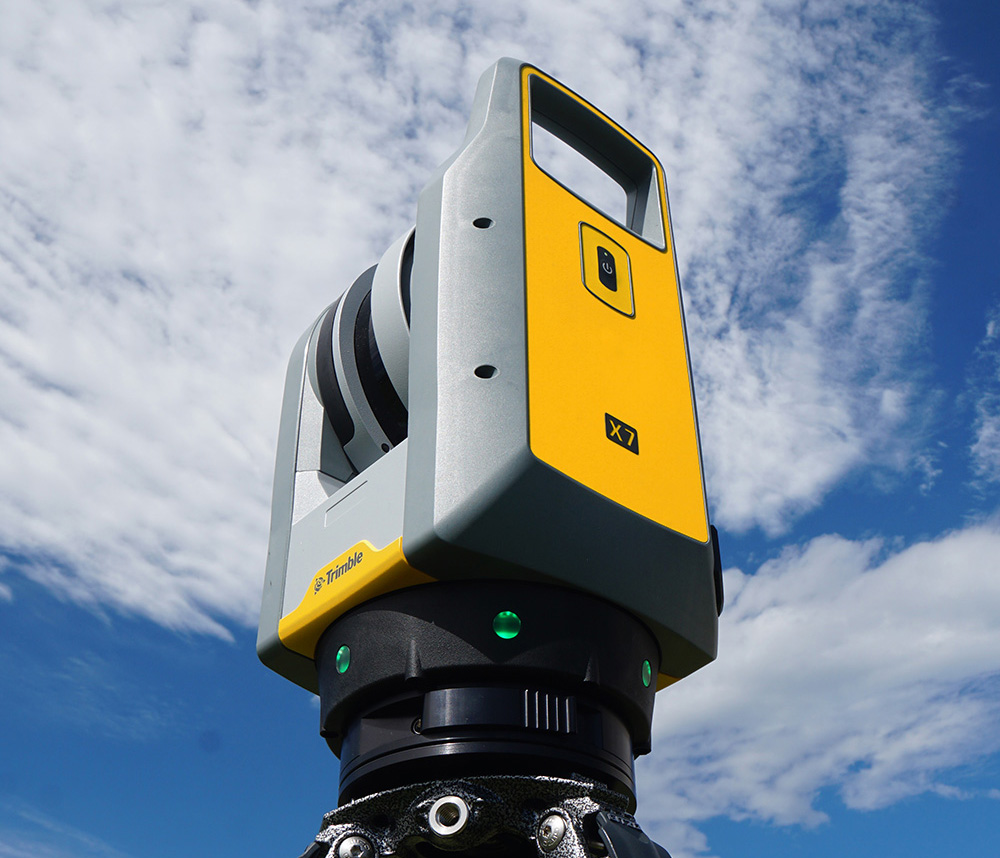
There’s no doubt that 3D Laser Scanning is now a widely accepted tool for surveyors thanks to its ability to quickly and accurately capture detailed 3D spatial data, making it valuable for a wide range of applications.
The technology has continued to evolve and become more accessible in terms of cost and equipment and there’s more choice than ever……which is where the challenge begins!
It’s at this point that I would urge you to move beyond the manufacturer’s spec sheets which are often complex and don’t compare the same information, and instead, ask yourself these 5 important questions:
1. What is the cost of ownership vs. unit cost?
The unit price tag may look good but what are the ongoing expenses? It’s time to dig a little deeper.
First up, I’d urge you to ask how often the scanner needs to be calibrated and here it’s crucial to consider not only the financial aspect of calibration but also the duration your instrument will be unavailable for use, particularly when it requires international shipment. Additionally, factor in the expenses associated with acquiring a temporary replacement.
Under cost of ownership, it’s also important to check for hidden charges including upgrades for firmware software licensing or any additional modules you may need to create your preferred deliverable. Also don’t forget to factor in office processing time and any extra investment in IT.
2. Do I need survey grade auto-levelling?
It’s not all about the time the scanner is turning and collecting data. Having an auto-levelling feature ensures that you are ready to go as soon as you set the instrument down. Having an IMU and dual-axis compensator on a scanner means data is always level to survey grade accuracy and does not require the same level of post-processing as those that don’t meet that same accuracy specification. This also massively improves the accuracy of your scan data over the scanner’s full range. Potentially, this feature can save you around 5 hours a week if you’re undertaking 150 scans a day.
3. What’s more important to you, scan time or total time to project deliverable?
I’ve written about workflows in previous columns, and it’s just as important here, as is a broad look at total production costs, namely adding in the field capture plus the office processing time and investment in IT and training.
The first thing to consider here is that speed is not always what you think or see on the spec sheet, because scan speed and scan rate are not the same thing. Scan speed is the number of points you collect per second, and scan rate is the number of seconds needed by a scanner to collect that data – this depends on the density of the scan data you require and the range of your scan. So in theory, the scanner with the fastest speed doesn’t always have the fastest rate. It’s therefore very important to make sure that you select a scanner that has the best balance for your applications.
Additionally, time saved in the field doesn’t always equate to a faster deliverable. When purchasing a scanner, one of the best ways to deliver a faster result to your customer is through in-field automatic scan registration so it’s definitely worth checking if your potential new scanner has this feature.
4. Will it work in the rain?
On average it rains 151 days a year in the UK! Time to check the IP (ingress protection) rating of your proposed scanner. The first IP digit relates to the level of protection against solid objects; the second digit relates to the level of protection against liquids. If your scanner’s IP rating is IP54, it’s important to understand that it does not have a closed mirror and you may be risking your scanner by working in conditions it’s simply not suitable for. IP54 means that the scanner is protected against water spray and is suitable for outdoor work, however an IP55 rating means suitability for working with in rain.
5. Has it got a handle?
It’s possibly any scanner’s most underrated feature, but your scanner is worth thousands of pounds, not to mention any downtime if it gets dropped! Easy manoeuvrability is vital in tight spaces or if you’re working within complex structures. Several KOREC customers have mentioned this as one of the deciding factors in their purchasing decisions.
…… and this feature doesn’t even get a mention on the spec sheet!
Thinking of investing in a laser scanner? Get in touch and we’ll be happy to discuss your requirements!
A maze of underground defensive tunnels was the perfect training location for the Royal School of Military Engineering to team up with KOREC and compare Trimble X9 3D Laser Scanner technology with traditional total station techniques.
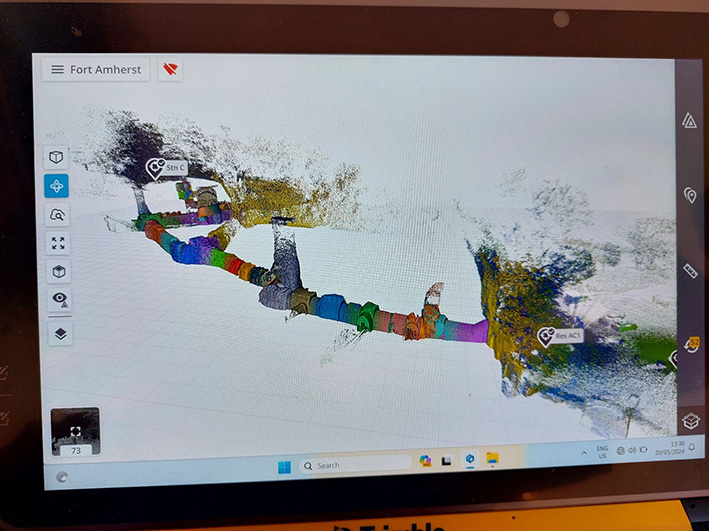
Purpose: Invited by Steve Coates, Head of Engineering Surveying at the Royal School of Military Engineering Surveying and Sergeant Niel De Witt, Senior Military Instructor, to deliver Trimble X9 3D Laser Scanning training in a tunnel
Training delivered by: Melvin Penwill, Scanning Specialist and Sarah Cummings, Training Specialist, KOREC
Location: Underground tunnels at Fort Amherst, Chatham
Additional benefits: Useful comparison of laser scanning compared with traditional total station and traversing methods. What had taken a week traversing with a total station was achieved in just a few hours with the X9 and included far more data
Stand out X9 features: Easy of use, in-field registration for visual checks on site, easy auto-levelling and excellent performance in the dark
A few years previously, KOREC had trained the Royal School of Military Engineering students on the Trimble X7 3D Laser Scanner. This time around, along with TSA, our scanning specialist Melvin Penwill and training specialist Sarah Cummings were delighted to accept an invitation from Steve Coates, the school’s Head of Engineering Surveying, to return with the Trimble X9, which offers a longer range, increased accuracy, faster scanning and enhanced imaging.
The location for the tunnelling workflow training was Chatham’s Fort Amherst, Britain’s biggest Napoleonic Fort with its maze of underground tunnels and features making it the perfect testing ground for the X9.
After arriving at the site, a sports pavilion was scanned with the X9 and a colourised pointcloud generated for a speedy demonstration of what could be achieved. The X9 was then taken to the tunnel area. Control had already been established earlier in the week when the trainees had traversed through Fort Amherst and then undertaken a total station topo survey of the tunnels. With KOREC on site, the same work was then completed using the Trimble X9.
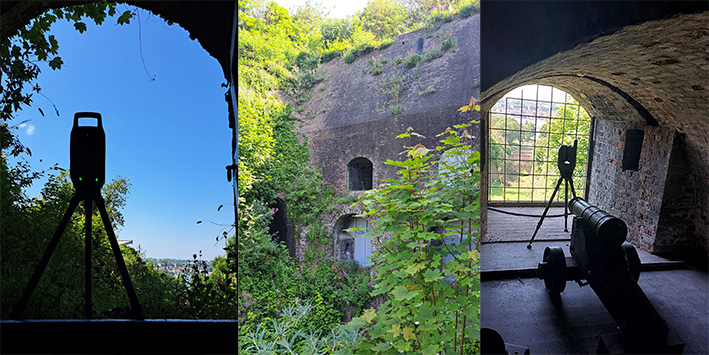
Scanning the Tunnel
The instrument was controlled by a Sergeant using a Trimble T10x Tablet running Trimble Perspective software and his first set up, guided by Melvin and Sarah, was at the mouth of the tunnel. Once in inside, the massive tunnel complex provided a perfect showcase for the X9’s functionality taking in a 20m shaft to measure its height, a steep staircase, hall and areas with very little detail and not much overlap which would be a good test for the Perspective software’s in-field registration for a visual check that nothing had been missed.
As well as surveying the tunnels, the twenty-metre-high shaft was scanned using the indoor mode fifty second scan in order to achieve sufficient detail in the shaft and capping. The scanner’s laser was used to shoot the control points and an area scan completed where the cannon was positioned.
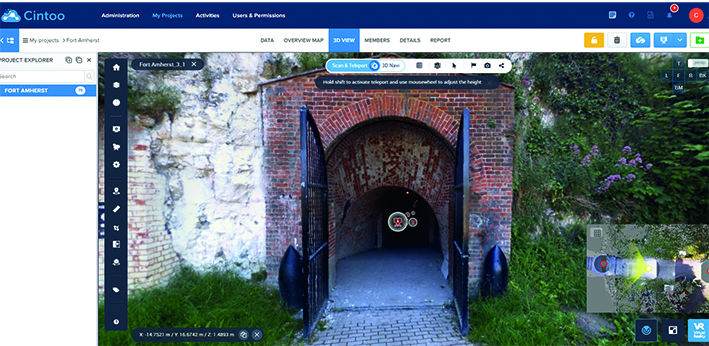
Cintoo Cloud turns laser scans into mesh-based reality capture data perfect for sharing
Following the seventy-five setups needed to complete the maze of tunnels, undertaken over a period of just a few hours, the afternoon was spent in the classroom where Melvin demonstrated Trimble RealWorks software for point cloud handling and showed the scanned data on a projector and answered questions.
Both Sarah and Melvin appreciate the positive feedback from the trainees and thoroughly enjoyed themselves as well!
For further information on the Trimble X9 or KOREC Training, please contact us here.
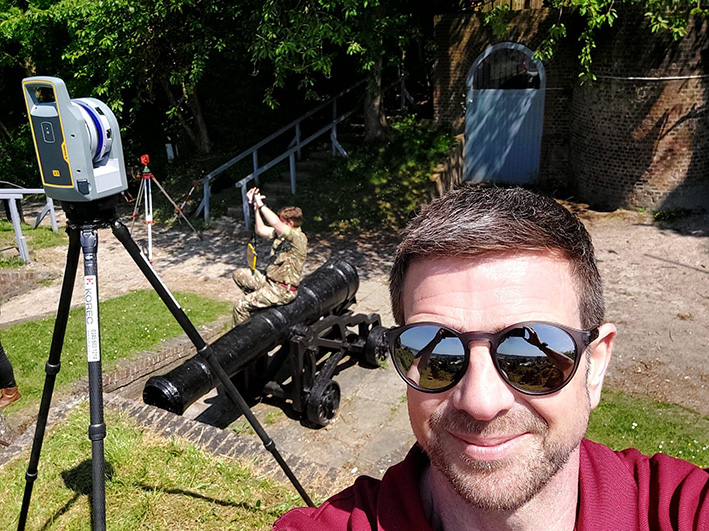
KOREC’s Melvin Penwill at Fort Amherst
How BB Surveys successfully completed a vast football stadium project with over 4,600 scans and and multi-sensor integration to create a range of high-quality deliverables.
Download a formatted verion of the case study here
Based in the East of England and operating throughout the UK, BB Surveys is an experienced and trusted land surveying company that undertakes a range of surveys including topographical, as-built, 3D Laser Scanning and high precision monitoring.
The survey team, under the leadership of Owner Barry Burrows, may be compact in size, but this understates the company’s commitment to cutting-edge surveying techniques and advanced computer technology. Not only was BB Surveys the first practice in the UK to acquire a Trimble X7 3D Laser Scanner, the company also has the advantage of retaining the most experienced user of Trimble RealWorks software in the UK and Ireland in Scanning Specialist Jason Jones.
Trimble RealWorks is point cloud processing and analysis software for 3D laser scanning professionals. It includes automated tools and point cloud specific workflows allowing users to import point cloud data from virtually any source, then quickly process, analyse and create the high quality customer deliverables that BB Surveys is known for.
Solely responsible for processing all laser scanning jobs and experienced in using a range of different laser scanners since 2010, Jason switched to Trimble RealWorks over a decade ago and today RealWorks and Trimble Business Center (TBC, for transformation of field data into high-quality client deliverables) remain his go to software for processing scan data.
A vast project and finding the right solution
The main use of the Trimble X7 for BB Surveys is for measured building surveys, both internally and externally. These can range in size from a single barn or residential building to more recently, an entire football stadium. The team has an extensive KOREC supplied Trimble portfolio at its disposal and therefore can pick the best solutions specific to each project choosing from high accuracy total stations, four types of GNSS, including the R12i, the X7 3D Laser Scanner and also a Trimble SX10 Scanning Total Station.
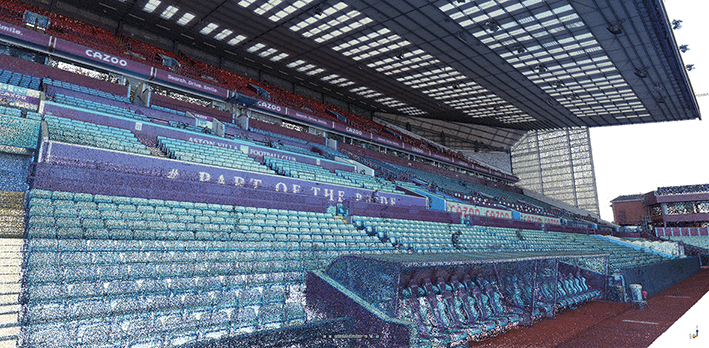
BB Surveys was recently commissioned by Foxton Construction to carry out a laser scanning project at Aston Villa F.C. and in particular to update information on the Holte End to assist in the planning and design of new seating proposals. The job would require both internal and external scans with a deliverable of 2D elevations, 2D floor plans and 3D Revit model.
The job then expanded to include a scan of the externals of the entire stadium as well as full internals of 3 of the 4 stands and the entire bowl seating areas. Further deliverables included 12 external elevations across all 4 stands, 4 pitch-side elevations, a full seating plan of all 42,000+ seats, 16 floor plans, a 3D model of the Holte Stand, internals and externals, and multiple sections through the stadium’s hospitality suites.
Combining data from 4,600+ scans and multiple sensors
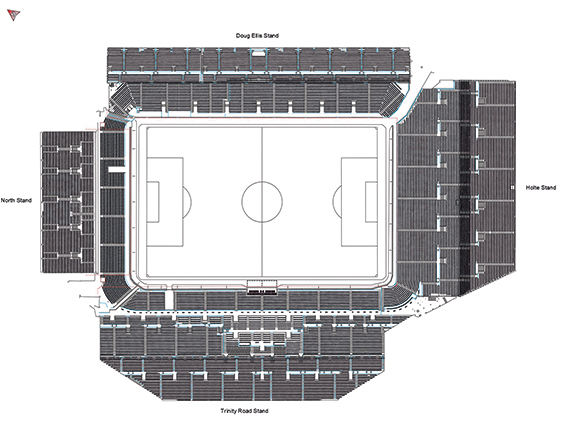
Jason Jones knew that a job of this scale demanded the use of a range of survey methods and sensors. However, as an experienced TBC user, he also knew that, if the data capture was handled correctly, it would be a relatively straight forward process to combine all the collected data into a single software package, in this case TBC, to help streamline and speed up the processing.
On site, a range of sensors were therefore used:
Trimble SX10 Scanning Total Station: The BB Surveys team traversed in ground control using the SX10, carrying out some laser scans as they worked. These scans, once processed, formed the primary control for the Trimble X7 scans to be registered to.
Trimble X7 3D Laser Scanner: The team supplemented their existing X7 with an additional one hired from KOREC to handle the high volume of work. Scans were undertaken internally and externally. For a project this size, Jason felt that Perspective software for in-field scanner control and registration was key to the success of the work. The surveyors on site were able to split the scans into multiple registration sets on the controller. This not only kept the enormous amount of scans organised for the on site scan team , but also these registration sets transferred over to RealWorks as Groups helping to speed up the registration/refining process. Being able to rename registration sets in the Perspective software was of significant help once the data was in RealWorks.
Trimble R12 GNSS: a Trimble R12 was used to survey the ground control and this allowed the team to accurately place the project onto the OS Grid although this was kept at a scale factor of 1.
Rotary drone: additionally, the team captured aerial imagery of the roof which was then fixed to the ground control and the point cloud was then brought into Trimble RealWorks to be combined with the point cloud from the terrestrial scanners.
In total, BB Surveys carried out 4,647 scans with the Trimble X7 plus additional scans with the SX10, generating over 24, billion points and more than 1,000 GB of data across four RealWorks projects.
Handling the data
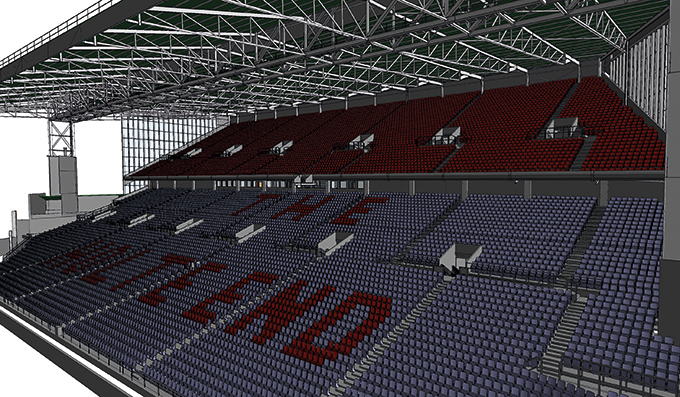
Back at the office, the SX10 and R12 data was imported into TBC to process the traverse and then the point clouds were exported into Trimble RealWorks. All data from the X7 was imported directly into Trimble RealWorks before being exported for drawing/modelling.
Trimble RealWorks was used to process and combine all the laser scans. Once in the software, the data was split down into four separate projects, one for the externals and pitch side scans, and another for the internals of each of the three stands scanned. This helped keep the file sizes smaller and consequently, more manageable.
RealWorks has the ability to export the registration to the RAW scan files. This allowed Jason to bring individual scans into multiple projects to ensure continuity between projects without needing to export point clouds or re-register scans.
RealWorks is also able to show multiple projects at the same time and this helped him to monitor the quality of the registration between projects throughout the processing of the data, without needing to combine all the scans into a single project.
Reflecting on the highly successful completion of this job, Jason has no hesitation in attributing a significant portion of its timely accomplishment to the combination of the Trimble X7 Laser Scanner and Perspective software, notably its on-site registration capabilities. “Before we had the ability to register scans as we went along, even a job involving just fifty scans across one or two levels could become quite cumbersome, necessitating site diagrams illustrating scan positions and inter-level connections. Imagine the complexity of a project like this one, with literally thousands of scans. The X7, Perspective software, and RealWorks have proved to be an invaluable combination.”
Top 4 RealWorks takeaways from Jason Jones on this project:
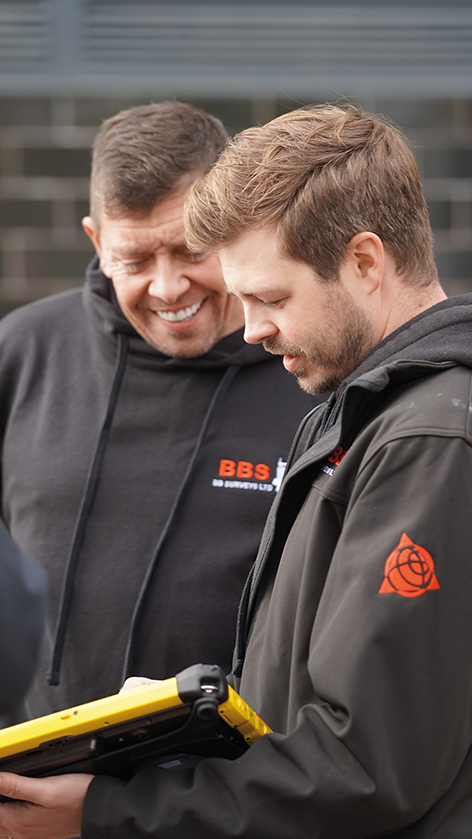
- For especially large projects, when you are importing your TDX files into RealWorks, choose a larger Spatial Sampling distance (20mm). This should still be enough to register the data together but won’t slow the process down with too many points. Then once registered, you can bring in more points for drawing/modelling/exporting using the Create Sampled Scans tool or Limit Box Extraction. Also applying a maximum distance on the data loaded will help reduce the number of points.
- Rather than using checker boards or other targets for georeferencing, we used SX10 scans coordinated using site control. This way we had millions of points to fix to, rather than just a handful of control points.
- Split your project up into groups for registration and in particular for refining the registration. These could be entire floors of a small building or a group for each room/corridor/stairwell if you are dealing with much larger spaces. Registering and then refining each of these groups in turn and then registering these groups together keeps the data sizes down for each process on larger projects and helps speeds up the processing. These groups and subgroups can then be merged once the registration has been finalised.
- Keep your RealWorks Project saved on your root drive whilst registering and not buried in a series of multiple sub folders with long names as this can cause the software to crash or run slowly (eg. D:\Wall Scan.rwp rather than D:\Workarea Laser Scanning\Project 0001 – Client – Building Project\Wall Monitoring\RealWorks\Wall Scan.rwp)
Top benefits of the Trimble X7 for BB Surveys
On-board registration with the Perspective software – this saves hours of processing time and makes it easier for companies like BB Surveys where they have different teams for data capture and processing. Plus, you can see your fully registered point cloud before you leave the site avoiding any gaps through missing scans.
On-board calibration – both the time and monitory saving of this is huge. With BB Survey’s previous scanner, the calibration cost was around £4k and could leave them without a scanner for several weeks at a time.
TDX file format – the X7 data works smoothly with all of BB Survey’s software packages allowing the team to switch easily between TBC and RealWorks and for combining data from the X7 and SX10 seamlessly.
The X7’s indoor mode – a useful way for speeding up internal scans, saving 10 seconds each time, which adds up on a project of this scale.
KOREC support – BB Surveys states that over the years KOREC has been a great source of advice, technical support and training.
After a day on site with the Trimble X12 3D Laser Scanner – we catch up with Paul Williams, Director of Survey Dimensions
The X12 is Trimble’s highest end scanner and marketed as a ‘best of both worlds’ combination of Z+F technology and a tried and tested Trimble workflow that uses its Perspective software. But does the reality deliver in the field? Customer feedback is vital to both us and Trimble so we were delighted to let Paul Williams, Director of Survey Dimensions, put the X12 through its paces and share his down to earth appraisal.
Paul’s Trimble X12 top 4
Crispness of the data – ‘the data quality is amazingly good’
Perspective workflow – ‘we were up and running immediately, it’s the same interface as the X7 and very easy to pick up’
Ability to scan at very short range and to challenging surfaces – ‘the X12 is very versatile’
It has a handle – ‘this is vital when carrying high value equipment up and down ladders etc’
First thoughts
As a Trimble X7 user, Paul was pleased to see that the X12 was also a manageable weight at 7.7kg (including the batteries). In particular, he noted that it would be easy to carry it up and down ladders and position into tight areas thanks to the handle – something that he was quick to point out that not all scanners have but is vital when you’re manoeuvring a high value piece of equipment around your site. Aside from its portability, his expectations were especially high concerning the quality of the data, the speed of the scans and also how versatile it would be on the trial job he had selected that required both short range and medium range scans in a variety of different scenarios.
Former convent school project
The project that Paul trialled the X12 on is a former Convent School, now owned by Falmouth University, with a spec that required exterior and interior surveys for remediation work and planning. Paul’s X7 was also taken along for the ride and all work was undertaken by a two-man team in a single day. Both scanners were used to complete a total of over 300 scans on the day.
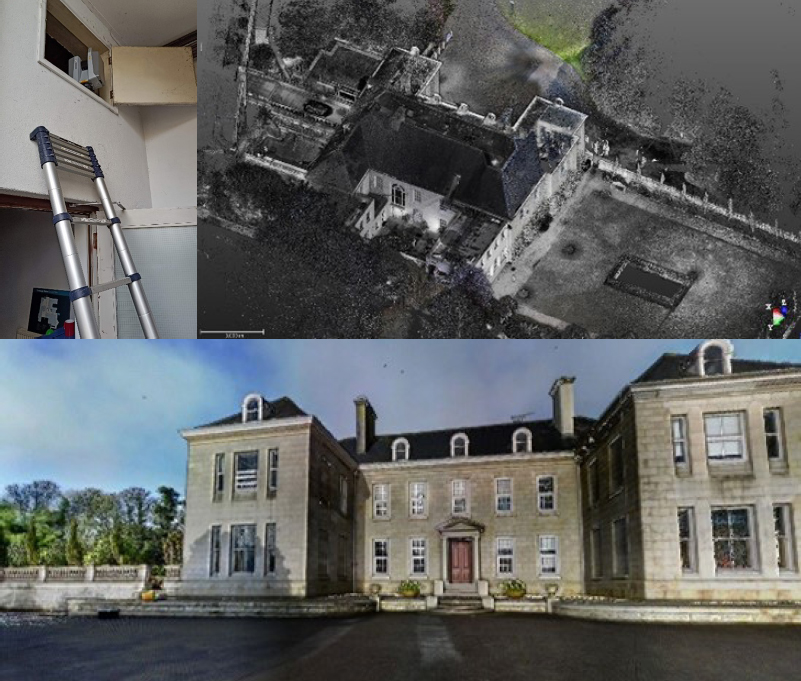
With the X12, Paul was up and running immediately because he was already familiar with the Trimble Perspective workflow from his X7. From his earlier X7 experience, he also knew that the Perspective software was extremely intuitive, even for someone using it for the first time. X12/Perspective features such as ‘Window Scan’ for focusing on areas where greater detail would be required, and the on-site registration to ensure that everything was captured before leaving the site were both rated as good time savers.
During the day, the X12 was used on and off a tripod and also at very short range to scan inside a small dark cupboard. Where more detail was required, for example when scanning architraves and decorative ceiling mouldings, the highest definition was used.
Paul’s feedback
Whilst Paul appreciates that the range of the X12 is over 300m, for this project he was working mainly at a range of 40m and lower. He also carried out a couple of comparisons with the X7 and noted that the quality of the data from the X12 is amazingly good; when sliced from the side, the X12 data had zero deviation on a 3mm thick slice compared to a light fuzziness with the X7. He also reports that the overall quality of the X12 scan data is second to none, especially inside on the ceilings and outside when looking at the brick detail. Around the site, Paul found that there were no surfaces too challenging for the X12 and scan quality was consistently excellent even when scanning at short range into darkness.
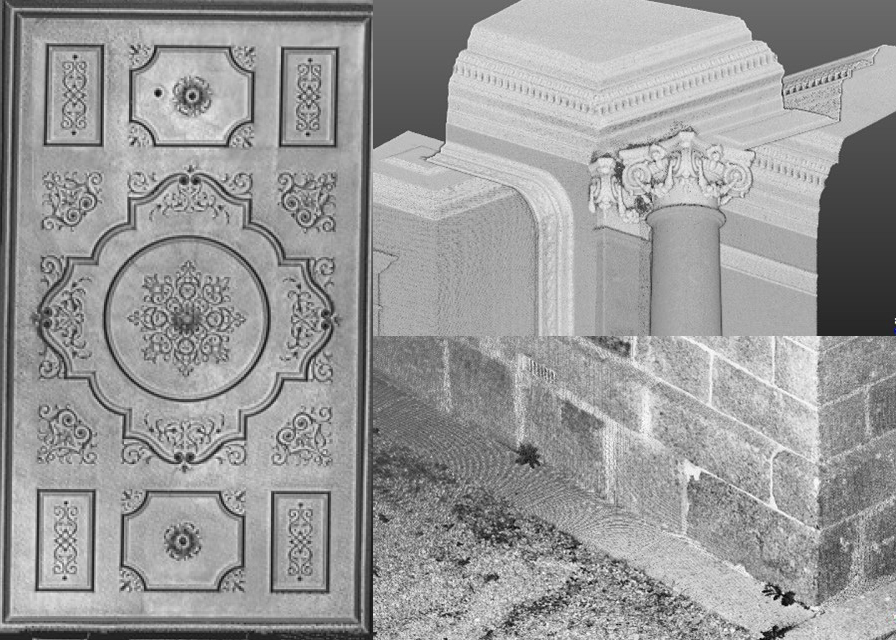
Paul noted that the colour imagery was easy to add, parallax free and excellent quality. The X12 also performed far faster than the X7 when scanning at higher definition (6mm point spacing). For example, a one minute 30 second scan with the X12 was far, far denser than a 5 minute scan with the X7. However, this makes perfect sense considering the different applications the scanners have been developed for.
Overall, Paul feels that the standout feature of the X12 is the ‘amazingly good’ crispness of data and rated the following four points as the X12’s stand out benefits:
The third question in our ‘five important questions blog’ is……
3. Survey grade self-levelling –optional extra or ‘must have’ feature?
Both the Trimble X7 and X9 have a great survey grade self-levelling feature which level the data up to a 3” arc.
But what exactly does that mean in practical terms?
Imagine you are scanning a multi-storey building that’s up to 10m in height, using the X7 or X9 you will have a pointcloud that will deviate from the vertical at just 0.1 of a millimetre which is perfectly acceptable. Likewise, over a longitudinal stretch, for example a road, the difference in level over a 20m length might be 0.3 of a millimetre, again, perfect acceptable, all because of the 3” arc.
Here’s how that 3” compares to other manufacturers levelling:
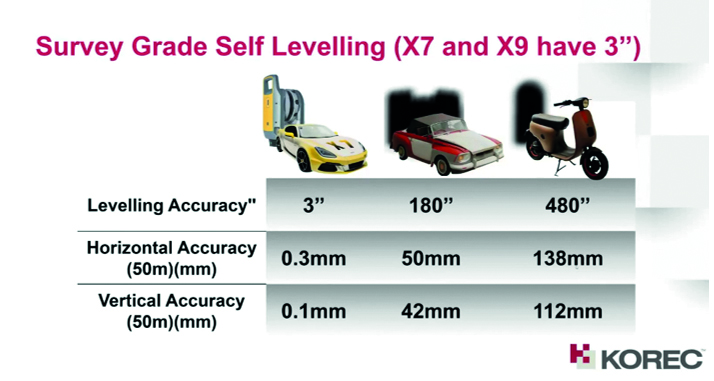
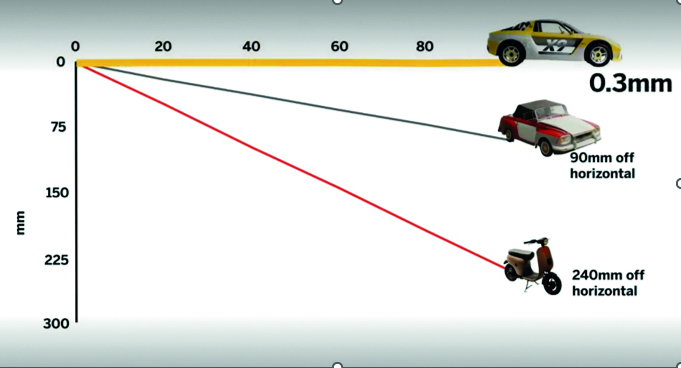
Yes, the levelling accuracy deviates heavily. It’s important to understand how important it is that your data is levelled, either with the X Series survey grade self-levelling function or by using one of two options:
- Manually force an arbitrary scan to be levelled in the software (relies on guesswork).
- Bring in control from a total station which you will need to traverse through a site (this is time consuming and increases production costs).
Top tip: Having survey grade self-levelling ensures the accuracy of your pointcloud and also saves you time. For example, if you’re undertaking 150 scans in a day you can save an hour of site time, 5 hours a week.
Keep following this blog to see our next three questions!
Click here for the answer to our previous question:
1. What is the cost of ownership v. unit cost?
2. What’s more important to you, scan time or total time to project deliverable?
The second question in our ‘five important questions blog’ is……
2. What’s more important to you, scan time or total time to project deliverable?
We admit it, 0-60 mph in under 3 seconds is going to feel great! But back in the real world, everyone knows that it’s the total journey time that really counts…and it’s exactly the same in the laser scanning world.
The first thing to consider is that speed is not always what you think*, because Scan Speed and Scan Rate are not the same thing. Scan speed is the number of points you collect per second, scan rate is the number of seconds needed by a scanner to collect that data and this depends on the density of the[CA1] scan data you require and the range of your scan. So in theory, the scanner with the fastest speed doesn’t always have the fastest rate. It’s therefore really important to make sure that you select a scanner that has the best balance for your applications.
Additionally, it’s vital to consider the ‘overall journey time’. Time saved in the field doesn’t always equate to a faster deliverable. When purchasing a scanner, one of the best ways to deliver a faster result to your customer is through in field automatic scan registration, and there’s two reasons for that:
- A scanner that can automatically fully register, refine, georeference, colourise and export your data before you even get back to the office will save you hours of processing time. You can check your data in the field as well.
- In-field registration ensures that you have captured everything you need, before you leave the site which means no costly return visits to capture missed data.
The Trimble X7, X9 and X12 are the only scanners that offer this feature, on a solution fully developed and supported by Trimble.
Keep following this blog to see our next three questions!
Click here for the answer to our first question:
1. What is the cost of ownership v. unit cost?
On Tuesday, September 26th 2023 – 11:00 AM (BST), we’ll be live with our ‘Scan Superiority’ webinar where we’ll be addressing:
- Lifetime Cost
- Self-levelling
- Auto calibration
- Weatherproof
- Fastest field to finish workflow
- In field auto registration
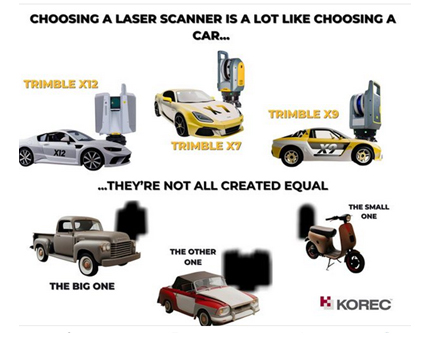
Purchasing a laser scanner shares striking similarities with buying a car! It represents a substantial investment, necessitates ongoing maintenance, boasts varying operational costs across different models, and showcases a range of performance capabilities. Naturally, your choice should align with its intended purpose – just as you wouldn’t opt for an electric car if your primary journeys involve long-distance travel through remote regions, neither would you select a gas-guzzler for driving into busy city centres. Similarly, it’s vital that the 3D Laser Scanning system you choose can produce the deliverables requested by your clients.
But how do you distinguish the top performers from the rest of the pack?
Setting priorities
We’ve come a long way since the early days of laser scanning when there was very little choice; units cost upwards of £80k and even the best designed were heavy and cumbersome to transport. Today there is a choice for every application and budget but with so many options, which scanner is going to be the best choice for your current projects, your client’s deliverable and your future plans?
The real challenge lies in surpassing the obvious inquiries about range, points per second, and accuracy to attain that elusive perfect balance that will deliver the right choice. Instead, we strongly encourage you to set aside the spec sheet, as it often fails to offer a true like for like comparison and instead, focus your attention on these five key questions to ask before making your investment. First up:
1. What is the cost of ownership v. unit cost?
The unit price tag may look good but what are the ongoing expenses? It’s time to dig a little deeper.
As a priority, we’d urge you to ask how often the scanner needs to be calibrated, after all you wouldn’t expect a reliable performance from your car if it wasn’t serviced regularly. It’s crucial to consider not only the financial aspect of calibration but also the duration your instrument will be unavailable for use, particularly when it requires international shipment. Additionally, factor in the expenses associated with acquiring a temporary replacement.
By choosing a scanner with smart auto calibration, you’re minimising the risk of the scanner not collecting accurate data on important jobs and the risk of delivering something that could liability for the customer. Smart, self-calibrating scanners like Trimble’s X7 and X9 generate a report as a back up for every job you do.
Under cost of ownership, it’s also important to check for hidden costs or the total production costs. That leather upholstery and heated seats can add up as can upgrades for firmware software licensing or any additional modules you may need to create your preferred deliverable, office processing time and investment in IT.
Keep following this blog to see our next four questions!
On Tuesday, September 26th 2023 – 11:00 AM (BST), we’ll be live with our ‘Scan Superiority’ webinar where we’ll be addressing:
- Lifetime Cost
- Self-levelling
- Auto calibration
- Weatherproof
- Fastest field to finish workflow
- In field auto registration

Purchasing a laser scanner shares striking similarities with buying a car! It represents a substantial investment, necessitates ongoing maintenance, boasts varying operational costs across different models, and showcases a range of performance capabilities. Naturally, your choice should align with its intended purpose – just as you wouldn’t opt for an electric car if your primary journeys involve long-distance travel through remote regions, neither would you select a gas-guzzler for driving into busy city centres. Similarly, it’s vital that the 3D Laser Scanning system you choose can produce the deliverables requested by your clients.
But how do you distinguish the top performers from the rest of the pack?
Setting priorities
We’ve come a long way since the early days of laser scanning when there was very little choice; units cost upwards of £80k and even the best designed were heavy and cumbersome to transport. Today there is a choice for every application and budget but with so many options, which scanner is going to be the best choice for your current projects, your client’s deliverable and your future plans?
The real challenge lies in surpassing the obvious inquiries about range, points per second, and accuracy to attain that elusive perfect balance that will deliver the right choice. Instead, we strongly encourage you to set aside the spec sheet, as it often fails to offer a true like for like comparison and instead, focus your attention on these five key questions to ask before making your investment. First up:
1. What is the cost of ownership v. unit cost?
The unit price tag may look good but what are the ongoing expenses? It’s time to dig a little deeper.
As a priority, we’d urge you to ask how often the scanner needs to be calibrated, after all you wouldn’t expect a reliable performance from your car if it wasn’t serviced regularly. It’s crucial to consider not only the financial aspect of calibration but also the duration your instrument will be unavailable for use, particularly when it requires international shipment. Additionally, factor in the expenses associated with acquiring a temporary replacement.
By choosing a scanner with smart auto calibration, you’re minimising the risk of the scanner not collecting accurate data on important jobs and the risk of delivering something that could liability for the customer. Smart, self-calibrating scanners like Trimble’s X7 and X9 generate a report as a back up for every job you do.
Under cost of ownership, it’s also important to check for hidden costs or the total production costs. That leather upholstery and heated seats can add up as can upgrades for firmware software licensing or any additional modules you may need to create your preferred deliverable, office processing time and investment in IT.
Keep following this blog to see our next four questions!
On Tuesday, September 26th 2023 – 11:00 AM (BST), we’ll be live with our ‘Scan Superiority’ webinar where we’ll be addressing:
- Lifetime Cost
- Self-levelling
- Auto calibration
- Weatherproof
- Fastest field to finish workflow
- In field auto registration
2. What’s more important to you, scan time or total time to project deliverable?
We admit it, 0-60 mph in under 3 seconds is going to feel great! But back in the real world, everyone knows that it’s the total journey time that really counts…and it’s exactly the same in the laser scanning world.
The first thing to consider is that speed is not always what you think*, because Scan Speed and Scan Rate are not the same thing. Scan speed is the number of points you collect per second, scan rate is the number of seconds needed by a scanner to collect that data and this depends on the density of the[CA1] scan data you require and the range of your scan. So in theory, the scanner with the fastest speed doesn’t always have the fastest rate. It’s therefore really important to make sure that you select a scanner that has the best balance for your applications.
Additionally, it’s vital to consider the ‘overall journey time’. Time saved in the field doesn’t always equate to a faster deliverable. When purchasing a scanner, one of the best ways to deliver a faster result to your customer is through in field automatic scan registration, and there’s two reasons for that:
- A scanner that can automatically fully register, refine, georeference, colourise and export your data before you even get back to the office will save you hours of processing time. You can check your data in the field as well.
- In-field registration ensures that you have captured everything you need, before you leave the site which means no costly return visits to capture missed data.
The Trimble X7, X9 and X12 are the only scanners that offer this feature, on a solution fully developed and supported by Trimble.
3. Survey grade self-levelling – most have feature or optional extra
Both the Trimble X7 and X9 have a great survey grade self-levelling feature which level the data up to a 3” arc.
But what exactly does that mean in practical terms?
Imagine you are scanning a multi-storey building that’s up to 10m in height, using the X7 or X9 you will have a pointcloud that will deviate from the vertical at just 0.1 of a millimetre which is perfectly acceptable. Likewise, over a longitudinal stretch, for example a road, the difference in level over a 20m length might be 0.3 of a millimetre, again, perfect acceptable, all because of the 3” arc.
Here’s how that 3″ compares to other manufacturers’ levelling:


Yes, the levelling accuracy deviates heavily. It’s important to understand how important it is that your data is levelled, either with the X Series survey grade self-levelling function or by using one of two options:
- Manually force an arbitrary scan to be levelled in the software (relies on guesswork).
- Bring in control from a total station which you will need to traverse through a site (this is time consuming and increases production costs).
Top tip: Having survey grade self-levelling ensures the accuracy of your pointcloud and also saves you time. For example, if you’re undertaking 150 scans in a day you can save an hour of site time, 5 hours a week.
4. What’s the scanner’s IP rating or, if the rain comes, will I have to stop working?
Do you use your scanner for TOPO surveys, in construction, in a country where it tends to rain a lot? If so, it’s time to check the IP (ingress Protection) rating of your proposed scanner. The first IP digit relates to the level of protection against solid objects; the second digit relates to the level of protection against liquids. If your scanner IP rating is IP54, it’s imporant to understand that it does not have a closed mirror and you may be risking your scanner by working in conditions it’s simply not suitable for. IP54 means that the scanner is protected against water spray and is suitable for outdoor work, however an IP55 rating means they are suitable for working with in rain.

Top tip: The Trimble X7 and X9 are the only scanners suitable for countries where it rains a lot. Fortunately we’ve done some important research for you – on average it rains 151 days a year in the UK! ….and here’s a useful little video.
5. Has it got a handle?
It’s possibly any scanners most underrated feature, but your scanner is worth thousands of pounds, not to mention any down time if it gets dropped! Easy maneouverability is vital in tight spaces of if you’re working within complex structures. Several of our customers have mentioned this as one of the deciding factors in their purchasing decision but it doesn’t even get a mention on the spec sheet!
Top tip: First hand example of how useful that handle can be, right here!
In conclusion, buying a 3D Laser Scanner is a lot like buying a car! Upkeep, reliablility, performance and suitability for purpose are all going to dictate your ultimate decision, and whilst we understand the attraction of leather seats, metallic paint and 0-60 in less than three seconds, we also understand that business decisions have to be based on hard facts. When choosing a 3D Laser Scanner, there is no easy choice, it’s about balancing your priorities to find the one that best fits your application.
However, it might be useful to know that the Trimble X7 and X9 are the ONLY 3D Laser Scanners on the market that offer all of the following:
- Self-levelling
- Auto-calibration
- Weatherproof with an IP55 rating
- Speed – fastest field to finish workflow
- In-field auto registration
- A handle!
For a Trimble X12, X9 or X7 demonstration, call us now on UK: 0345 603 1214
IRE: 01456 4702