

KOREC Group announces new distributor agreement with Soarvo
KOREC Group is delighted to announce that it has been named as the official distribution partner in the UK and Ireland for Soarvo.
Soarvo is a new cloud-based geospatial data platform for surveyors, drone operators, and mapping specialists. It is designed for seamless data visualisation and sharing, supporting a wide variety of sources and file formats, all hosted in one place.
This strategic move enables KOREC to bring Soarvo to the geospatial professionals who need it most—those seeking a platform capable of handling and sharing the high-quality, dense datasets captured by industry-leading sensors such as drones, mobile mapping systems and 3D laser scanners.
Eliminating the need for expensive, complex hardware and software, Soarvo presents this data in a rich, multilayered 3D geographic environment.
Mark Poveda, Managing Director – UK & Ireland, KOREC Group said:
“Partnering with Soarvo is a strategic move that complements our mission to provide top-tier geospatial solutions. We are confident that this partnership will drive mutual growth and deliver exceptional results for our customers.”
Alan Browne, CEO and Co Founder – Soarvo said:
“This collaboration with KOREC will help Soarvo maximise its impact within the geospatial community. KOREC’s expertise and support will enhance the overall customer experience, ensuring that users receive the full benefits of Soarvo’s innovative 3D geospatial platform.”
About Soarvo
Founded by Alan Browne and Paul Brodin—an engineer and a software developer with decades of geospatial experience—Soarvo is all about making geospatial data management simple and accessible for professionals and their customers across various industries.
The Soarvo team has been built to deliver innovative geospatial data solutions that help users unlock the potential of their geospatial data and enhance collaboration for a more connected world. Soarvo is on a journey to turn geospatial data into actionable insights, optimising real-world outcomes for businesses and communities alike.
Request a demo at www.soarvo.com
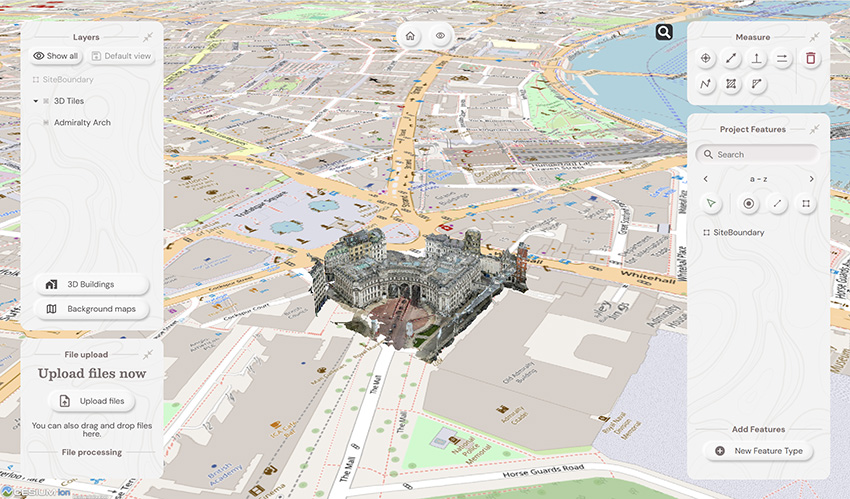
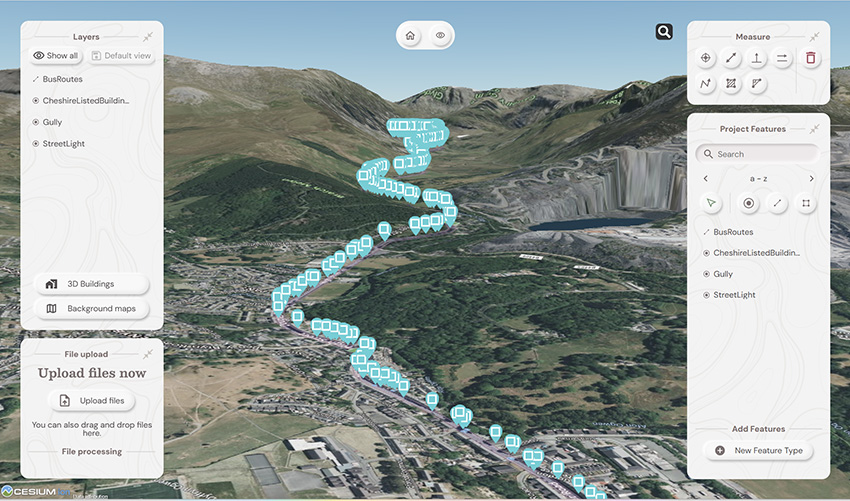
Soarvo provides context around your dataset and positions it in the real world on a choice of background map data
Download a PDF of the release here
The driving force behind Soarvo’s launch? Pure genius and a bit of fire and frustration too. Soarvo have come up with something designed to rescue a geospatial community drowning in much needed, excellent, high-quality data, but restricted in what they can do with it. Think of it as throwing a life belt… but make it a carefully developed revolutionary 3D geospatial platform instead!
Here at KOREC we have a long history in the development of geospatial data platforms. Go right back to the earliest days of GIS in the 90’s and we were there, developing, supporting and working with the very best. So trust us when we say we know a good thing when we see it – and that good thing is Soarvo.
Why’s it different?
The obvious question is what is Soarvo, and the easy answer is of course found in its official description as a “…..revolutionary 3D geospatial data platform, which enables users to Aggregate, Illustrate and Collaborate all in one place.”
That’s exactly what it ‘does’ but what makes it really different is why and how. Let’s go back a couple of years or so when the geospatial industry was spoilt for choice when it came to sensors for generating extremely large, accurate data sets whether that be from mobile mapping, drones or 3D Laser Scanners. The hardware was doing a great job! But what wasn’t so great was what was happening in many offices. Without the mother of all PC’s and a significant investment in multiple software packages, skills and office time, our fantastic, captured data was becoming either a bottle neck holding up projects or simply siloed.
Great data sets aren’t meant to be hidden away, they need to be shared, seen, and collaborated on, not just admired by a select few. That’s why geospatial professionals across all industries – from surveying to rail to mapping – were on the hunt for something that could handle it all and turn those data sets into useful info, fast. But could they find anything? Nope, there wasn’t a single package that could do the job… until now.
Soarvo is born!
The Soarvo aim was to create something with exceptional functionality and security but with a user-friendly interface as inviting as the hugely popular design software, Canva. So, we created Soarvo from the ground up, taking end-user feedback on board at every step of the development process.
And now it’s ready.
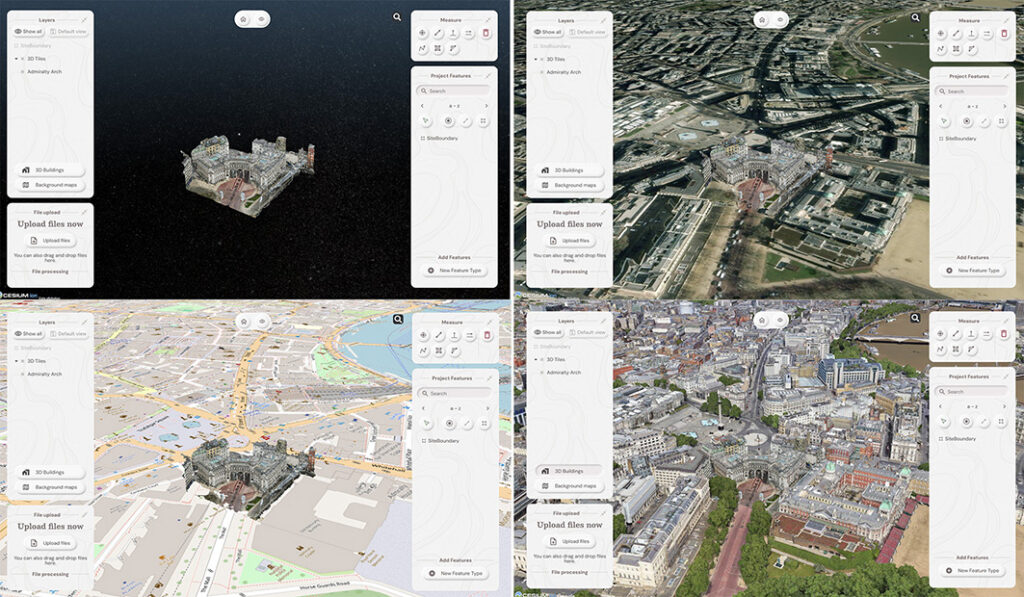
Top left: What you had. Remaining three pictures, adding context with SOARVO
Why it’s exciting? Our top five reasons
It’s extremely easy to use: The development’s been all about the user experience, with an interface built for ease of use. That’s why it looks and feels so different (in the best possible way) compared to other data sharing software out there.
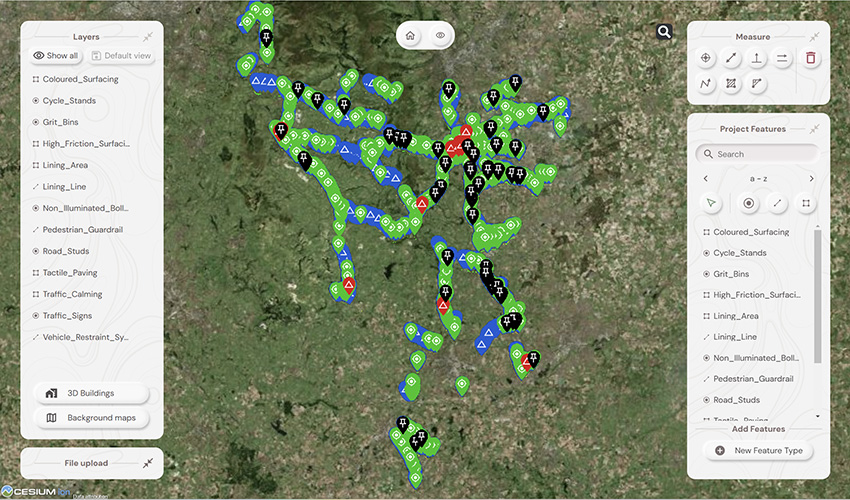
Favourite feature of Paul Brodin, Technical Lead: “The visualisation functionality and the speed with which it loads. I know because I timed it – 15 seconds for a mobile mapping data set that previously took hours!”
It provides a unique view of your data compared to other platforms: Well, how does it do that? The answer is it provides context around your dataset and positions it in the real world. For example, your laser scan point cloud doesn’t sit in a black space, it’s positioned on to the background map of your choice from OS to Google to Bing. This opens up new doors with your clients. It’s all about making your data set relevant for its end users by providing visualisation in a rich 3D environment with analysis and measurement tools thrown in.
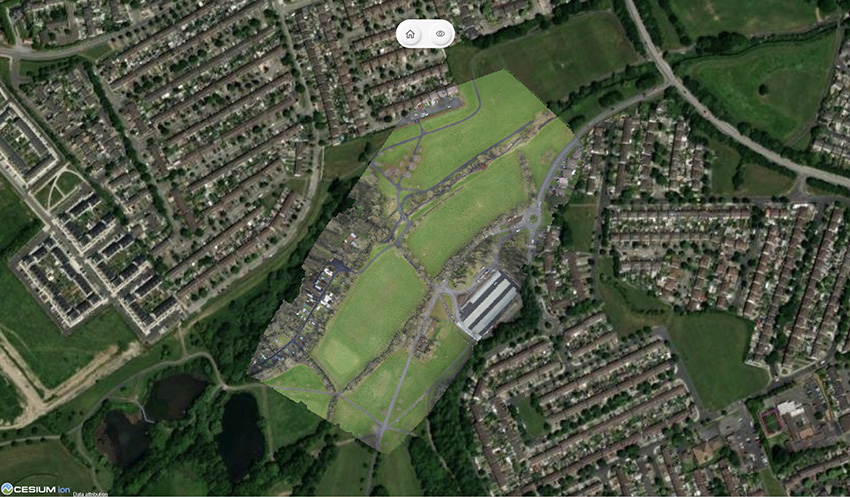
Favourite feature of Alan Browne, CEO and Co-Founder of SOARVO: “It’s all about the effortless processing of drone data – everything included and definitely no fuss required.”
It truly delivers on collaboration: Once your datasets are uploaded, you simply share a secure link to your chosen users and they can log in securely, via the cloud, for viewing or editing depending on their pre-determined rights. We don’t mess about with login limits – invite the whole team if you fancy because the whole point is sharing this information whether it be for visualisation, site planning, measurement, whatever.
Everyone’s invited: As well as unlimited log ins, the software handles data from just about every sensor under the sun, seamlessly combining output from drones, laser scans, GNSS, total stations, mobile mapping, mixed reality, 3D models, CAD and GIS.
It’s a standalone tool for drone data: Capture your aerial data and drop it straight into SOARVO to create your deliverables whether that’s an ortho-mosaic, point cloud, or 3D model. No extra software, no faff—just process, share, and crack on!
Favourite feature of Richard Gauchwin, Senior Product Manager: “For me, it’s all about how it looks and also hearing the amazing reactions from our early access users. As someone who used to be in sales, being able to say ‘yes’ to so many questions just proves we’ve built something genuinely unique here.”
But don’t just take our word for it…
We love feedback and our early access users have provided exactly that:
Soarvo provides us with a platform to automatically process drone orthomosaics and view them within a web-based geospatial data solution. This capability is greatly beneficial to us—having a one-stop shop for all our drone and GIS needs in a single platform is both unique and highly valuable.
The ability to easily share project updates with clients, alongside geospatial and media data, has resolved a long-standing need for us. We now have greater flexibility to share data with contractors and provide updates online, without the need to email GIS files or rely on others to know how to use complex GIS software.
Having a central online location where our team can share data and collaborate easily on projects with online easy to use GIS tools makes workflows and data sharing much more efficient and accessible. Soarvo has provided us with an opportunity to streamline data management within the team.
Ease of navigation in 3D
Speed of rendering large point clouds and ability to move them
Simple clean interface and comprehensive basemap data
Favourite feature of Gabriel Hradilek, Chief Operating Officer: “A simple one from me, but absolutely massive for our customers: how easy and secure it is to share data. It’s a big deal, trust me!”
Need to know more, contact KOREC
Here at KOREC we’re delighted to be the UK & Irish distribution partner for SOARVO. That means when you get your hands on the new software, you’re also getting over 30 years of our know-how, support, and training – all backed up in our T.R.U.S.T. brand promise. Join the waitlist at https://soarvo.com/
KOREC Group is delighted to announce that it has become a top level, Tier 1 reseller for DJI’s Enterprise drones through an agreement with Midwich Ltd, a key distributor of DJI Enterprise’s drone solutions in the UK and Ireland.
This new agreement will see KOREC further expanding its drone and UAV portfolio which already includes Wingtra, Parrot and AgEagle products.
The DJI Enterprise range, including Matrice and Mavic rotary drones as well as Dock solutions, will provide KOREC geospatial customers with a comprehensive, one-stop solution. This offering combines cutting-edge products with certified pilot training, technical support & consultancy, processing software and cost-effective GNSS technology for establishing ground control points (GCPs), all backed up by KOREC’s T.R.U.S.T. brand promise.
John Cartledge, Mapping & GIS Business Area Manager, KOREC Group said:
“We are delighted to achieve Tier 1 status, the highest grade of partnership with DJI, and to bring their innovative portfolio to these markets. Our mapping and GIS team has undergone rigorous technical and product training to meet DJI’s exacting standards.
With our proven ability to provide end-to-end solutions for drone operators and service providers — including pilot training, processing software, and GPS control (Catalyst) — we deliver everything needed for imagery, thermal, multi-spectral, and LiDAR applications. Whether tackling small-scale or large-scale projects, KOREC is equipped to meet every requirement.”
Adam Box, Sales Manager (Drones and UAV) for Midwich Ltd said:
“We are delighted to announce that KOREC Group has officially joined the DJI Enterprise family as a reseller, further strengthening our dealer channel at Midwich Ltd.
With their extensive expertise in geospatial solutions and commitment to delivering cutting-edge technology, KOREC Group is perfectly positioned to represent DJI Enterprise’s innovative drone solutions. This partnership marks an exciting step forward in expanding the reach and support for DJI Enterprise across the UK and Ireland.”
To learn more about DJI Enterprise drones, look out for details on our upcoming launch event and webinar or contact us now
Sam Hough, Construction Business Manager (UK), KOREC Group, reports from this year’s prestigious BITA (British and Irish Trading Alliance) Gala Ball and Awards Celebration
On Saturday 19th October, I was delighted to join KOREC’s Group Leadership Team at the biggest event in the BITA (British and Irish Trading Alliance) calendar, the Gala Ball and Awards Celebration. Held bi-annually at a prestigious location in London, this year the Raffles Hotel, the event is a fabulous coming together of prominent figures in the construction, property, financial, and hospitality industry providing opportunities for networking whilst also supporting charitable causes.
As one of the headline sponsors of the evening, it was an excellent opportunity for KOREC to connect with key figures across various industries such as Laing O’Rourke, John Sisk and Sons and Kelly Communications, and share the our ‘Measure, Map and Manage’ message with relation to the connected construction site, expanded on in the latest release of BITA’s publication ‘Networks’ with this piece below:

Pictured above (left to right), Mark Poveda (Managing Director – UK & Ireland), Sam Hough (Construction Business Manager (UK), Mark Reid (UK Sales Director), Alan Browne (Executive Chairman) and John McGoey (CEO at ECC Group)
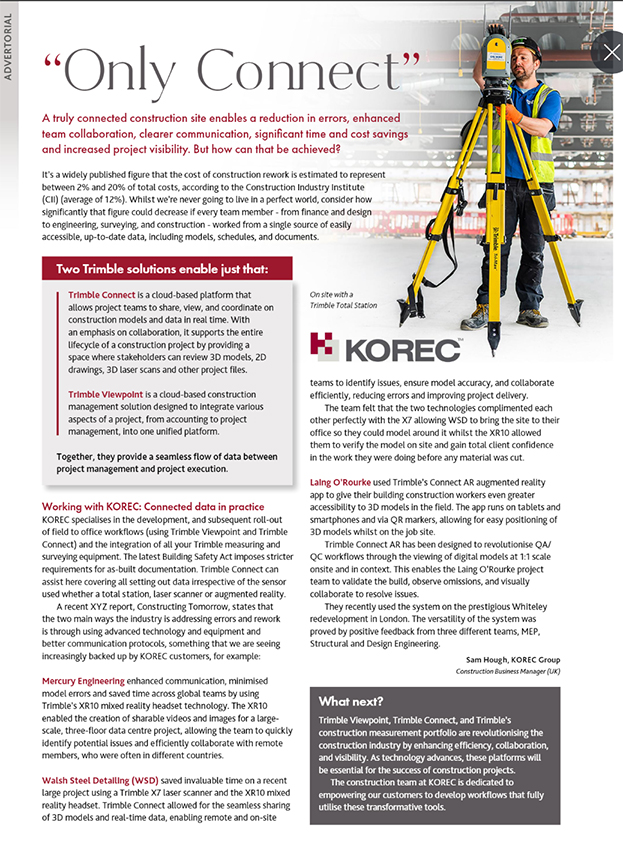
Imagine a construction site powered by real-time data, a truly connected construction site enables a reduction in errors, the latest models are used for setting out, enhanced team collaboration, clearer communication, significant time and cost savings and increased project visibility. But how can that be achieved?
It’s a widely published figure that the cost of construction rework is estimated to represent between 2% and 20% of total costs, according to the Construction Industry Institute (CII) (average of 12%). Whilst we’re never going to live in a perfect world, consider how significantly that figure could decrease if every team member – from finance and design to engineering, surveying, and construction – worked from a single source of easily accessible, up-to-date data, including models, schedules, and documents?
Two Trimble solutions enable just that:
Trimble Connect is a cloud-based platform that allows project teams to share, view, and coordinate on construction models and data in real time. With an emphasis on collaboration, it supports the entire lifecycle of a construction project by providing a space where stakeholders can review 3D models, 2D drawings, 3D laser scans and other project files.
Trimble Viewpoint is a cloud-based construction management solution designed to integrate various aspects of a project, from accounting to project management, into one unified platform.
Together, they provide a seamless flow of data between project management and project execution.
Working with KOREC: Connected data in practice
KOREC specialises in the development, and subsequent roll-out of field to office workflows (using Trimble Viewpoint and Trimble Connect) and the integration of all your Trimble measuring and surveying equipment. The latest Building Safety Act imposes stricter requirements for as-built documentation. Trimble Connect can assist here covering all setting out data irrespective of the sensor used whether a total station, laser scanner or augmented reality.
A recent XYZ report, Constructing Tomorrow, states that the two main ways the industry is addressing errors and rework is through using advanced technology and equipment and better communication protocols, something that we are seeing increasingly backed up by KOREC customers, for example:
Mercury Engineering enhanced communication, minimised model errors and saved time across global teams by using Trimble’s XR10 mixed reality headset technology. The XR10 enabled the creation of sharable videos and images for a large-scale, three-floor data centre project, allowing the team to quickly identify potential issues and efficiently collaborate with remote members, who were often in different countries.
Walsh Steel Detailing (WSD) saved invaluable time on a recent large project using a Trimble X7 laser scanner and the XR10 mixed reality headset. Trimble Connect allowed for the seamless sharing of 3D models and real-time data, enabling remote and on-site teams to identify issues, ensure model accuracy, and collaborate efficiently, reducing errors and improving project delivery.
The team felt that the two technologies complimented each other perfectly with the X7 allowing WSD to bring the site to their office so they could model around it whilst the XR10 allowed them to verify the model on site and gain total client confidence in the work they were doing before any material was cut.
Laing O’Rourke used Trimble’s Connect AR augmented reality app to give their building construction workers even greater accessibility to 3D models in the field. The app runs on tablets and smartphones and via QR markers allows for easy positioning of 3D models whilst on the job site.
Trimble Connect AR has been designed to revolutionise QA/QC workflows through the viewing of digital models at 1:1 scale onsite and in context. This enables the Laing O’Rourke project team to validate the build, observe omissions, and visually collaborate to resolve issues.
They recently used the system on the prestigious Whiteley redevelopment in London. The versatility of the system was proved by positive feedback from three different teams, MEP, Structural and Design Engineering.
What next?
Trimble Viewpoint, Trimble Connect, and Trimble’s construction measurement portfolio are revolutionising the construction industry by enhancing efficiency, collaboration, and visibility. As technology advances, these platforms will be essential for the success of construction projects.
The construction team at KOREC is dedicated to empowering our customers to develop workflows that fully utilise these transformative tools.
Trimble’s innovative technology is paving the way for more efficient and accurate building processes. Let’s build better together!
- Contact us on UK: 0345 603 1214 and IRE: 014564 702
- Follow Sam Hough on LinkedIn
- Visit www.korecgroup.com or www.facebook.com/TrimbleConstructionByKOREC
- Lower price point for affordable entry into 3D Laser Scanning
- Hardware/software subscription options that fight theft and spread the cost
- Easy upgrade from Core to Premium to expand your laser scanning capabilities with the same hardware
- Improved performance, further, faster and cleaner data
- 1 TB of storage on Trimble’s Reality Data Capture Service (TRCPS), for easy point cloud data sharing, included with all X9 Core and Premium purchases
- …and of course all the best features are still there; auto-levelling, on-site registration, automatic calibration, laser pointer, simple workflows and KOREC’s renowned technical support backed up by the T.R.U.S.T. brand promise
Trimble launched the X7 in 2019 bringing simplicity and performance to laser scanning, and then four years later came the launch of the Trimble X9 bringing the same simplicity and even greater performance. But if we know anything about Trimble, it’s that the development team never sleeps!
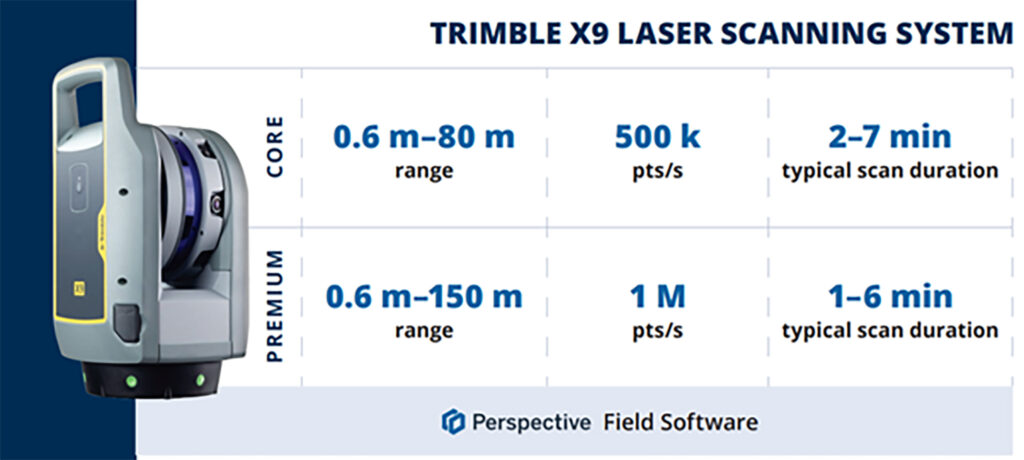
So, what’s new? In September we unveiled the Trimble X9 Core and Premium, both offering the same great X9 hardware but with different hardware & software purchasing choices – perpetual and subscription – depending on your current and future requirements as your business grows.
Core or Premium?
The Trimble X9 Core offers a user-friendly solution for both beginners and seasoned professionals, making it an ideal starting point to expand your scanning capabilities. Competitively priced, it brings a number of features greatly improved from the original Trimble entry level X-Series scanner. Expect increased angular accuracy, increased imagery quality, reduced range noise, high sensitivity data capture for all scan modes, optimisation of calibration routine to save time and reduce frequency of full calibrations and atmospheric correction for temperature and pressure.
The Trimble X9 Premium delivers faster, farther, and more precise measurements than the Core version—capturing extensive areas in a single setup with zero detail overlooked and is ideal for surveyors tackling complex and demanding projects.
Subscriptions bring flexibility
Some of our customers love the flexibility of a subscription, others still to prefer an initial outlay so Core and Premium come with two options, Perpetual or Subscription.
Subscription brings a number of key benefits including a couple of extra important ones too, namely if your instrument is stolen, the subscription only runs until the end of that period (one year) which means after that time, the thief has effectively stolen a very expensive paperweight which should act as a deterrent. Additionally, if anything happens to your hardware, through theft or accident, the cost to replace it will be significantly lower than the original outlay.
View a KOREC video on subscriptions as a theft deterrent here
What are the reasons for offering both perpetual and subscription licensing? In one word, flexibility. Perpetual licenses provide traditional purchase options while subscriptions of course offer lower upfront costs.
Subscription benefits include:
- Access to the best Trimble technology with a lower price point
- Allows you to adapt the technology at a level to suit and then customise accordingly
- Ensures all devices and software are on the same, latest version
- Provides greater flexibility and scalability to meet the needs of a growing business with easy movement between Core and Premium annual subscriptions
New! 1 TB of storage on TRCPS included with all X9 Core and Premium purchases
In September, Trimble announced the launch of the Trimble Reality Capture platform service (TRCPS), designed to enable you to share & collaborate, and store & manage, massive data sets securely and efficiently in the cloud.
For a limited period, KOREC will be including 1 Terrabyte of storage on the TRCPS platform, for one year, with all Trimble X9 Core or Premium scanner purchases. (TRCPS seamlessly integratesasan extension inside Trimble Connect cloud software).
Last but not least – the best features are all there!
We’ve conducted numerous case studies on the Trimble X-Series, thanks to its many satisfied customers. While the technology offers a wide range of impressive features, we’ve highlighted the top ones most frequently praised by our users:
- On-site registration – saving processing time back at the office and ensuring nothing is missed whilst the surveyor is still on site.
- Auto-calibration – By choosing a scanner with smart auto calibration (the routine can be optimised), you’re minimising the risk of the scanner not collecting accurate data on important jobs and the risk of delivering something that could liability for the customer. Smart, self-calibrating scanners like Trimble’s X9 Core and Premium generate a report as a back-up for every job you do. You also don’t have to send it away for calibration, sometimes costing thousands of pounds and leaving you without a scanner for weeks if not months.
- Auto-levelling – speeds up your time around site
- Straight forward workflows – KOREC technical support is excellent at helping you to integrate a laser scanning workflow into your existing survey practices
- It’s got a handle – if the X9 can go anywhere so you’ll need to manoeuvre it in tricky areas without risking your investment!
- KOREC support – by far the most cited point in all our case studies, for its speedy, quality of information and friendliness.
- The laser pointer – for easy geo-referencing of the point cloud without the need for a total station
Next steps
If you’re interested in finding out more about th X9 Core or Premium or booking a demo, contact us now by email or call us on 0345 603 1214.
Meanwhile, we’ve done some great blogs and case studies on the X9 – here are the links to four of our most visited:
Go beyond the spec sheet –Five important questions to ask before purchasing a laser scanner
Case study (ScanPlan) – “The X9 is life changing”
Case study (Connect Scaffolding) – Planning for scaffolding design
Case study (South West Surveys) – Measured building scans for redevelopment

Verification, along with documentation for sub-contractors and as-built surveys are areas where 3D Laser Scanning can really add value to a construction workflow.
Scanners are so much easier to use than a total station so why’s the take up so low on construction sites? I thought I’d share a few thoughts!
Construction needs laser scanning now more than ever. Why do I believe this? Because when I go on to construction sites, yes, I do see total stations but I’m also still seeing tape measures, spirit levels and notebooks! The old ways can be functional and achieve a ‘result’ but to manually check every aspect of a large-scale project is extremely time consuming (unsustainable during a skills shortage) and prone to inconsistencies (we’re all human). In short, a few millimetres out on a ground floor can lead to 50mm out elsewhere. Clashes and rework inevitably result in additional expense and delays costing the industry £2 Billion in the UK each year with 49% of UK construction leaders reporting frequency of errors and rework as occurring a couple of times a week and 48% a couple of times a month*.
3D Laser Scanning has taken off within other industries including surveying, forensics, civil engineering, rail, steel fabrication, facilities management etc. When I talk to professionals in these areas it’s very much about the benefits and gains. When I’m in the construction environment, it’s very much about overcoming objections.I don’t believe that this is down to the traditional opinion that ‘construction is slow to adopt new technology’ and industry surveys back this up – for example, over 98% of polled construction companies in the US & UK use some form of AR on their projects and 87% use BIM*. Instead, the construction industry is raising valid concerns that must be addressed if this next step towards a digital site is to be taken.
Here are the five points I hear most:
I’ve got a total station that does the job just fine
Just as the total station superseded the dumpy level, it’s now time to take another step forward, and that step should be a 3D Laser Scanner. First up, you can trust the accuracy of a laser scanner – and we get asked this a lot. For example, all of the Trimble X Series scanners offer a 3” arc over 20mm, that’s 1mm accuracy. They also self-calibrate at the beginning of every job so you can have total confidence in the accuracy of your collected data.
Therefore, it’s delivering sufficient accuracy for construction applications. However, that’s not where the real value lies. A total station can only ever tell the story of the exact points collected which of course may be completely correct and as per the design. Laser scanning tells the whole story – including everything that’s happening between the total station points – and that’s where the ROI lies, this is vital information for avoiding rework costs and delays. The picture delivered by ten carefully surveyed total station points simple can’t compare to the level of information provided by the thousands of points collected by a laser scanner.
Using a laser scanner on site is relatively easy but it might take me a week to extract the information I need.
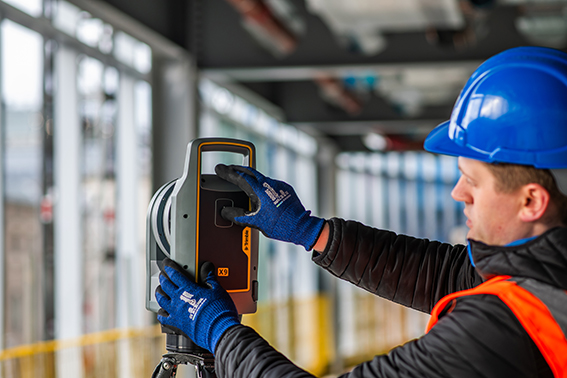
You can use your collected point cloud immediately thanks to on-site registration for error checking (a standard feature with Trimble’s X7, X9 and X12 Laser Scanners). Of course, you can check again back in the office but all the answers you need for reacting immediately to an error or clash on site can be viewed through functionality in the included on-board software, Trimble FieldLink, including setting-out errors, clashes, verticality issues and floor flatness.
To get value out of a point cloud, I’d need to invest in hardware and software that can handle massive data sets.
Again, this might have been the situation in the past but now you can carry out essential functionality in the field using the FieldLink software. Back at the office, Cintoo Cloud is a great asset, allowing you to store massive 3D point cloud datasets in the cloud, eliminating the need for extensive local storage and enabling easy access from anywhere. I’ve got a customer in demolition who scans buildings for recycling purposes and lets colleagues view this data in Cintoo which has massively helped his business at a price on average of £1,200 per year for 500 scans. It’s really easy to use and extract data from, perfect for sharing clash information.
We’d have to learn about another new technology
The good news is that a 3D Laser Scanner is far easier to set up and operate than a traditional total station which is why take-up has been so successful in industries that are not traditionally related to survey. We’ve had people scanning statues for documentation, bar & restaurant interiors for planning and all sorts of buildings by architects. We are currently facing a significant skills shortage in the construction industry and this type of technology can attract a forward-thinking generation that has grown up with smartphones, however, it needs a forward thinking buyer to start the ball rolling.
There are so many different types of laser scanner, it’s hard to know where to start
Correct, the market offers many types of laser scanner which is why I’ve also checked with my KOREC construction colleague, Sam Hough for a recommendation on the best 3D Laser Scanning system for construction documentation and as-builts. Here’s his list:
Trimble X7 or X9 3D Laser Scanner (must haves include on-site registration, auto-levelling, auto-calibration, ease of use, IP55 rating and a handle!)
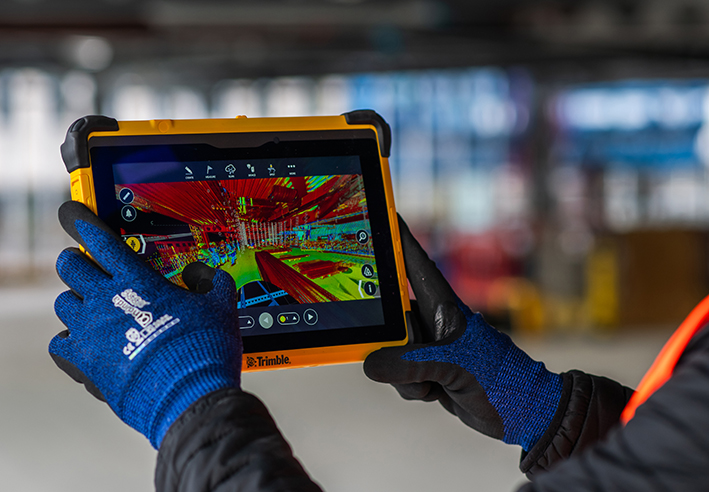
Trimble FieldLink Intuitive software with some great functionality running on a T10x rugged tablet
Cintoo Cloud for viewing and sharing of large point clouds and further functionality for measuring etc eliminating the need for further software/hardware outlay.
…. which led to an interesting chat with Sam following our recent membership to GIRI – Get it Right Initiative. Sam agrees that 3D Laser Scanning provides a highly effective solution for as-builts, documentation and error/clash detection but he’s ready to argue that it would be far more pro-active to avoid errors and solve any potential problems in the first place! And this is why he will be my next KOREC colleague to share his opinion on LinkedIn…coming soon.
Do you agree with my conclusion that construction is ready to take on 3D Laser Scanning? Please do comment.
For further information on any of the above, please contact myself, Melvin.Penwill@korecgroup.com, or sam.hough@korecgroup.com visit here for full contact information.
*XYZ report Constructing Tomorrow
Europe’s largest maize maze is back and it’s even better than last year, all set out with some special assistance from a KOREC supplied Trimble TDC650 handheld GNSS.
If there’s one thing that we can rely on from Tom Pearcy, Maze Master at York Maze, it’s a fantastic theme for this annual attraction. Over the years, we’ve been delighted to help him out with the loan of various high-accuracy Trimble GPS systems for setting out the intricated designs. Our favourite? Well, it’s a toss-up between ‘40 years of Star Wars’ and ‘90 years of Lego play’.
So, what have we got for this year? Here’s a clue:
I’m the scariest creature in the deep dark wood, with my terrible tusks and my terrible claws!
Yes, the theme for 2024 is 25 years of The Gruffalo, and as ever it covers over 5km of pathways cut into the 15-acre field. Tom chose the theme because “…I used to love reading The Gruffalo to my children, it is something that appeals to grown-ups too. My design celebrating 25 Years of The Gruffalo has been cut out using Trimble GPS technology supplied by KOREC to plot the pathways. It is nerve-wracking because I can’t tell if I’ve made a mistake and put a path in the wrong place until July when the maize plants are fully grown and the final image is revealed.”

A couple of years ago, Tom revealed exactly how the maize magic happens and why the Trimble TDC650 is helpful.
“We’ve come a long way since our first creation in 2002. Back then our mazes were based on just lines and circles drawn onto graph paper and in the field, we used sticks and strings to set out the design, a time-consuming exercise which could take two weeks or more.
Today the process is much more straightforward. Our theme is designed in a basic drawing package and then uploaded onto our Trimble handheld GNSS. We then go out into the maize field and effectively create the biggest dot to dot in the world!
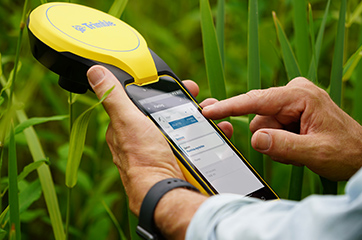
Using the map on the handheld, I plot out the design amongst the 6” high maize plants, marking the points as I go, whilst a cultivator follows on behind.
The TDC650 has been great for mapping out the maze, it holds its accuracy all day long, and it didn’t lose its connection for the whole time we used it, something the previous models could be prone to. The accuracy allows us to create ever more complex mazes, that look truly amazing from the sky!”
York Maze is open for visitors to explore from Saturday 15 July to Monday 2 September 2024 when the crop will be harvested. Book tickets here.
If you’d like to learn more about the Trimble mapping systems, call our KOREC Mapping Team on UK: +44 (0) 345 603 1214 or Ireland +353 (0) 1456 4702
How the best (the Trimble R12i) just got better (the new Trimble R980). Introducing the new Trimble R980 GNSS

When you buy into the Trimble brand and KOREC support, every GNSS receiver you choose has something in common – all of them are based on Trimble’s 40-year heritage dedicated to reliability and innovation and they are all backed up by KOREC’s renowned technical support, training and T.R.U.S.T ethos. You’re buying into a premium brand and that brings a host of proven benefits including long term value, extensive R&D and high-level customer support.
….and the Trimble flagship GNSS is of course the R12i, at least that was until today! We’re delighted to announce that the best just got even better with the launch of the new R980 GNSS receiver.
So, what’s new apart from a nifty new name that ties it in with the existing R580 and R780 receivers?
Well, here’s what you get with the Trimble R980 standard package:
- NEW: Now has a 4G internal modem as opposed to the R12i’s 3.5G. For the UK market that means users can make the most of the additional bandwidth and gain more speed. And of course, in the GNSS world, it’s usual that the faster the internet is, the better the accuracies you achieve.
- NEW: A dual band UHF 450/900Mhz Radio has been added, (the R12i had just a 450Mhz radio) making it suitable for use across the world with a single board.
- NEW: An expanded internal memory up from 6GB for the R12i to 9GB for the R580. Perfect for logging raw data for post processing within TBC for a useful workflow for establishing ground control points and networks. 9GB will give you up to up 15 years of continuous logging of observations within the R980, capturing GPS and GLONASS data every 15 seconds. That’s a lot!
- Trimble TIP Tilt technology – it’s the most accurate tilt technology in the world today offering calibration-free Inertial Measurement Unit based tilt compensation with immunity to magnetic interference.
- Trimble ProPoint – for increased performance in challenging GNSS environments, including close proximity to trees and in urban canyons.
- Trimble xFill as standard – this feature enables cm-levels corrections whenever the internet connection goes down, for up to 5-10 minutes, allowing surveyors to carry on working.
- 12 months of CenterPoint RTX positioning insurance – this feature enables the GNSS to carry on working with satellite corrections, without internet, for an unlimited amount of time.
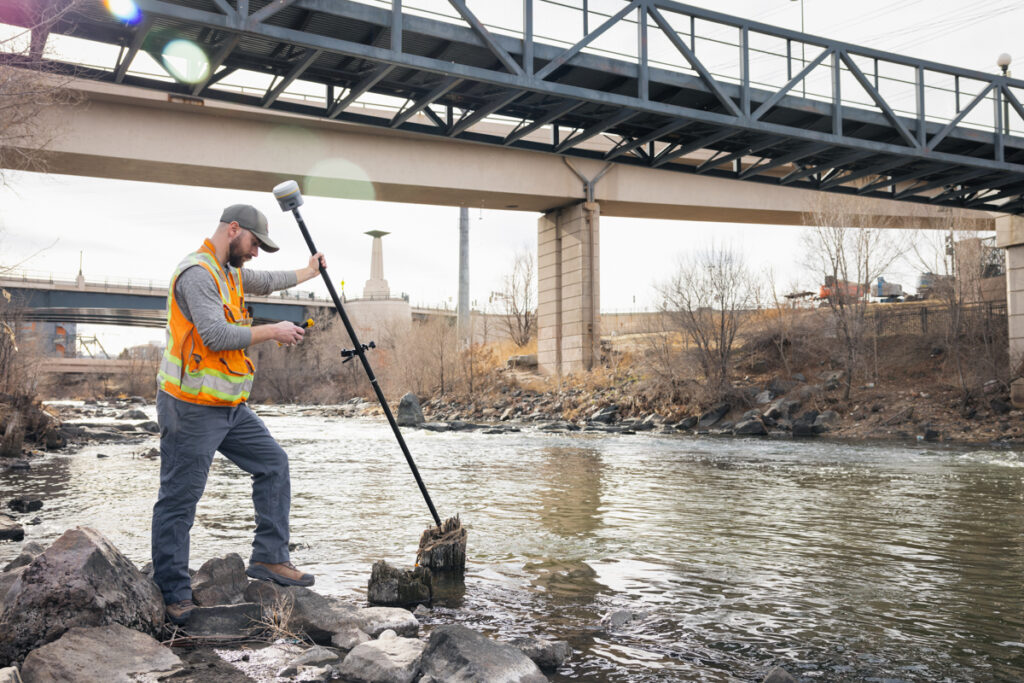
A firm supporter of Trimble GNSS technology is James Richards of Benchmark Surveys. We asked him why he rated it so highly, his answer: “It always works”, which has to be the best reason of all!
Read his thoughts here and here.
….and don’t forget – Trimble users have a single source of supply for the complete GNSS workflow – VRS Network, Mobile SIM cards, GNSS hardware, controllers, field software and augmentation services like Trimble CenterPoint RTX – just call KOREC.
In his last column, KOREC’s Mark Poveda delved into the crucial questions to consider before buying a 3D Laser Scanner. In this column, he turns his focus to four important factors to weigh up before making an investment in a GNSS survey-grade receiver.
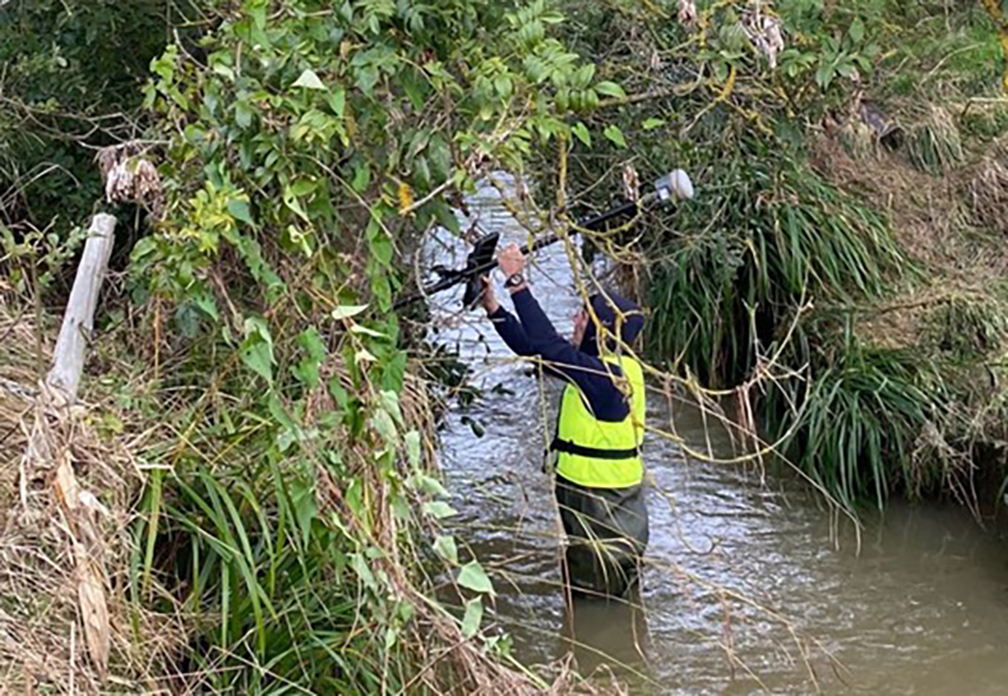
Benchmark Surveys and the Trimble R12i
Across the geospatial industry, we’re seeing a bigger shift towards people using GNSS for their survey grade data collection and setting out operations, thanks in part to developments that have increased their ability to work accurately in challenging GNSS conditions such as urban canyons or under tree canopy. However, it’s important to state that if it’s high-accuracy, mm positions you’re after, then a total station will always be your go to.
In this column, I’m going to take a look at four GNSS areas it’s worth considering, especially if you’re keen to avoid time consuming total station set ups in your day-to-day survey work.
1. It’s not about the number of channels, it’s about how your receiver handles and decodes them
When choosing the correct receiver for your purposes, it’s important to understand that most of them now support multi-constellations (GPS, GLONASS, Galileo, BeiDou), but it’s also important to check that they also support L1, L2 and L5 frequencies which mitigate signal interference in harsh GNSS environments. For example, Trimble’s ProPoint technology, found in several of their receivers, takes signals from all available constellations via three frequencies and uses dual core receivers for fast and accurate precision in challenging survey scenarios. My advice here would be to test repeatability of positions in these conditions during a field trial. We don’t want the spoofed accuracies that can occur with some receivers and this is the only way to ensure that doesn’t happen.
2. RTK and Correction Services for positioning security – choose wisely, they’re not all the same
Your RTK and Correction Services are key to continuous centimetre positions in the field and especially if you’re likely to be working where there’s patchy mobile coverage or your signal may drop in areas like quarries. If you want to avoid getting the total station out for those few points you need when there’s no signal, then it’s important to check that your receivers can also ‘bridge the gap’ using satellite corrections. KOREC customers report that the xFill function on their Trimble receivers, which does exactly this, saves them around 30 minutes of site time by avoiding a total station set up, it all adds up on downtime cost savings. Sometimes they’re not even aware the feature has kicked in because work is continuous and uninterrupted. Again, something to check on your field test.
3. Environmental durability and endurance – will your expensive investment survive the conditions you work in?
Construction sites are demanding places to work in and on top of that, did you know that last year rain fell on 171 days in the UK!
If your expensive investment is going to handle the British weather as well as tough site conditions, then you’ll need an IP65 rating for your receiver, or if you want it to withstand submersion, then IP68, plus you’ll need MIL-STD810G or H for ruggedness for both your receiver and controller. Especially, take a really good look at the build quality during your field test and check out whether it comes with local servicing and repairs from your GNSS supplier.
4. It’s all about the workflow – protecting your data and turning it into manageable information
Finally, a successful survey isn’t just about the receiver, it’s about collecting, processing and analysing that data and of course, protecting the information you’ve collected. Unfortunately instrument theft is a common occurrence so we definitely recommend that your receiver has the ability to sync with secure cloud storage and also that you can choose where it is hosted rather than it ending up in a random location anywhere in the world.
It’s also important to consider the end-to-end workflow and ensure that yours is futureproof. For example, is your collected information compatible with your back-end packages if you’re an n4ce or SCC user? Seamless integration is vital for saving office time on the processing and decoding of your collected data.
Whilst I hope this information is a good guide to what to look for in a GNSS Receiver, my best advice would be to rigorously check before you buy with an extensive field test and especially, check its accuracy and repeatability in different conditions.
If you’re looking to invest in 3D Laser Scanning technology, Mark Poveda urges you to go beyond the spec sheet to unlock your perfect 3D Laser Scanning solution and ask these five important questions instead.
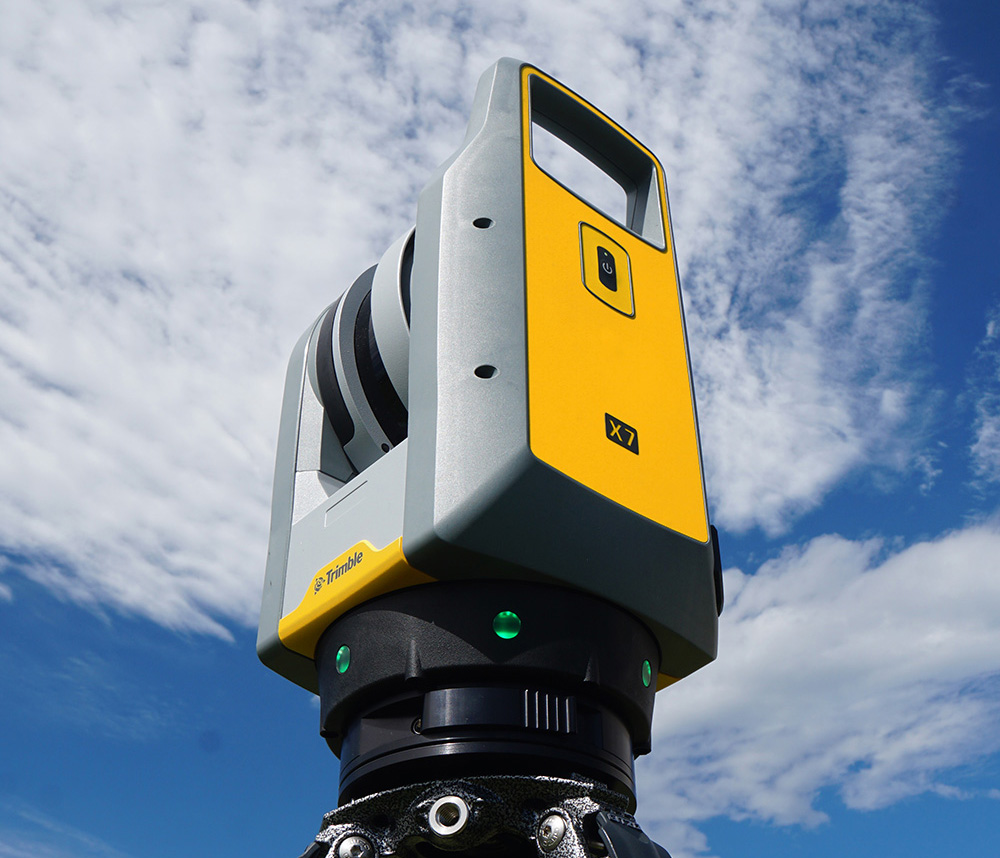
There’s no doubt that 3D Laser Scanning is now a widely accepted tool for surveyors thanks to its ability to quickly and accurately capture detailed 3D spatial data, making it valuable for a wide range of applications.
The technology has continued to evolve and become more accessible in terms of cost and equipment and there’s more choice than ever……which is where the challenge begins!
It’s at this point that I would urge you to move beyond the manufacturer’s spec sheets which are often complex and don’t compare the same information, and instead, ask yourself these 5 important questions:
1. What is the cost of ownership vs. unit cost?
The unit price tag may look good but what are the ongoing expenses? It’s time to dig a little deeper.
First up, I’d urge you to ask how often the scanner needs to be calibrated and here it’s crucial to consider not only the financial aspect of calibration but also the duration your instrument will be unavailable for use, particularly when it requires international shipment. Additionally, factor in the expenses associated with acquiring a temporary replacement.
Under cost of ownership, it’s also important to check for hidden charges including upgrades for firmware software licensing or any additional modules you may need to create your preferred deliverable. Also don’t forget to factor in office processing time and any extra investment in IT.
2. Do I need survey grade auto-levelling?
It’s not all about the time the scanner is turning and collecting data. Having an auto-levelling feature ensures that you are ready to go as soon as you set the instrument down. Having an IMU and dual-axis compensator on a scanner means data is always level to survey grade accuracy and does not require the same level of post-processing as those that don’t meet that same accuracy specification. This also massively improves the accuracy of your scan data over the scanner’s full range. Potentially, this feature can save you around 5 hours a week if you’re undertaking 150 scans a day.
3. What’s more important to you, scan time or total time to project deliverable?
I’ve written about workflows in previous columns, and it’s just as important here, as is a broad look at total production costs, namely adding in the field capture plus the office processing time and investment in IT and training.
The first thing to consider here is that speed is not always what you think or see on the spec sheet, because scan speed and scan rate are not the same thing. Scan speed is the number of points you collect per second, and scan rate is the number of seconds needed by a scanner to collect that data – this depends on the density of the scan data you require and the range of your scan. So in theory, the scanner with the fastest speed doesn’t always have the fastest rate. It’s therefore very important to make sure that you select a scanner that has the best balance for your applications.
Additionally, time saved in the field doesn’t always equate to a faster deliverable. When purchasing a scanner, one of the best ways to deliver a faster result to your customer is through in-field automatic scan registration so it’s definitely worth checking if your potential new scanner has this feature.
4. Will it work in the rain?
On average it rains 151 days a year in the UK! Time to check the IP (ingress protection) rating of your proposed scanner. The first IP digit relates to the level of protection against solid objects; the second digit relates to the level of protection against liquids. If your scanner’s IP rating is IP54, it’s important to understand that it does not have a closed mirror and you may be risking your scanner by working in conditions it’s simply not suitable for. IP54 means that the scanner is protected against water spray and is suitable for outdoor work, however an IP55 rating means suitability for working with in rain.
5. Has it got a handle?
It’s possibly any scanner’s most underrated feature, but your scanner is worth thousands of pounds, not to mention any downtime if it gets dropped! Easy manoeuvrability is vital in tight spaces or if you’re working within complex structures. Several KOREC customers have mentioned this as one of the deciding factors in their purchasing decisions.
…… and this feature doesn’t even get a mention on the spec sheet!
Thinking of investing in a laser scanner? Get in touch and we’ll be happy to discuss your requirements!